How to Add Dogechain to MetaMask

On this page
Dogechain is a Layer 1 blockchain aimed at adding utility to Dogecoin, allowing users to engage with various dApps built on Dogechain and pay gas fees in Dogecoin. This guide will provide a detailed overview of Dogechain, including instructions on how to add Dogechain to MetaMask and tips on how to explore and make the most of the Dogechain ecosystem.
Does MetaMask Support Dogechain?
MetaMask supports any EVM-compatible blockchain, including Dogechain. Adding Dogechain to MetaMask is easy and only requires a few simple steps.
About Dogechain
Dogechain is a Proof-of-Stake blockchain built on Polygon Edge, allowing users to interact with various dApps, create tokens, and mint NFTs while paying gas fees in Dogecoin. It is not an extension of Dogecoin but offers a bridge to convert $DOGE into wrapped Dogecoin ($wDOGE) for use on the Dogechain network.
By adding Dogechain to MetaMask, users can put their DOGE to use beyond just holding it for gains. They can explore NFTs, games, and a variety of dApps built on the Dogechain network, expanding the utility of their Dogecoin within the Web3 ecosystem.
Dogechain Network Details
To add Dogechain to MetaMask, you’ll need to input the network details. Whichever method you choose, make sure to verify the information to ensure the correct network is added.
Network name: Dogechain
New RPC URL: https://rpc.dogechain.dog
Chain ID: 2000
Currency symbol: DOGE
Block explorer URL (Optional): https://explorer.dogechain.dog
How to Add Dogechain to MetaMask
MetaMask provides a built-in feature that lets users manually add new networks to their wallet. By using this option, you can add any network, including Dogechain, as long as you have the correct network details. Here’s a guide on how to manually add the Dogechain network to MetaMask:
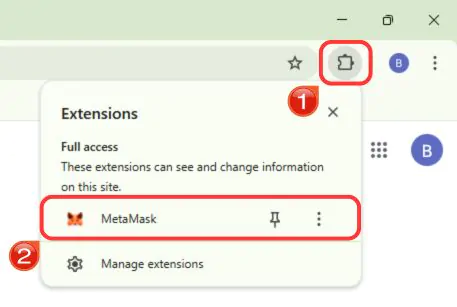
Step 1: Open MetaMask by clicking its icon in your browser’s extension bar.
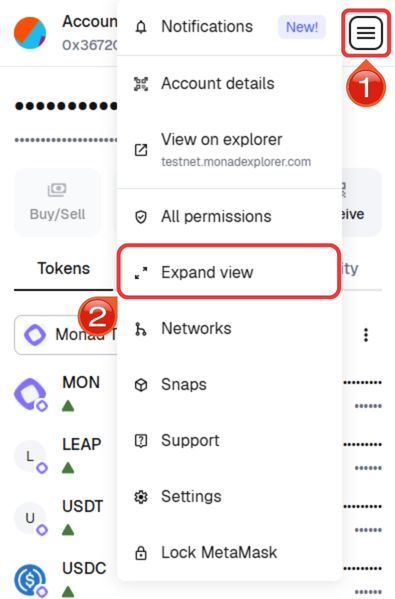
Step 2: For improved navigation, click the “hamburger” icon at the top-right corner, open the MetaMask menu, and choose “Expand View”.
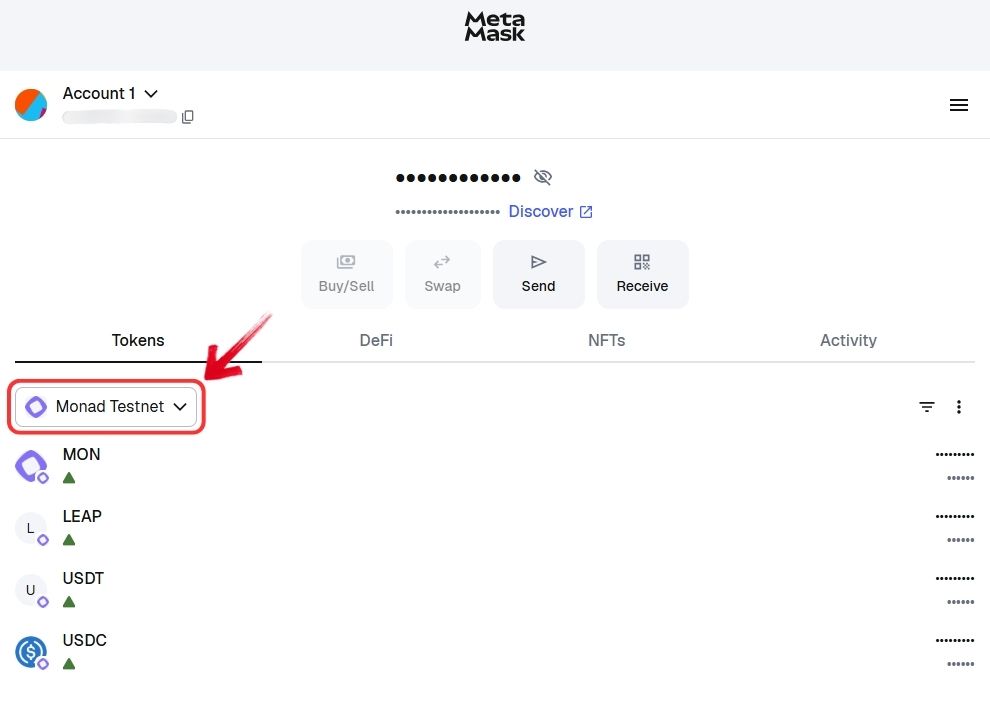
Step 3: In the expanded screen, look toward the middle left and click the “Network” dropdown.
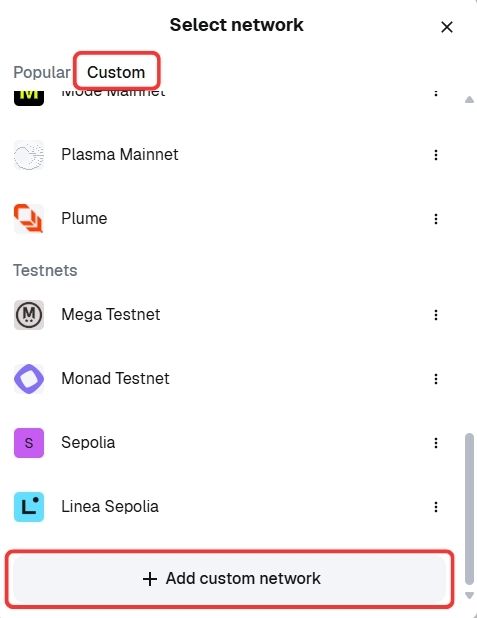
Step 4: In the Custom section, go to “Add custom network” to manually enter Dogechain’s settings.
Step 5: Enter all relevant RPC information for Dogechain, verify your entries, and click “Save”.
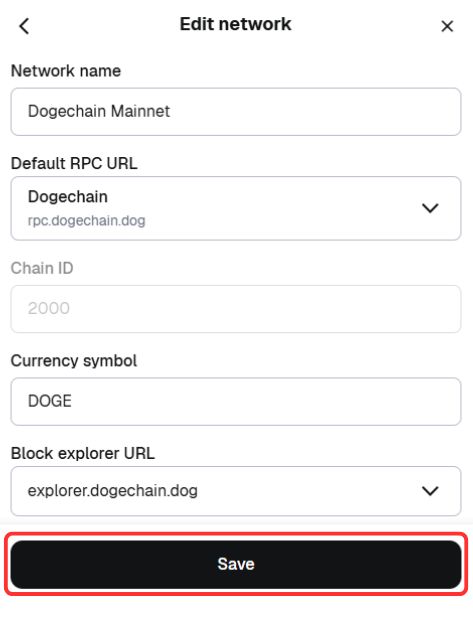
Step 6: MetaMask will automatically connect to the Dogechain network, ready for use.
Manually adding Dogechain to MetaMask is straightforward and requires inputting the correct network details. Make sure you enter the information accurately to avoid any errors. This process ensures that you can connect MetaMask to the Dogechain network easily.
Exploring Dogechain Network via MetaMask
Once you’ve added Dogechain to MetaMask, you can start interacting with the Dogechain ecosystem. Use your Dogecoin to participate in decentralized finance (DeFi) activities, like staking and providing liquidity to earn passive income. You can also mint, buy, and sell NFTs, or engage in blockchain-based games using Dogecoin.
To get started, purchase DOGE on an exchange like Binance or Coinbase, then use the Dogechain bridge to convert your DOGE to Wrapped Dogecoin (WDOGE). WDOGE is used as gas within the Dogechain ecosystem, allowing for seamless transactions and interactions.
The Role of Wrapped Dogecoin (WDOGE)
To interact with dApps on the Dogechain network, users must first convert their Dogecoin into Wrapped Dogecoin (WDOGE) using the Dogechain bridge. Once converted, Dogecoin is securely locked in a digital vault, and an equivalent amount of WDOGE is minted on Dogechain. This WDOGE can then be used for gas fees and engaging with dApps. When users are ready, they can easily swap their WDOGE back for regular Dogecoin at a 1:1 ratio.
Bottomline
Dogechain is set to revolutionize the Dogecoin ecosystem by adding layers of utility previously unavailable to Dogecoin holders. With MetaMask, users can easily connect to Dogechain dApps and start using their Dogecoin in innovative ways. This integration opens up exciting possibilities for meme-powered applications and engagement.
FAQs
No, you cannot use Dogecoin directly on the Dogechain network. To interact with dApps on Dogechain, you must first convert your Dogecoin into Wrapped Dogecoin (WDOGE) using the Dogechain bridge. WDOGE is the token used for transactions and gas fees within the Dogechain ecosystem.
Dogechain employs robust security measures to protect your Dogecoin during the conversion process. When you bridge your Dogecoin to Dogechain, the Dogecoin is locked in a secure vault, and an equivalent amount of WDOGE is minted. This 1:1 peg ensures that your Dogecoin remains safe and can be swapped back at any time.
Yes, you can use MetaMask with Dogechain on mobile devices. MetaMask is available as a mobile app for both iOS and Android, allowing you to connect to the Dogechain network and interact with dApps on the go. The setup process is similar to that on desktop browsers, making it easy to add Dogechain to your mobile MetaMask wallet.
- Smart Contract Vulnerabilities: Exploits in the bridge contract could compromise assets.
- Centralization Risks: Centralized elements in the bridge might be susceptible to attacks.
- Liquidity Issues: High withdrawal volumes could strain the bridge’s liquidity.
Yes, you can easily remove Dogechain from your MetaMask wallet if you decide not to use the network anymore. To do this, go to the “Networks” settings in MetaMask, select Dogechain, and click “Delete” or “Remove Network”. This action will disconnect Dogechain from your MetaMask, but it won’t affect any WDOGE or Dogecoin stored on the network. You can reconnect to Dogechain at any time by re-adding the network.