删除 Gemini 账户:分步指南


- 你可以通过网页浏览器或手机 App 关闭 Gemini 账户。
- 提交关闭账户申请前,请先提取账户中的所有加密货币和法币。
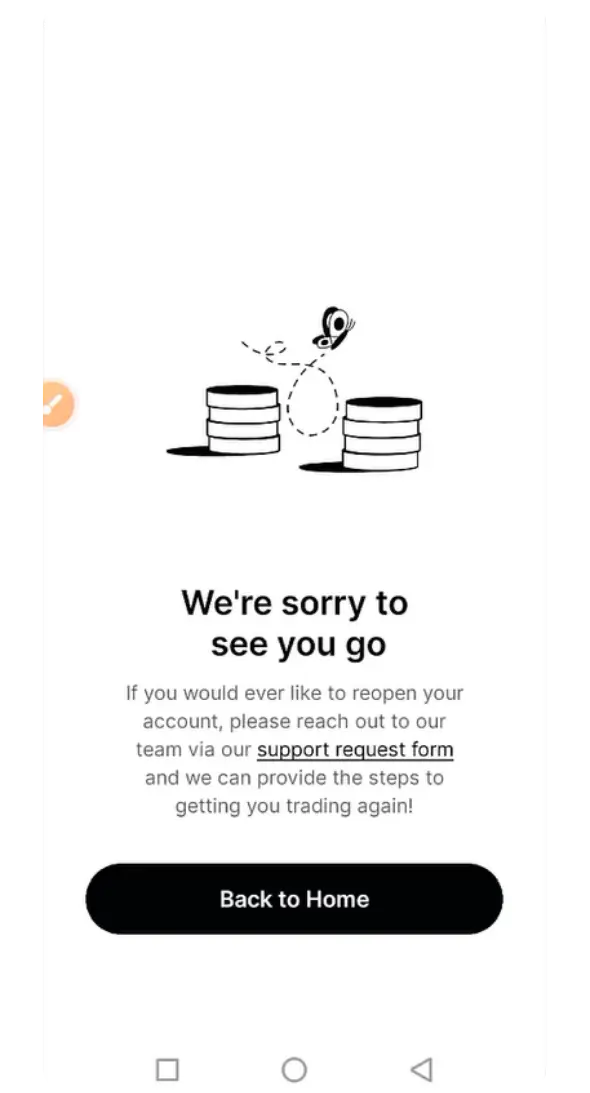
- 关闭账户后,如需重新开通,可以联系 Gemini 客服。
你可以通过 Gemini 官网或手机 App 关闭账户。请先提取资金、取消未完成的订单,并下载所需的对账单。Gemini 可以受理重新开通已关闭账户的申请,但你必须联系支持团队,且仍需符合使用其服务的资格。
关闭 Gemini 账户前须知
关闭 Gemini 账户前,建议先处理好以下事项,以免之后遇到问题。
- 提取账户中的所有加密货币和法币。
- 取消所有未完成的订单或定期买入计划。
- 如有需要,请下载对账单或交易记录。
- 关闭账户后,你无法自行重新开通。如需再次访问账户,请联系 Gemini 客服。
- Gemini 可能会按规定保留监管所需的记录。
如何通过网页关闭 Gemini 账户
通过网页浏览器关闭 Gemini 账户通常最方便,因为各项功能和选项更容易查找和操作。具体步骤如下:
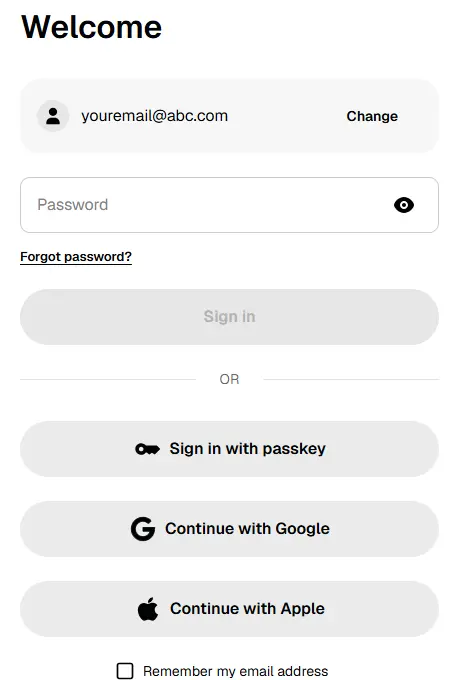
第 1 步:首先,使用电脑或手机浏览器登录 Gemini 账户。
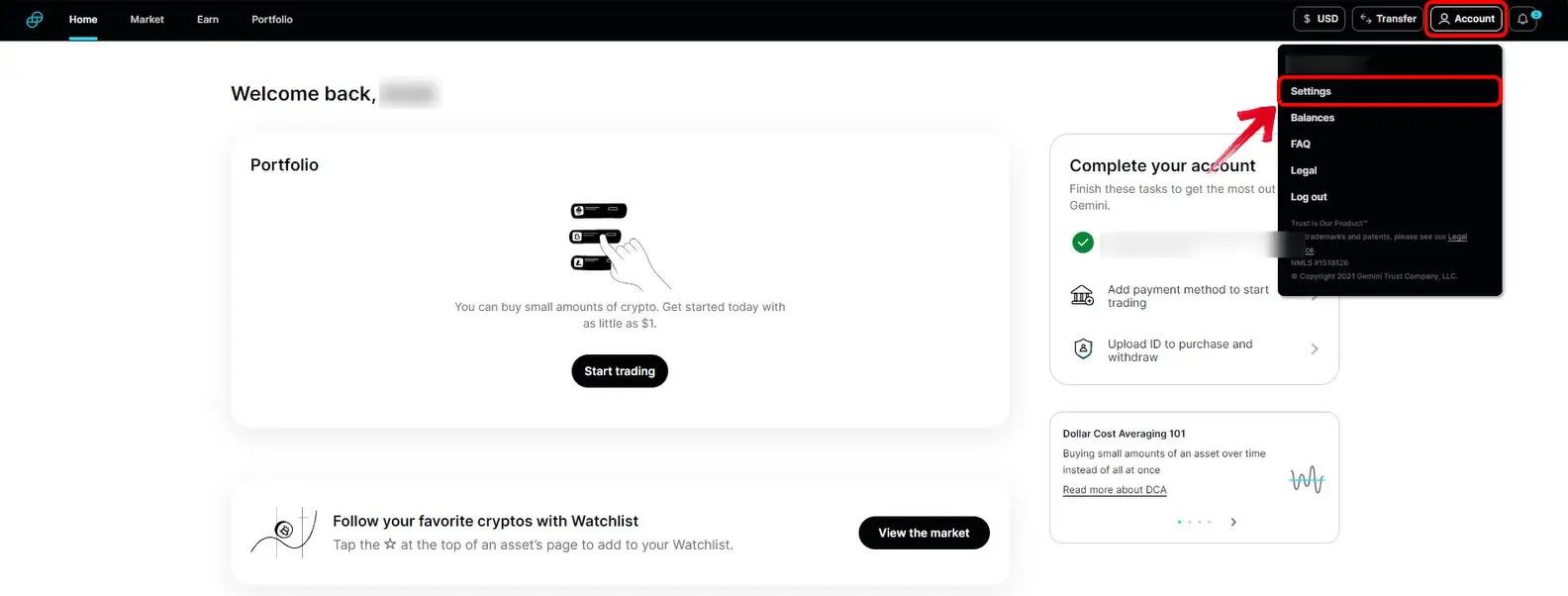
第 2 步:登录后,点击右上角的个人资料图标,然后在下拉菜单中选择“账户”。
第 3 步:向下滚动,找到“关闭账户”部分。
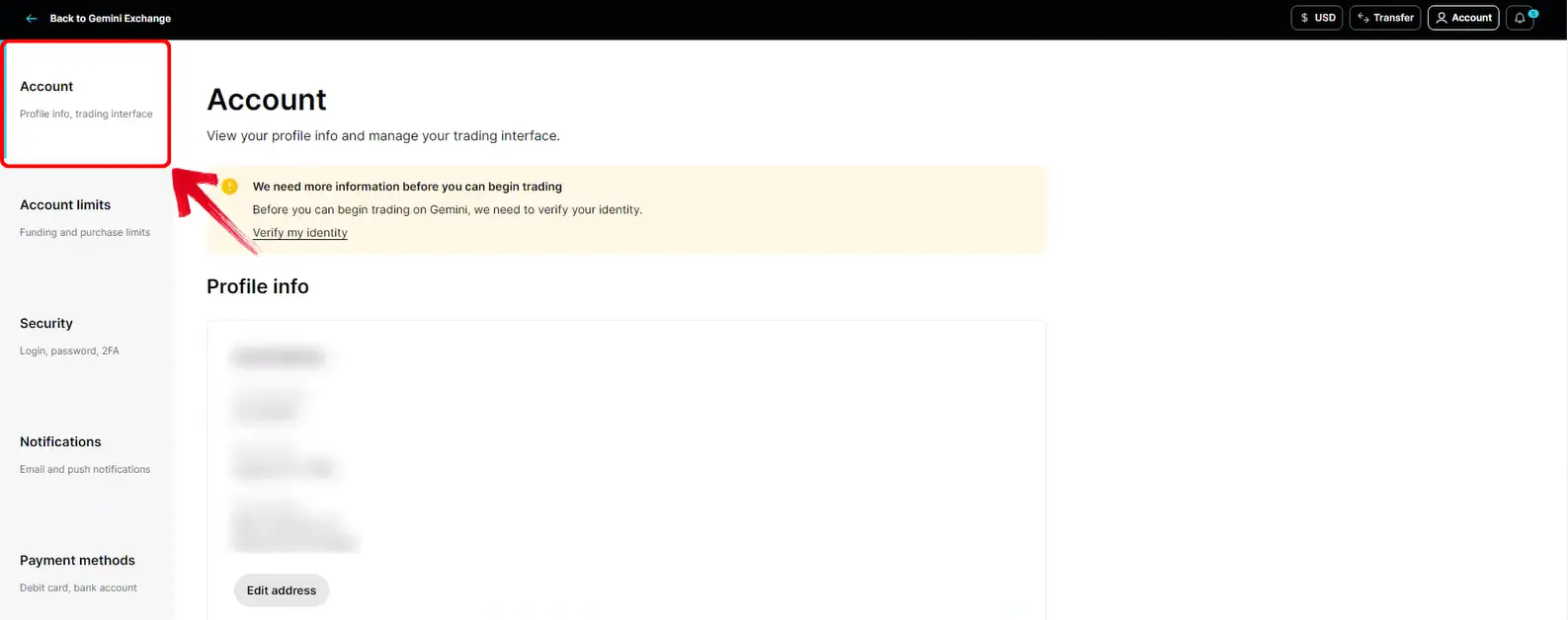
第 4 步:点击这里的“关闭账户”选项,开始操作。
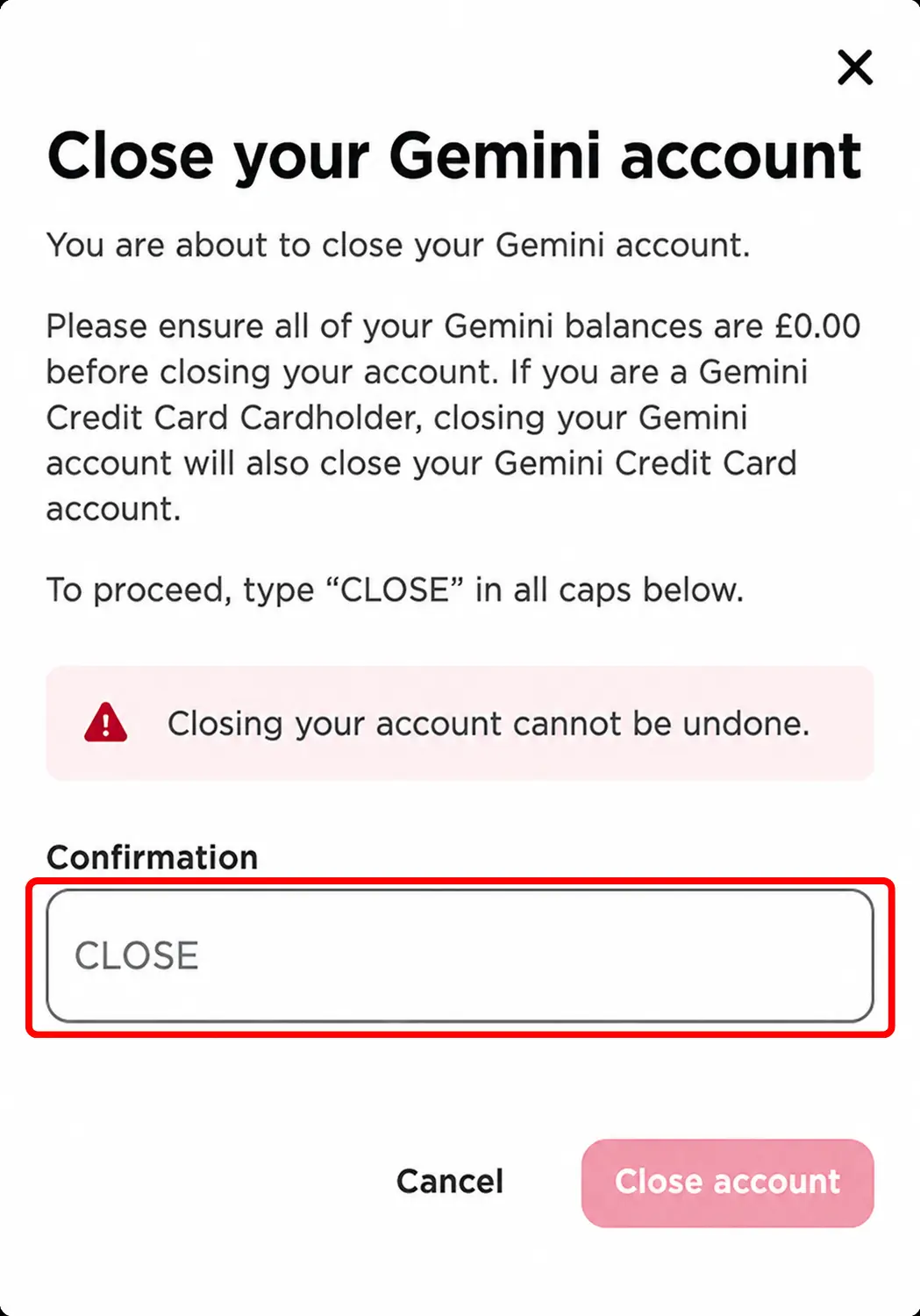
第 5 步:Gemini 会要求你输入大写的“CLOSE”。输入后确认申请,即可提交关闭账户申请。
如何通过手机 App 关闭 Gemini 账户
如果你主要通过手机使用 Gemini,也可以在 App 中关闭账户。相关选项位于账户偏好设置中:
第 1 步:首先打开手机上的 Gemini App。在首页点击顶部的个人资料图标,进入账户页面。
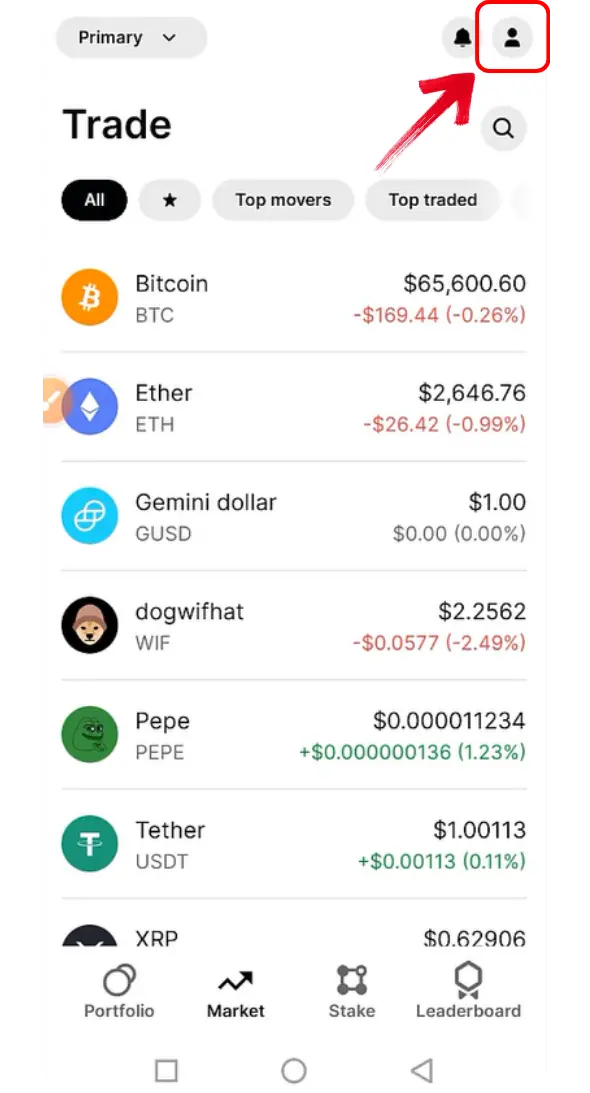
第 2 步:进入账户页面后,找到“偏好设置”选项。点击该选项进入账户设置。
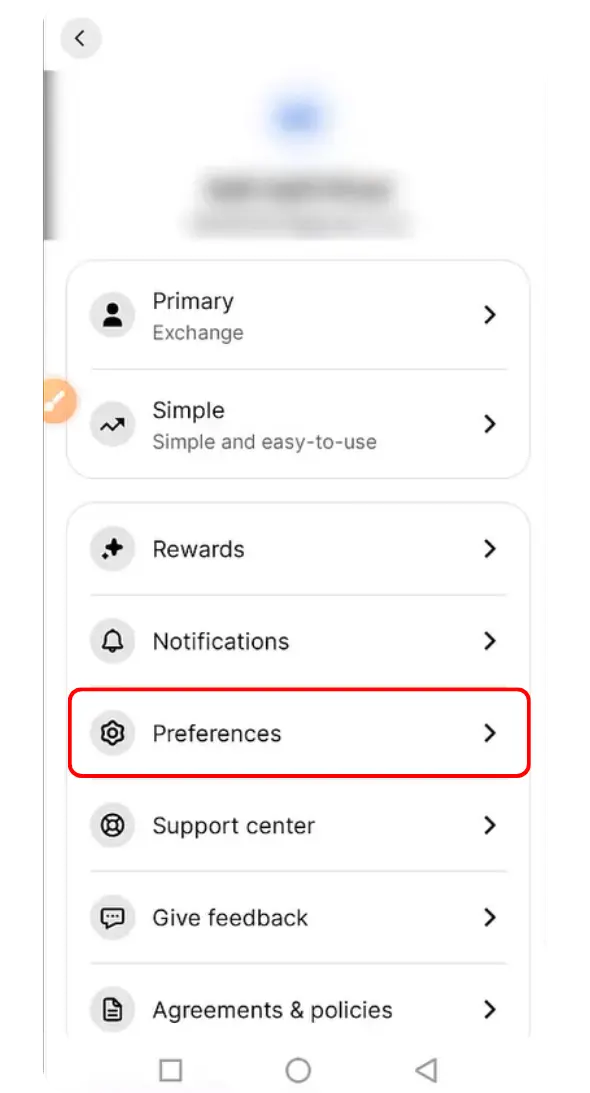
第 3 步:在偏好设置页面,点击“关闭账户”选项继续操作。
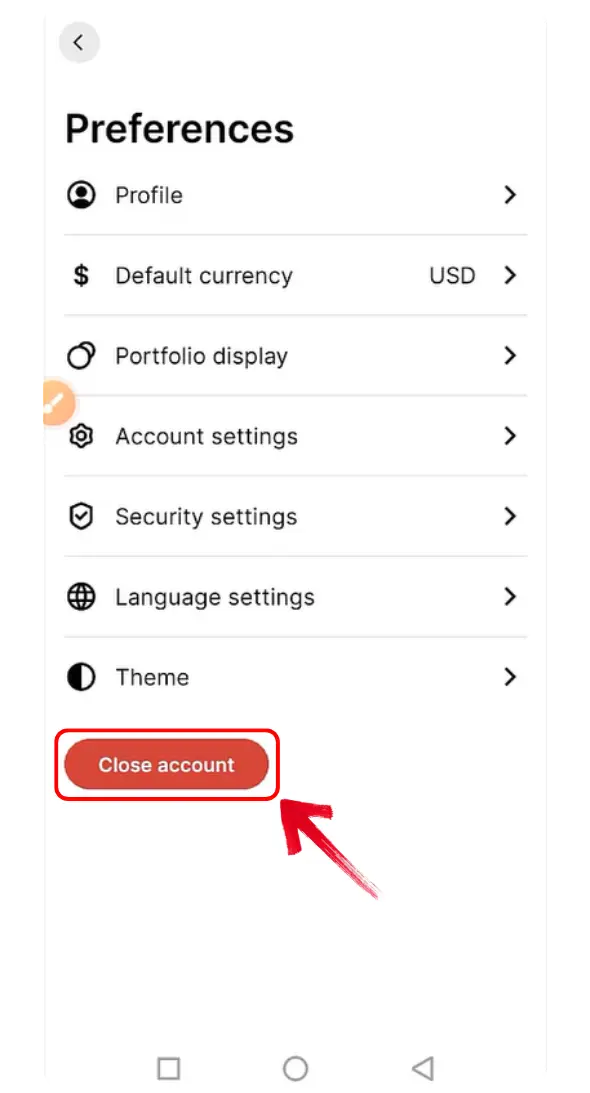
第 4 步:Gemini 会要求你确认关闭账户。请务必输入大写的“CLOSE”。
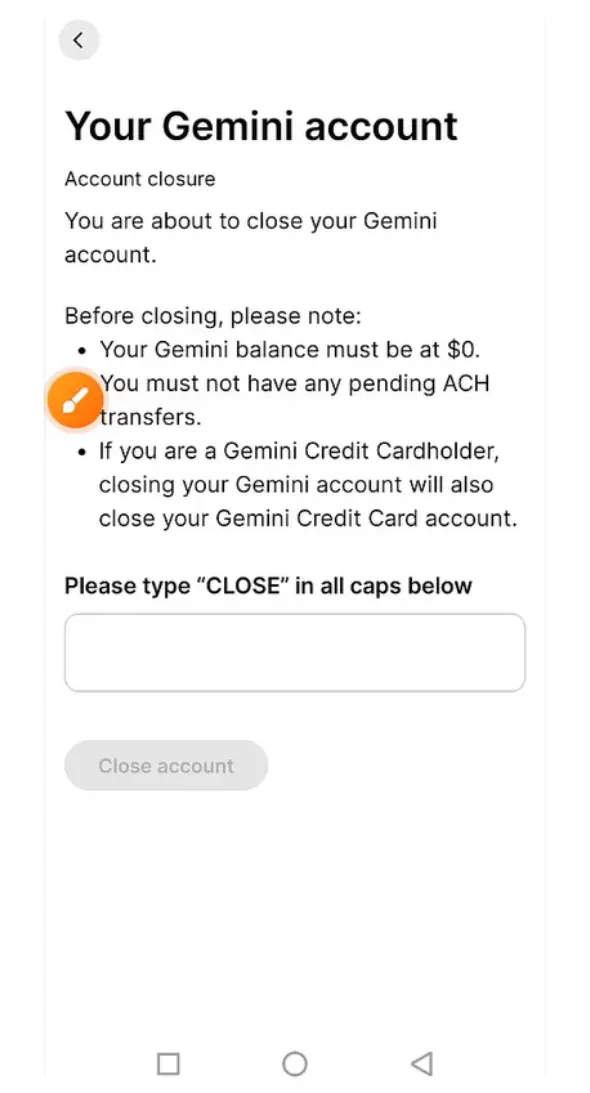
第 5 步:确认关闭后,Gemini 会在屏幕上显示通知,确认已收到你的申请。
Gemini 的替代交易所
如果你打算改用其他交易所,可以比较一下你所在地区可用的这些平台。查看各平台的评测,了解其支持的服务和账户要求。

Kraken
- 现货吃单费
- 0.8%
- 合约吃单费
- 0.05%
- 资产
- 682
- 最大杠杆
- 50×

Bybit
- 现货吃单费
- 0.1%
- 合约吃单费
- 0.055%
- 资产
- 378
- 最大杠杆
- 100×

Binance
- 现货吃单费
- 0.1%
- 合约吃单费
- 0.05%
- 资产
- 520
- 最大杠杆
- 150×

Bitvavo
- 现货吃单费
- 0.25%
- 合约吃单费
- —
- 资产
- 427
- 最大杠杆
- —

BloFin
- 现货吃单费
- 0.1%
- 合约吃单费
- 0.06%
- 资产
- 351
- 最大杠杆
- 150×

Hyperliquid
- 现货吃单费
- 0.07%
- 合约吃单费
- 0.045%
- 资产
- 334
- 最大杠杆
- 40×

Bitunix
- 现货吃单费
- 0.1%
- 合约吃单费
- 0.06%
- 资产
- 539
- 最大杠杆
- 200×

WhiteBIT
- 现货吃单费
- 0.1%
- 合约吃单费
- 0.055%
- 资产
- 464
- 最大杠杆
- 100×

Ourbit
- 现货吃单费
- 0%
- 合约吃单费
- 0.04%
- 资产
- 560
- 最大杠杆
- 500×

WEEX
- 现货吃单费
- 0.1%
- 合约吃单费
- 0.08%
- 资产
- 2,016
- 最大杠杆
- 400×

OKX EU
- 现货吃单费
- 0.2%
- 合约吃单费
- 0.05%
- 资产
- 290
- 最大杠杆
- 10×

Bitget
- 现货吃单费
- 0.1%
- 合约吃单费
- 0.06%
- 资产
- 496
- 最大杠杆
- 125×
OKX
- 现货吃单费
- 0.35%
- 合约吃单费
- 0.05%
- 资产
- 299
- 最大杠杆
- 125×

Coinbase
- 现货吃单费
- 0.6%
- 合约吃单费
- 0.05%
- 资产
- 402
- 最大杠杆
- 10×

Bybit EU
- 现货吃单费
- 0.25%
- 合约吃单费
- —
- 资产
- 108
- 最大杠杆
- —

BYDFi
- 现货吃单费
- 0.1%
- 合约吃单费
- 0.06%
- 资产
- 527
- 最大杠杆
- 500×

BTCC
- 现货吃单费
- 0.3%
- 合约吃单费
- 0.06%
- 资产
- 245
- 最大杠杆
- 500×

Lighter
- 现货吃单费
- 0%
- 合约吃单费
- 0%
- 资产
- 8
- 最大杠杆
- 50×

XT.com
- 现货吃单费
- 0.2%
- 合约吃单费
- 0.06%
- 资产
- 502
- 最大杠杆
- 125×

Crypto.com
- 现货吃单费
- 0.5%
- 合约吃单费
- 0.04%
- 资产
- 411
- 最大杠杆
- 50×

KCEX
- 现货吃单费
- 0%
- 合约吃单费
- 0.01%
- 资产
- 802
- 最大杠杆
- 125×

Pionex
- 现货吃单费
- 0.05%
- 合约吃单费
- 0.05%
- 资产
- 394
- 最大杠杆
- 100×

Zoomex
- 现货吃单费
- 0.1%
- 合约吃单费
- 0.06%
- 资产
- 65
- 最大杠杆
- 1000×

Bitstamp
- 现货吃单费
- 0.4%
- 合约吃单费
- —
- 资产
- 117
- 最大杠杆
- —

edgeX
- 现货吃单费
- —
- 合约吃单费
- 0.038%
- 资产
- 4
- 最大杠杆
- 100×

Gate
- 现货吃单费
- 0.1%
- 合约吃单费
- 0.05%
- 资产
- 2,037
- 最大杠杆
- 200×

Woo X
- 现货吃单费
- 0.1%
- 合约吃单费
- 0.05%
- 资产
- 11
- 最大杠杆
- 100×

BingX
- 现货吃单费
- 0.1%
- 合约吃单费
- 0.05%
- 资产
- 640
- 最大杠杆
- 150×

Derive
- 现货吃单费
- 0%
- 合约吃单费
- 0.03%
- 资产
- 15
- 最大杠杆
- 15×

KuCoin
- 现货吃单费
- 0.1%
- 合约吃单费
- 0.06%
- 资产
- 818
- 最大杠杆
- 125×

Bitbase
- 现货吃单费
- 0.1%
- 合约吃单费
- 0.06%
- 资产
- 385
- 最大杠杆
- 150×

Phemex
- 现货吃单费
- 0.1%
- 合约吃单费
- 0.06%
- 资产
- 1,028
- 最大杠杆
- 100×

dYdX
- 现货吃单费
- 0.1%
- 合约吃单费
- 0.05%
- 资产
- 57
- 最大杠杆
- 50×

HTX
- 现货吃单费
- 0.2%
- 合约吃单费
- 0.06%
- 资产
- 488
- 最大杠杆
- 200×

Tapbit
- 现货吃单费
- 0.1%
- 合约吃单费
- 0.06%
- 资产
- 51
- 最大杠杆
- 150×

GMX
- 现货吃单费
- —
- 合约吃单费
- 0.06%
- 资产
- 103
- 最大杠杆
- 100×

Deribit
- 现货吃单费
- 0%
- 合约吃单费
- 0.05%
- 资产
- 10
- 最大杠杆
- 50×

Aster
- 现货吃单费
- 0.04%
- 合约吃单费
- 0.04%
- 资产
- 34
- 最大杠杆
- 200×

Extended
- 现货吃单费
- 0.025%
- 合约吃单费
- 0.025%
- 资产
- 335
- 最大杠杆
- 50×

Binance.US
- 现货吃单费
- 0.01%
- 合约吃单费
- —
- 资产
- 150
- 最大杠杆
- —

LeveX
- 现货吃单费
- 0.1%
- 合约吃单费
- 0.06%
- 资产
- 117
- 最大杠杆
- 500×

Backpack Exchange
- 现货吃单费
- 0.1%
- 合约吃单费
- 0.05%
- 资产
- 88
- 最大杠杆
- 75×

Bitpanda
- 现货吃单费
- 1.49%
- 合约吃单费
- —
- 资产
- 568
- 最大杠杆
- —

Toobit
- 现货吃单费
- 0.1%
- 合约吃单费
- 0.06%
- 资产
- 530
- 最大杠杆
- 200×

Aevo
- 现货吃单费
- —
- 合约吃单费
- 0.08%
- 资产
- 72
- 最大杠杆
- 20×

Bitfinex
- 现货吃单费
- 0%
- 合约吃单费
- 0%
- 资产
- 82
- 最大杠杆
- 100×

Paradex
- 现货吃单费
- 0%
- 合约吃单费
- 0%
- 资产
- 43
- 最大杠杆
- 50×

Upbit
- 现货吃单费
- 0.05%
- 合约吃单费
- —
- 资产
- 342
- 最大杠杆
- —

Nado
- 现货吃单费
- 0.035%
- 合约吃单费
- 0.035%
- 资产
- 9
- 最大杠杆
- 20×

Binance TR
- 现货吃单费
- 0.2%
- 合约吃单费
- —
- 资产
- —
- 最大杠杆
- —

Pacifica
- 现货吃单费
- 0.04%
- 合约吃单费
- 0.04%
- 资产
- 1
- 最大杠杆
- 50×

BullX
- 现货吃单费
- —
- 合约吃单费
- —
- 资产
- —
- 最大杠杆
- —

Coincheck
- 现货吃单费
- 0%
- 合约吃单费
- —
- 资产
- 16
- 最大杠杆
- —

GRVT
- 现货吃单费
- —
- 合约吃单费
- 0.045%
- 资产
- 184
- 最大杠杆
- 50×

BTSE
- 现货吃单费
- 0.2%
- 合约吃单费
- 0.05%
- 资产
- 228
- 最大杠杆
- 100×

VirgoCX
- 现货吃单费
- —
- 合约吃单费
- —
- 资产
- —
- 最大杠杆
- —

Deepcoin
- 现货吃单费
- 0.1%
- 合约吃单费
- 0.06%
- 资产
- 114
- 最大杠杆
- 125×

CoinW
- 现货吃单费
- 0.1%
- 合约吃单费
- 0.06%
- 资产
- 335
- 最大杠杆
- 200×

Poloniex
- 现货吃单费
- 0.2%
- 合约吃单费
- 0.06%
- 资产
- 127
- 最大杠杆
- 100×

MEXC
- 现货吃单费
- 0.05%
- 合约吃单费
- 0.02%
- 资产
- 1,270
- 最大杠杆
- 500×

Delta Exchange
- 现货吃单费
- 0.1%
- 合约吃单费
- 0.05%
- 资产
- 3
- 最大杠杆
- 100×

Hotcoin Global
- 现货吃单费
- 0.2%
- 合约吃单费
- 0.06%
- 资产
- 207
- 最大杠杆
- 200×

Uphold
- 现货吃单费
- 0.25%
- 合约吃单费
- —
- 资产
- —
- 最大杠杆
- —

Bithumb
- 现货吃单费
- 0.25%
- 合约吃单费
- —
- 资产
- 489
- 最大杠杆
- —

Paybis
- 现货吃单费
- 1.49%
- 合约吃单费
- —
- 资产
- —
- 最大杠杆
- —

EasyBit
- 现货吃单费
- 0.2%
- 合约吃单费
- —
- 资产
- —
- 最大杠杆
- —

GMTrade
- 现货吃单费
- —
- 合约吃单费
- 0.024%
- 资产
- 70
- 最大杠杆
- 500×

Ostium
- 现货吃单费
- —
- 合约吃单费
- 0.04%
- 资产
- 32
- 最大杠杆
- 200×

Vest Markets
- 现货吃单费
- —
- 合约吃单费
- —
- 资产
- 68
- 最大杠杆
- 100×

Bitrue
- 现货吃单费
- 0.098%
- 合约吃单费
- 0.06%
- 资产
- 480
- 最大杠杆
- 125×

Helix
- 现货吃单费
- 0.05%
- 合约吃单费
- 0.05%
- 资产
- 25
- 最大杠杆
- 100×

Coinmama
- 现货吃单费
- 3.9%
- 合约吃单费
- —
- 资产
- —
- 最大杠杆
- —

LBank
- 现货吃单费
- 0.1%
- 合约吃单费
- 0.06%
- 资产
- 865
- 最大杠杆
- 200×

Margex
- 现货吃单费
- —
- 合约吃单费
- 0.06%
- 资产
- 50
- 最大杠杆
- 100×

PrimeXBT
- 现货吃单费
- —
- 合约吃单费
- 0.02%
- 资产
- 159
- 最大杠杆
- 500×

eToro
- 现货吃单费
- 1%
- 合约吃单费
- —
- 资产
- —
- 最大杠杆
- —

DigiFinex
- 现货吃单费
- 0.2%
- 合约吃单费
- 0.05%
- 资产
- 471
- 最大杠杆
- 100×

BigONE
- 现货吃单费
- 0.2%
- 合约吃单费
- 0.06%
- 资产
- 154
- 最大杠杆
- 100×
您所选地区没有可用的替代平台。
总结
确认关闭账户前,请提取剩余的加密货币和法币、取消定期买入计划,并保存好相关记录。如果之后需要重新访问账户,请联系 Gemini 客服申请重新开通。能否获批取决于你的账户情况以及是否符合所在地区的资格要求。
常见问题
可以。用户可以联系 Gemini 客服申请重新开通账户。你无法通过官网或 App 自行重新激活账户,且能否重新开通还取决于你是否符合所在地区的资格要求。
需要。确认关闭账户前,请先转出所有加密货币和法币余额。这样可以避免之后无法访问资金,也省去联系 Gemini 取回剩余资金的麻烦。
关闭账户不一定会删除所有记录。为履行法律和监管义务,Gemini 可能会保留账户信息、活动记录和通信内容。