Gemini hesabı nasıl silinir? Adım adım kılavuz


Bu sayfada
- Gemini hesapları web tarayıcısı veya mobil uygulama üzerinden kapatılabilir.
- Hesap kapatma talebinde bulunmadan önce tüm kripto ve itibari para bakiyelerinizi çekin.
- Hesabınızı kapattıktan sonra yeniden açılmasını istemek için Gemini destek ekibiyle iletişime geçebilirsiniz.
Gemini hesabınızı web sitesi veya mobil uygulama üzerinden kapatabilirsiniz. Önce bakiyenizi çekin, açık emirlerinizi iptal edin ve ihtiyaç duyduğunuz ekstreleri indirin. Gemini, kapatılan hesapların yeniden açılması taleplerini değerlendirebilir. Bunun için destek ekibiyle iletişime geçmeniz ve Gemini hizmetlerinden yararlanma şartlarını karşılamanız gerekir.
Gemini Hesabınızı Silmeden Önce
Hesabınızı kapatmadan önce, sonradan sorun yaşamamak için yapmanız gereken birkaç işlem var.
- Tüm kripto ve itibari para bakiyelerinizi çekin.
- Açık emirlerinizi ve düzenli alım talimatlarınızı iptal edin.
- Gerekliyse ekstrelerinizi veya işlem kayıtlarınızı indirin.
- Kapatılan hesabınızı kendiniz yeniden açamazsınız. Hesabınıza tekrar erişmeniz gerekiyorsa Gemini destek ekibiyle iletişime geçin.
- Gemini, mevzuat gereği tutması gereken kayıtları saklayabilir.
Gemini Hesabı Web Üzerinden Nasıl Silinir?
Gemini hesabınızı silmenin en pratik yolu muhtemelen web tarayıcısını kullanmaktır. Aradığınız seçenekleri bulmak ve sayfalar arasında gezinmek bu şekilde daha kolaydır. Web üzerinden hesabınızı kapatmak için şu adımları izleyin:
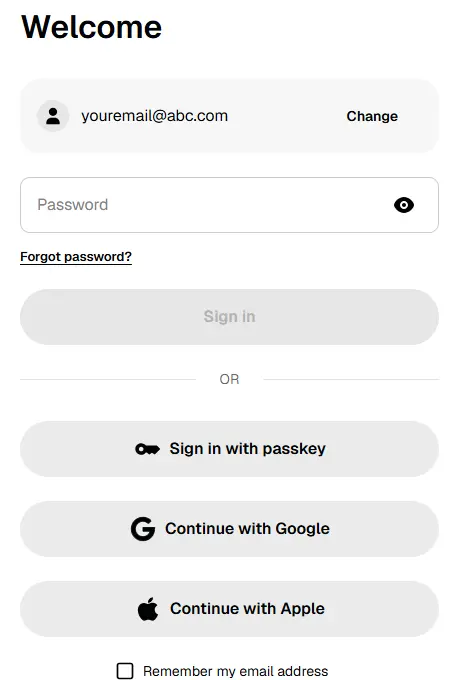
1. Adım: Öncelikle Gemini hesabınıza masaüstü veya mobil tarayıcıdan giriş yapın.
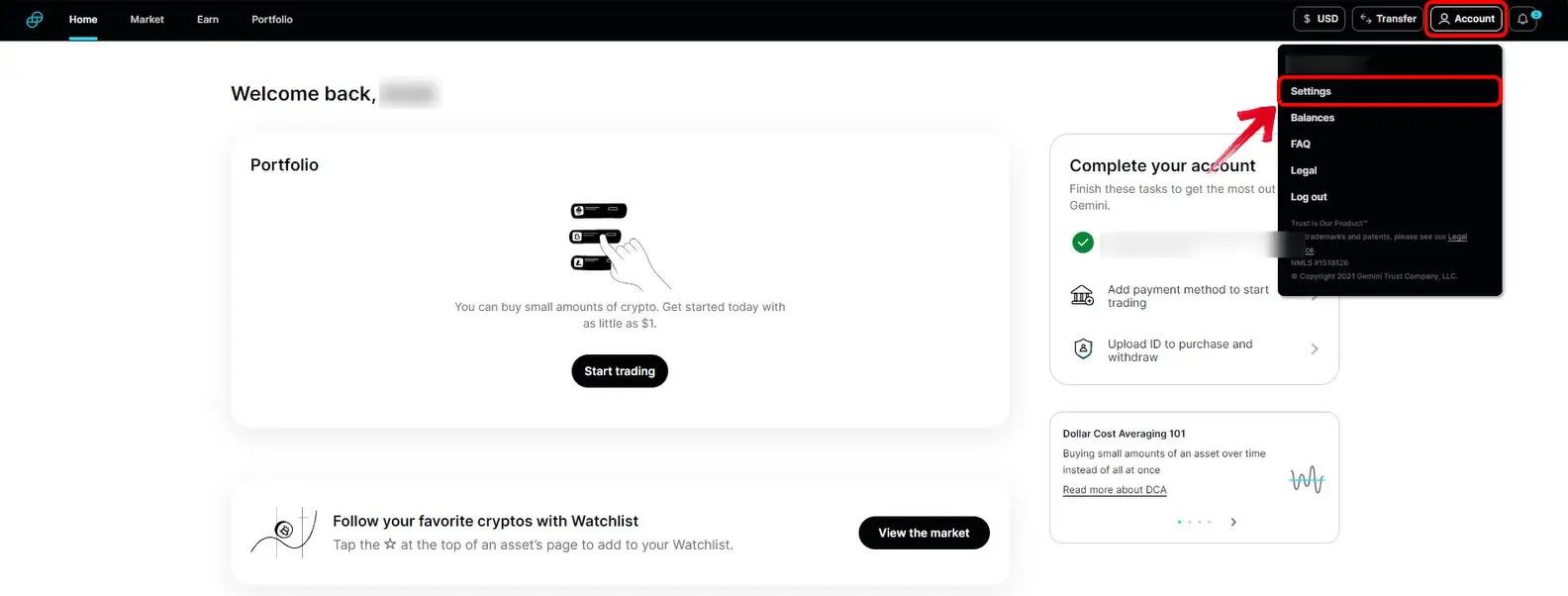
2. Adım: Giriş yaptıktan sonra sağ üst köşedeki Profil simgesine tıklayın. Açılır menüden “Hesap” seçeneğini belirleyin.
3. Adım: “Hesap Kapatma” bölümünü görene kadar aşağı kaydırın.
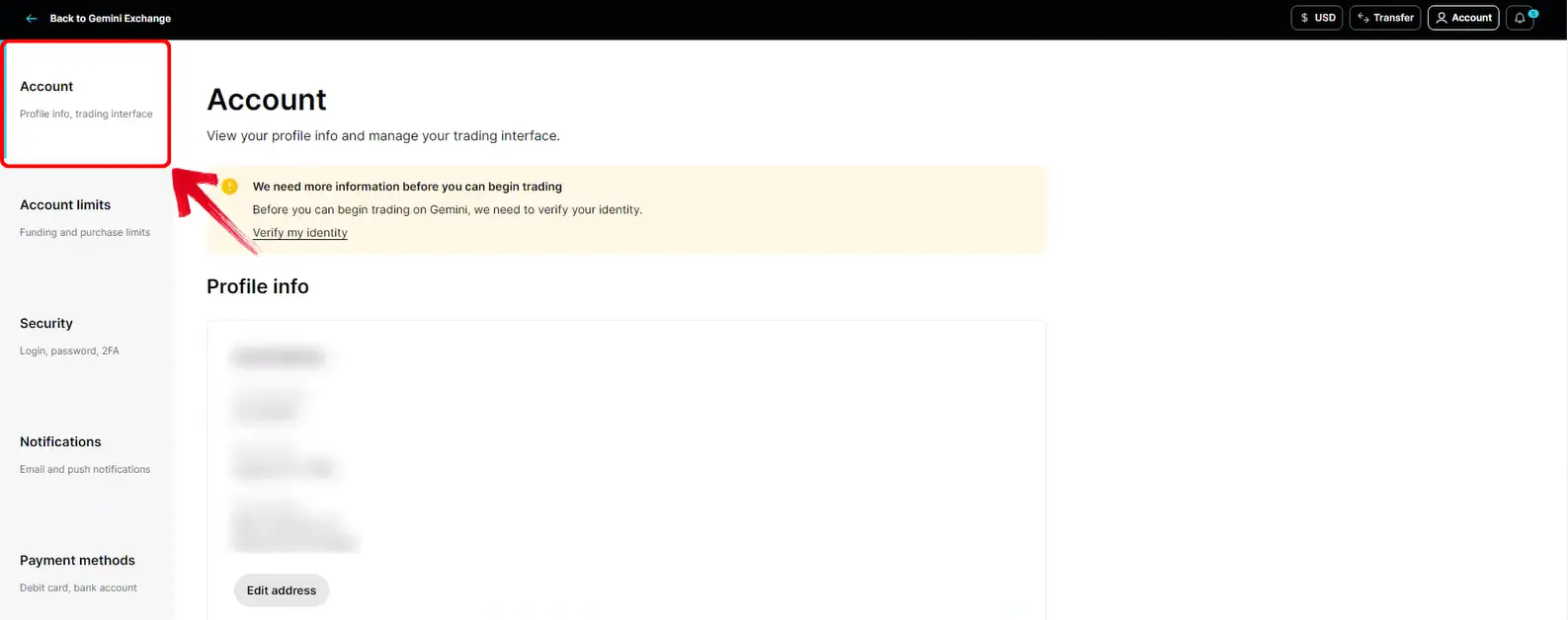
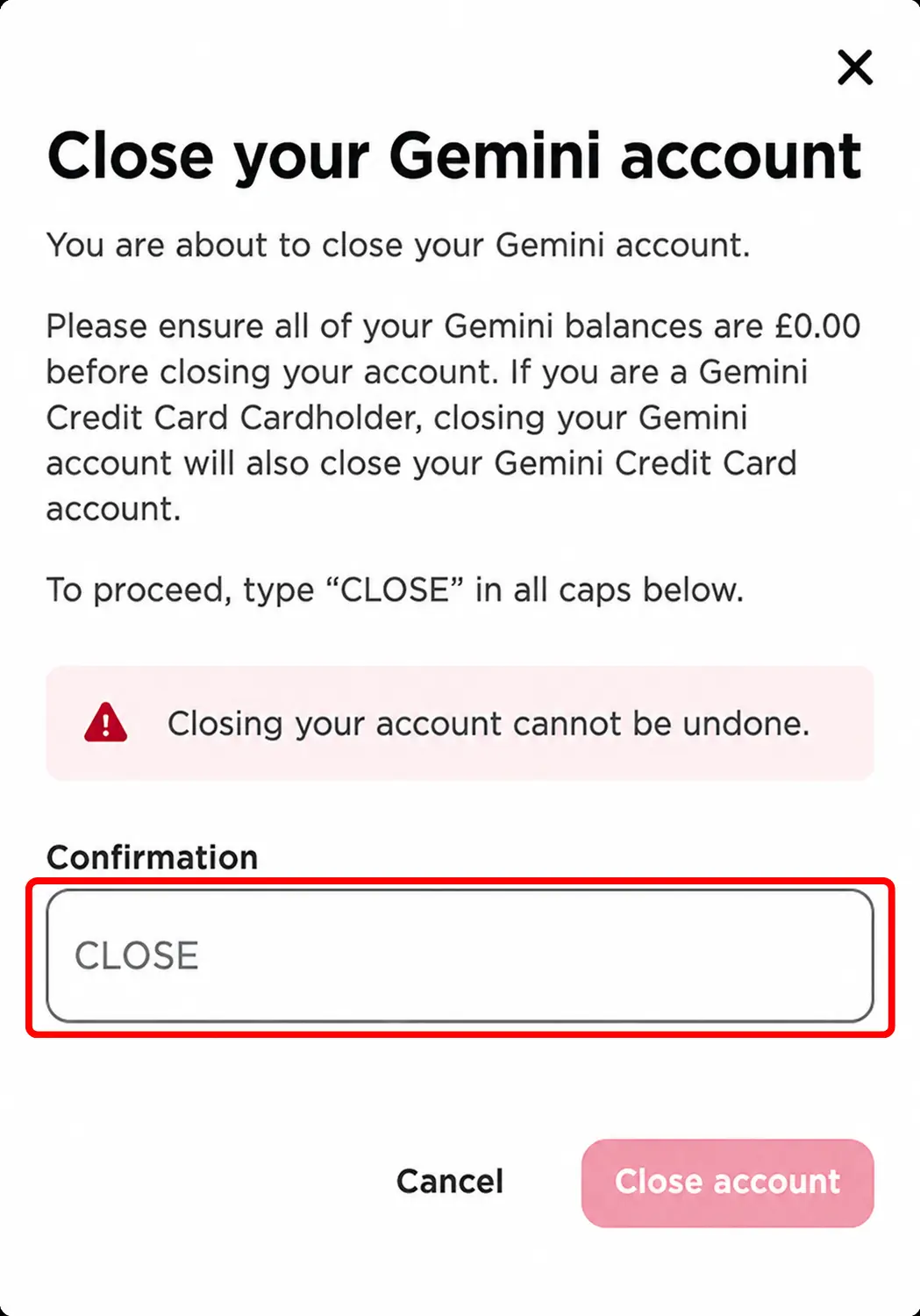
4. Adım: İşlemi başlatmak için “Hesabı kapat” seçeneğine tıklayın.
5. Adım: Gemini, büyük harflerle “CLOSE” yazmanızı isteyecek. İfadeyi yazıp talebi onayladığınızda hesap kapatma talebiniz iletilecek.
Gemini Hesabı Mobil Uygulama Üzerinden Nasıl Silinir?
Gemini’yi çoğunlukla telefonunuzdan kullanıyorsanız hesabınızı uygulama üzerinden de kapatabilirsiniz. Bu seçenek hesap ayarları bölümünde yer alır:
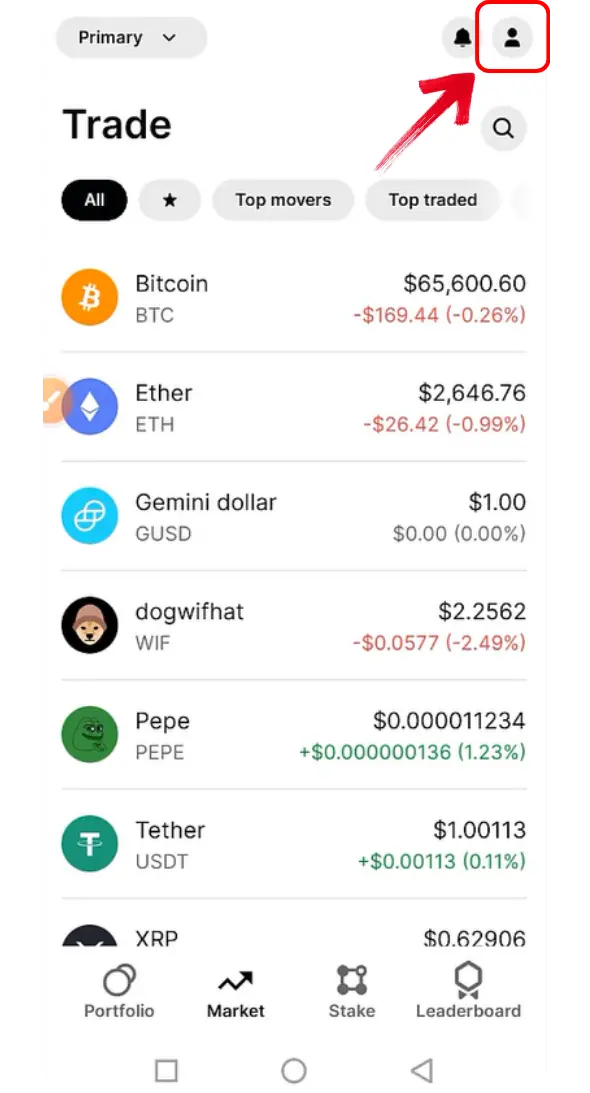
1. Adım: Önce telefonunuzda Gemini uygulamasını açın. Ana ekrana geldiğinizde hesap sayfanıza ulaşmak için üst kısımdaki profil simgesine dokunun.
2. Adım: Hesap sayfasında “Tercihler” seçeneğini göreceksiniz. Hesap ayarlarını açmak için bu seçeneğe dokunun.
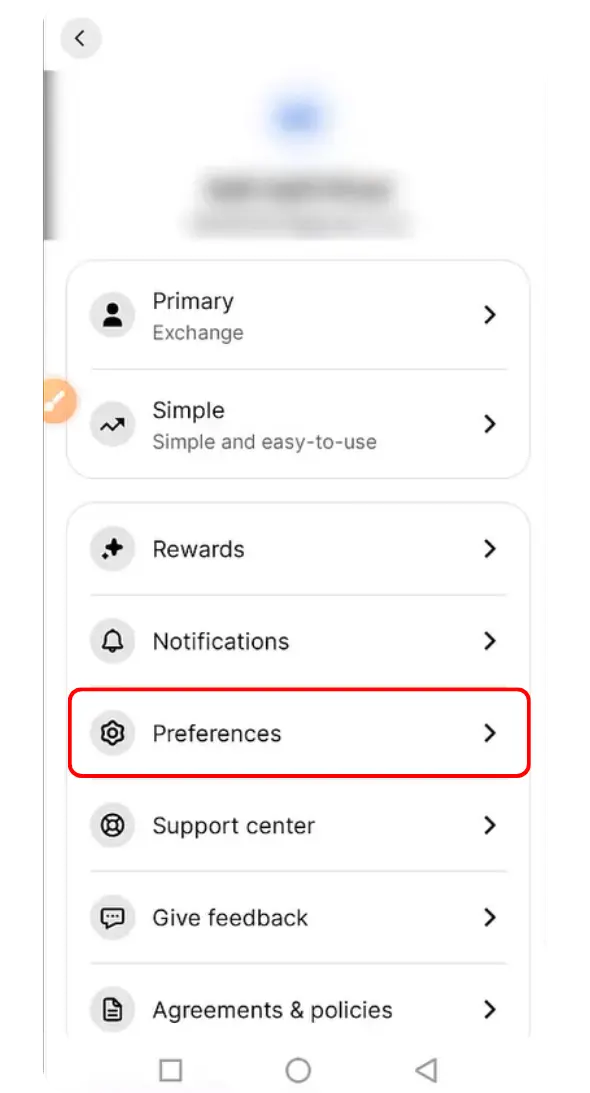
3. Adım: Tercihler sayfasında devam etmek için “Hesabı kapat” seçeneğine dokunun.
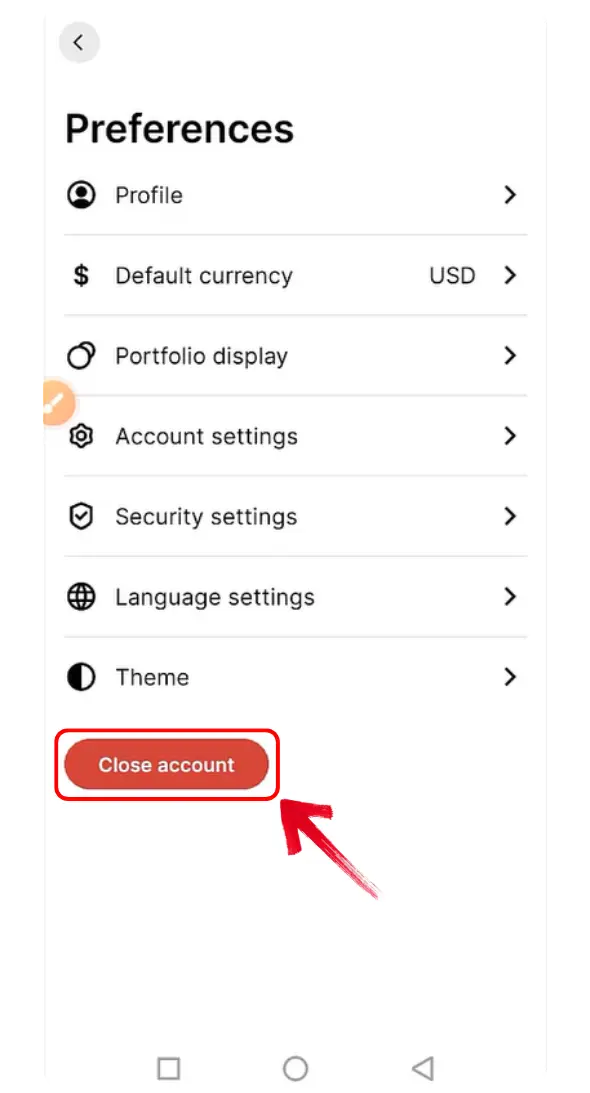
4. Adım: Gemini, kararınızı onaylamanızı isteyecek. Büyük harflerle “CLOSE” yazdığınızdan emin olun.
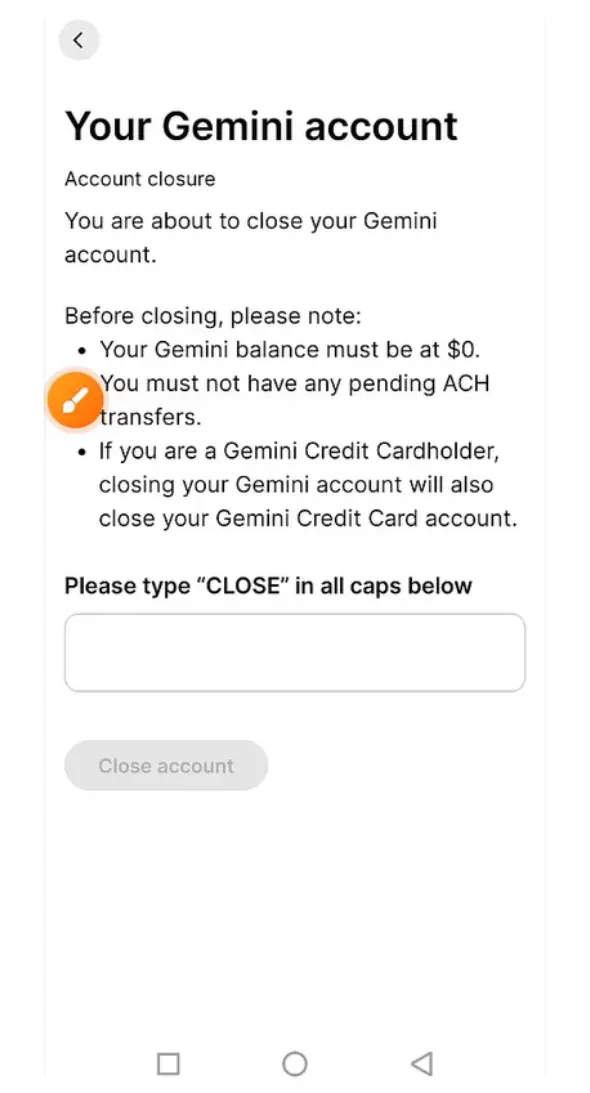
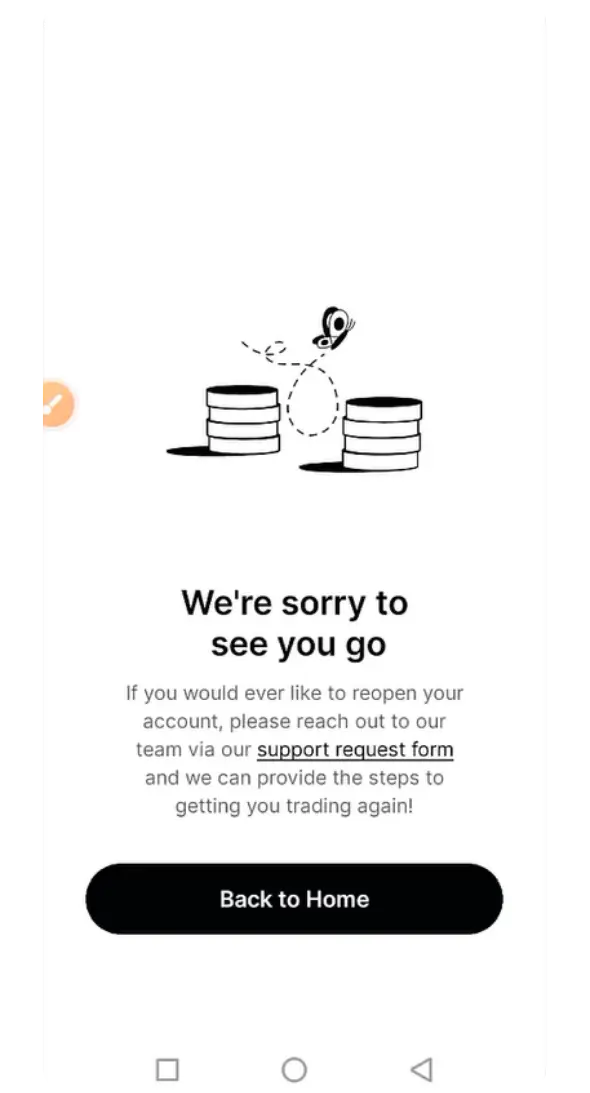
5. Adım: Kapatma talebinizi onayladığınızda Gemini, talebinizin alındığını belirten bir bildirimi ekranda gösterecek.
Gemini Alternatifleri
Başka bir borsa kullanmayı düşünüyorsanız, seçtiğiniz bölgede hizmet veren şu alternatifleri karşılaştırın. Sunulan hizmetleri ve hesap koşullarını öğrenmek için her birinin incelemesine göz atın.

Kraken
- Spot taker
- 0.8%
- Vadeli işlem taker
- 0.05%
- Varlıklar
- 682
- Maksimum kaldıraç
- 50×

Bybit
- Spot taker
- 0.1%
- Vadeli işlem taker
- 0.055%
- Varlıklar
- 378
- Maksimum kaldıraç
- 100×

Binance
- Spot taker
- 0.1%
- Vadeli işlem taker
- 0.05%
- Varlıklar
- 520
- Maksimum kaldıraç
- 150×

Bitvavo
- Spot taker
- 0.25%
- Vadeli işlem taker
- —
- Varlıklar
- 427
- Maksimum kaldıraç
- —

BloFin
- Spot taker
- 0.1%
- Vadeli işlem taker
- 0.06%
- Varlıklar
- 351
- Maksimum kaldıraç
- 150×

Hyperliquid
- Spot taker
- 0.07%
- Vadeli işlem taker
- 0.045%
- Varlıklar
- 334
- Maksimum kaldıraç
- 40×

Bitunix
- Spot taker
- 0.1%
- Vadeli işlem taker
- 0.06%
- Varlıklar
- 539
- Maksimum kaldıraç
- 200×

WhiteBIT
- Spot taker
- 0.1%
- Vadeli işlem taker
- 0.055%
- Varlıklar
- 464
- Maksimum kaldıraç
- 100×

Ourbit
- Spot taker
- 0%
- Vadeli işlem taker
- 0.04%
- Varlıklar
- 560
- Maksimum kaldıraç
- 500×

WEEX
- Spot taker
- 0.1%
- Vadeli işlem taker
- 0.08%
- Varlıklar
- 2,016
- Maksimum kaldıraç
- 400×

OKX EU
- Spot taker
- 0.2%
- Vadeli işlem taker
- 0.05%
- Varlıklar
- 290
- Maksimum kaldıraç
- 10×

Bitget
- Spot taker
- 0.1%
- Vadeli işlem taker
- 0.06%
- Varlıklar
- 496
- Maksimum kaldıraç
- 125×
OKX
- Spot taker
- 0.35%
- Vadeli işlem taker
- 0.05%
- Varlıklar
- 299
- Maksimum kaldıraç
- 125×

Coinbase
- Spot taker
- 0.6%
- Vadeli işlem taker
- 0.05%
- Varlıklar
- 399
- Maksimum kaldıraç
- 10×

Bybit EU
- Spot taker
- 0.25%
- Vadeli işlem taker
- —
- Varlıklar
- 108
- Maksimum kaldıraç
- —

BYDFi
- Spot taker
- 0.1%
- Vadeli işlem taker
- 0.06%
- Varlıklar
- 527
- Maksimum kaldıraç
- 500×

BTCC
- Spot taker
- 0.3%
- Vadeli işlem taker
- 0.06%
- Varlıklar
- 246
- Maksimum kaldıraç
- 500×

Lighter
- Spot taker
- 0%
- Vadeli işlem taker
- 0%
- Varlıklar
- 8
- Maksimum kaldıraç
- 50×

XT.com
- Spot taker
- 0.2%
- Vadeli işlem taker
- 0.06%
- Varlıklar
- 504
- Maksimum kaldıraç
- 125×

Crypto.com
- Spot taker
- 0.5%
- Vadeli işlem taker
- 0.04%
- Varlıklar
- 411
- Maksimum kaldıraç
- 50×

KCEX
- Spot taker
- 0%
- Vadeli işlem taker
- 0.01%
- Varlıklar
- 801
- Maksimum kaldıraç
- 125×

Pionex
- Spot taker
- 0.05%
- Vadeli işlem taker
- 0.05%
- Varlıklar
- 394
- Maksimum kaldıraç
- 100×

Zoomex
- Spot taker
- 0.1%
- Vadeli işlem taker
- 0.06%
- Varlıklar
- 65
- Maksimum kaldıraç
- 1000×

Bitstamp
- Spot taker
- 0.4%
- Vadeli işlem taker
- —
- Varlıklar
- 117
- Maksimum kaldıraç
- —

edgeX
- Spot taker
- —
- Vadeli işlem taker
- 0.038%
- Varlıklar
- 4
- Maksimum kaldıraç
- 100×

Gate
- Spot taker
- 0.1%
- Vadeli işlem taker
- 0.05%
- Varlıklar
- 2,038
- Maksimum kaldıraç
- 200×

Woo X
- Spot taker
- 0.1%
- Vadeli işlem taker
- 0.05%
- Varlıklar
- 17
- Maksimum kaldıraç
- 100×

BingX
- Spot taker
- 0.1%
- Vadeli işlem taker
- 0.05%
- Varlıklar
- 640
- Maksimum kaldıraç
- 150×

Derive
- Spot taker
- 0%
- Vadeli işlem taker
- 0.03%
- Varlıklar
- 15
- Maksimum kaldıraç
- 15×

KuCoin
- Spot taker
- 0.1%
- Vadeli işlem taker
- 0.06%
- Varlıklar
- 818
- Maksimum kaldıraç
- 125×

Bitbase
- Spot taker
- 0.1%
- Vadeli işlem taker
- 0.06%
- Varlıklar
- 385
- Maksimum kaldıraç
- 150×

Phemex
- Spot taker
- 0.1%
- Vadeli işlem taker
- 0.06%
- Varlıklar
- 1,028
- Maksimum kaldıraç
- 100×

dYdX
- Spot taker
- 0.1%
- Vadeli işlem taker
- 0.05%
- Varlıklar
- 57
- Maksimum kaldıraç
- 50×

HTX
- Spot taker
- 0.2%
- Vadeli işlem taker
- 0.06%
- Varlıklar
- 497
- Maksimum kaldıraç
- 200×

Tapbit
- Spot taker
- 0.1%
- Vadeli işlem taker
- 0.06%
- Varlıklar
- 52
- Maksimum kaldıraç
- 150×

GMX
- Spot taker
- —
- Vadeli işlem taker
- 0.06%
- Varlıklar
- 103
- Maksimum kaldıraç
- 100×

Deribit
- Spot taker
- 0%
- Vadeli işlem taker
- 0.05%
- Varlıklar
- 11
- Maksimum kaldıraç
- 50×

Aster
- Spot taker
- 0.04%
- Vadeli işlem taker
- 0.04%
- Varlıklar
- 35
- Maksimum kaldıraç
- 200×

Extended
- Spot taker
- 0.025%
- Vadeli işlem taker
- 0.025%
- Varlıklar
- 335
- Maksimum kaldıraç
- 50×

Binance.US
- Spot taker
- 0.01%
- Vadeli işlem taker
- —
- Varlıklar
- 166
- Maksimum kaldıraç
- —

LeveX
- Spot taker
- 0.1%
- Vadeli işlem taker
- 0.06%
- Varlıklar
- 117
- Maksimum kaldıraç
- 500×

Backpack Exchange
- Spot taker
- 0.1%
- Vadeli işlem taker
- 0.05%
- Varlıklar
- 88
- Maksimum kaldıraç
- 75×

Bitpanda
- Spot taker
- 1.49%
- Vadeli işlem taker
- —
- Varlıklar
- 568
- Maksimum kaldıraç
- —

Toobit
- Spot taker
- 0.1%
- Vadeli işlem taker
- 0.06%
- Varlıklar
- 530
- Maksimum kaldıraç
- 200×

Aevo
- Spot taker
- —
- Vadeli işlem taker
- 0.08%
- Varlıklar
- 72
- Maksimum kaldıraç
- 20×

Bitfinex
- Spot taker
- 0%
- Vadeli işlem taker
- 0%
- Varlıklar
- 82
- Maksimum kaldıraç
- 100×

Paradex
- Spot taker
- 0%
- Vadeli işlem taker
- 0%
- Varlıklar
- 43
- Maksimum kaldıraç
- 50×

Upbit
- Spot taker
- 0.05%
- Vadeli işlem taker
- —
- Varlıklar
- 346
- Maksimum kaldıraç
- —

Nado
- Spot taker
- 0.035%
- Vadeli işlem taker
- 0.035%
- Varlıklar
- 9
- Maksimum kaldıraç
- 20×

Binance TR
- Spot taker
- 0.2%
- Vadeli işlem taker
- —
- Varlıklar
- —
- Maksimum kaldıraç
- —

Pacifica
- Spot taker
- 0.04%
- Vadeli işlem taker
- 0.04%
- Varlıklar
- 1
- Maksimum kaldıraç
- 50×

BullX
- Spot taker
- —
- Vadeli işlem taker
- —
- Varlıklar
- —
- Maksimum kaldıraç
- —

Coincheck
- Spot taker
- 0%
- Vadeli işlem taker
- —
- Varlıklar
- 15
- Maksimum kaldıraç
- —

GRVT
- Spot taker
- —
- Vadeli işlem taker
- 0.045%
- Varlıklar
- 184
- Maksimum kaldıraç
- 50×

BTSE
- Spot taker
- 0.2%
- Vadeli işlem taker
- 0.05%
- Varlıklar
- 228
- Maksimum kaldıraç
- 100×

VirgoCX
- Spot taker
- —
- Vadeli işlem taker
- —
- Varlıklar
- —
- Maksimum kaldıraç
- —

Deepcoin
- Spot taker
- 0.1%
- Vadeli işlem taker
- 0.06%
- Varlıklar
- 114
- Maksimum kaldıraç
- 125×

CoinW
- Spot taker
- 0.1%
- Vadeli işlem taker
- 0.06%
- Varlıklar
- 336
- Maksimum kaldıraç
- 200×

Poloniex
- Spot taker
- 0.2%
- Vadeli işlem taker
- 0.06%
- Varlıklar
- 144
- Maksimum kaldıraç
- 100×

MEXC
- Spot taker
- 0.05%
- Vadeli işlem taker
- 0.02%
- Varlıklar
- 1,274
- Maksimum kaldıraç
- 500×

Delta Exchange
- Spot taker
- 0.1%
- Vadeli işlem taker
- 0.05%
- Varlıklar
- 1
- Maksimum kaldıraç
- 100×

Hotcoin Global
- Spot taker
- 0.2%
- Vadeli işlem taker
- 0.06%
- Varlıklar
- 207
- Maksimum kaldıraç
- 200×

Uphold
- Spot taker
- 0.25%
- Vadeli işlem taker
- —
- Varlıklar
- —
- Maksimum kaldıraç
- —

Bithumb
- Spot taker
- 0.25%
- Vadeli işlem taker
- —
- Varlıklar
- 489
- Maksimum kaldıraç
- —

Paybis
- Spot taker
- 1.49%
- Vadeli işlem taker
- —
- Varlıklar
- —
- Maksimum kaldıraç
- —

EasyBit
- Spot taker
- 0.2%
- Vadeli işlem taker
- —
- Varlıklar
- —
- Maksimum kaldıraç
- —

GMTrade
- Spot taker
- —
- Vadeli işlem taker
- 0.024%
- Varlıklar
- 70
- Maksimum kaldıraç
- 500×

Ostium
- Spot taker
- —
- Vadeli işlem taker
- 0.04%
- Varlıklar
- 32
- Maksimum kaldıraç
- 200×

Vest Markets
- Spot taker
- —
- Vadeli işlem taker
- —
- Varlıklar
- 68
- Maksimum kaldıraç
- 100×

Bitrue
- Spot taker
- 0.098%
- Vadeli işlem taker
- 0.06%
- Varlıklar
- 480
- Maksimum kaldıraç
- 125×

Helix
- Spot taker
- 0.05%
- Vadeli işlem taker
- 0.05%
- Varlıklar
- 26
- Maksimum kaldıraç
- 100×

Coinmama
- Spot taker
- 3.9%
- Vadeli işlem taker
- —
- Varlıklar
- —
- Maksimum kaldıraç
- —

LBank
- Spot taker
- 0.1%
- Vadeli işlem taker
- 0.06%
- Varlıklar
- 867
- Maksimum kaldıraç
- 200×

Margex
- Spot taker
- —
- Vadeli işlem taker
- 0.06%
- Varlıklar
- 50
- Maksimum kaldıraç
- 100×

PrimeXBT
- Spot taker
- —
- Vadeli işlem taker
- 0.02%
- Varlıklar
- 159
- Maksimum kaldıraç
- 500×

eToro
- Spot taker
- 1%
- Vadeli işlem taker
- —
- Varlıklar
- —
- Maksimum kaldıraç
- —

DigiFinex
- Spot taker
- 0.2%
- Vadeli işlem taker
- 0.05%
- Varlıklar
- 474
- Maksimum kaldıraç
- 100×

BigONE
- Spot taker
- 0.2%
- Vadeli işlem taker
- 0.06%
- Varlıklar
- 155
- Maksimum kaldıraç
- 100×
Seçtiğiniz bölgede listelenen alternatif bulunmuyor.
Sonuç
Kapatma işlemini onaylamadan önce kalan kripto ve itibari para bakiyenizi çekin, düzenli alımları iptal edin ve kayıtlarınızı saklayın. Hesabınıza daha sonra yeniden erişmeniz gerekirse hesabınızı yeniden açma talebi için Gemini destek ekibiyle iletişime geçin. Talebin onaylanması, hesabınızın durumuna ve bulunduğunuz bölgedeki uygunluk koşullarına bağlıdır.
Sıkça Sorulan Sorular
Evet. Gemini kullanıcıları, destek ekibiyle iletişime geçerek hesaplarının yeniden açılmasını talep edebilir. Hesabınızı web sitesi veya uygulama üzerinden kendiniz yeniden etkinleştiremezsiniz. Ayrıca hesabın yeniden açılması, bulunduğunuz bölgedeki uygunluk koşullarına tabidir.
Evet. Kapatma işlemini onaylamadan önce tüm kripto ve itibari para bakiyelerinizi başka bir yere aktarın. Böylece hesabınıza erişimle ilgili sorun yaşama ve kalan bakiyenizi geri almak için sonradan Gemini ile iletişime geçme ihtimaliniz azalır.
Hesabın kapatılması, tüm kayıtların mutlaka silineceği anlamına gelmez. Gemini, yasal ve düzenleyici yükümlülüklerini yerine getirmek amacıyla hesap bilgilerini, faaliyetleri ve yazışmaları saklayabilir.