Gemini 계정 삭제하기: 단계별 안내


이 페이지에서
- Gemini 계정은 웹 브라우저나 모바일 앱에서 해지할 수 있습니다.
- 계정 해지 신청을 제출하기 전에 보유한 암호화폐와 법정화폐 잔액을 모두 출금하세요.
- 해지한 계정도 Gemini 고객지원팀에 문의하면 나중에 다시 열 수 있습니다.
Gemini 계정은 웹사이트나 모바일 앱에서 해지할 수 있습니다. 먼저 자금을 출금하고, 미체결 주문을 취소한 뒤, 필요한 명세서를 다운로드하세요. Gemini는 해지된 계정을 다시 열어 달라는 요청을 검토할 수 있지만, 고객지원팀에 문의해야 하며 Gemini 서비스 이용 자격을 유지해야 합니다.
Gemini 계정을 해지하기 전에 확인할 사항
계정을 해지하기 전에 몇 가지 사항을 미리 처리해 두면 이후에 문제가 생기는 것을 막을 수 있습니다.
- 보유한 암호화폐와 법정화폐 잔액을 모두 출금하세요.
- 미체결 주문이나 정기 구매를 모두 취소하세요.
- 필요하다면 명세서나 거래 내역을 다운로드하세요.
- 해지한 계정은 직접 다시 열 수 없습니다. 다시 이용해야 한다면 Gemini 고객지원팀에 문의하세요.
- Gemini는 규정 준수에 필요한 기록을 보관할 수 있습니다.
웹에서 Gemini 계정 해지하는 방법
Gemini 계정은 웹 브라우저에서 해지하는 것이 가장 편리할 수 있습니다. 필요한 메뉴를 찾고 이동하기가 더 쉽기 때문입니다. 웹에서 계정을 해지하는 방법은 다음과 같습니다.
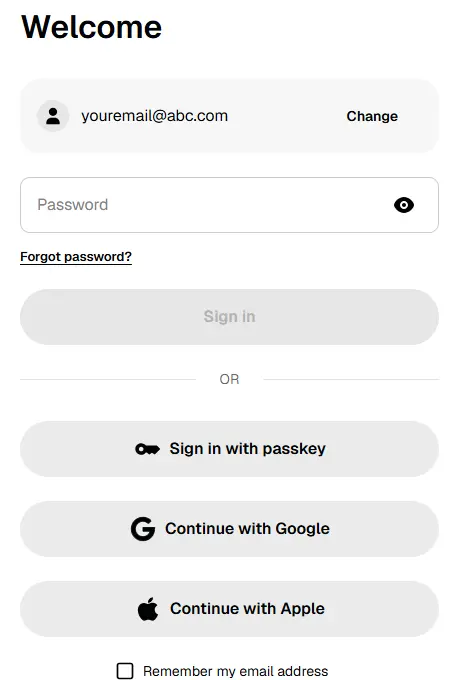
1단계: 데스크톱이나 모바일 브라우저에서 Gemini 계정에 로그인합니다.
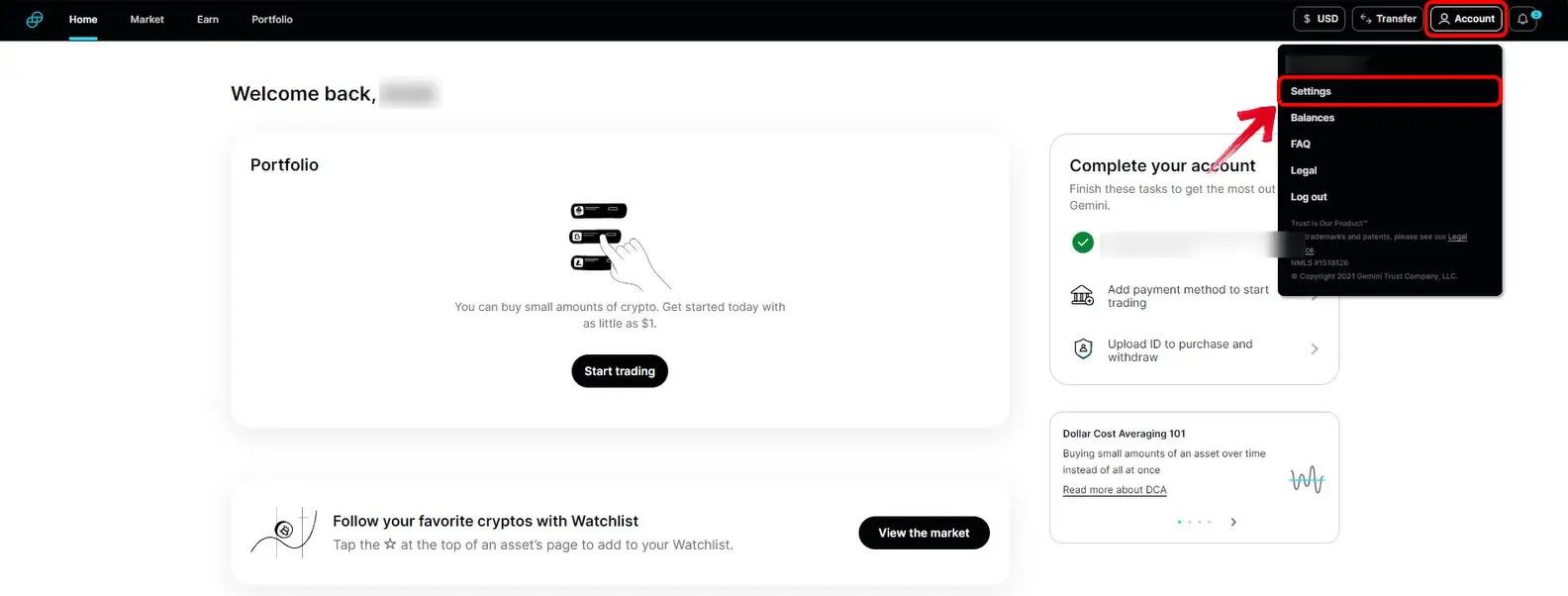
2단계: 로그인한 다음 오른쪽 상단의 프로필 아이콘을 클릭합니다. 드롭다운 메뉴에서 “계정”을 선택합니다.
3단계: 아래로 스크롤해 “계정 해지” 항목을 찾습니다.
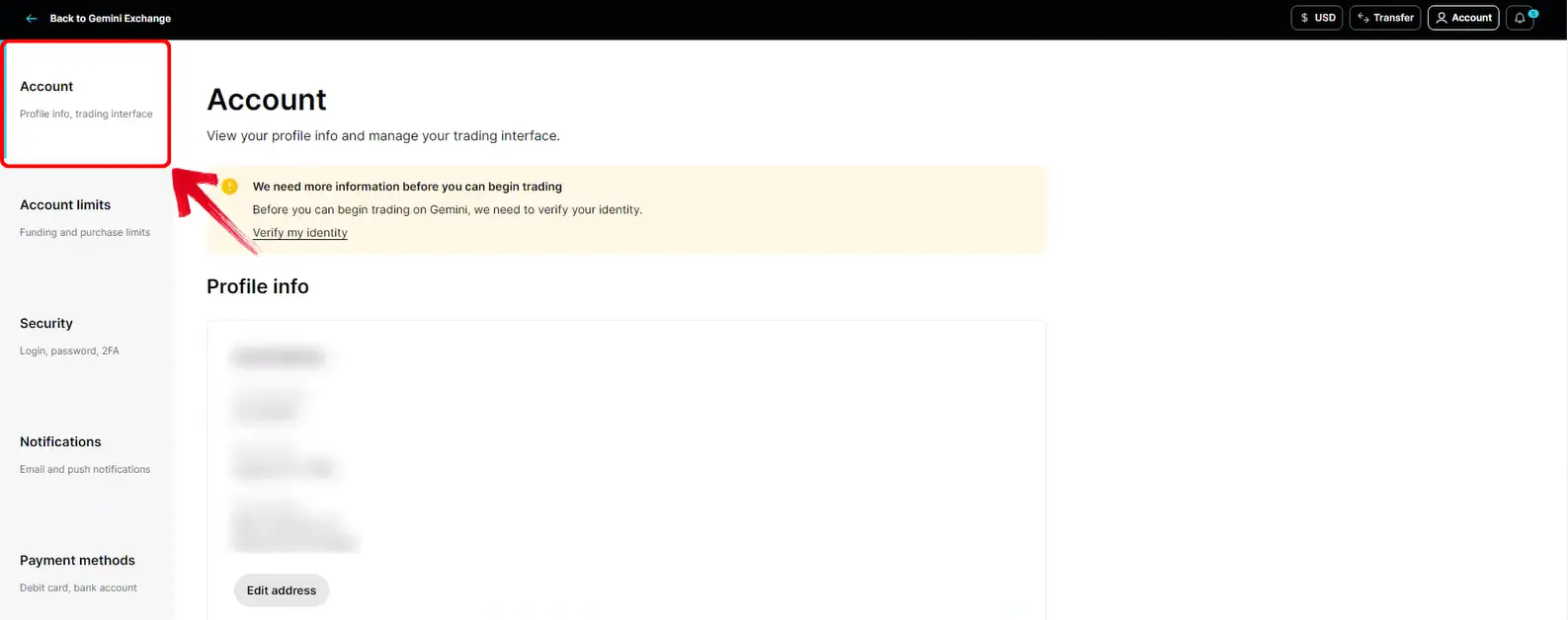
4단계: 여기서 “계정 해지”를 클릭해 절차를 시작합니다.
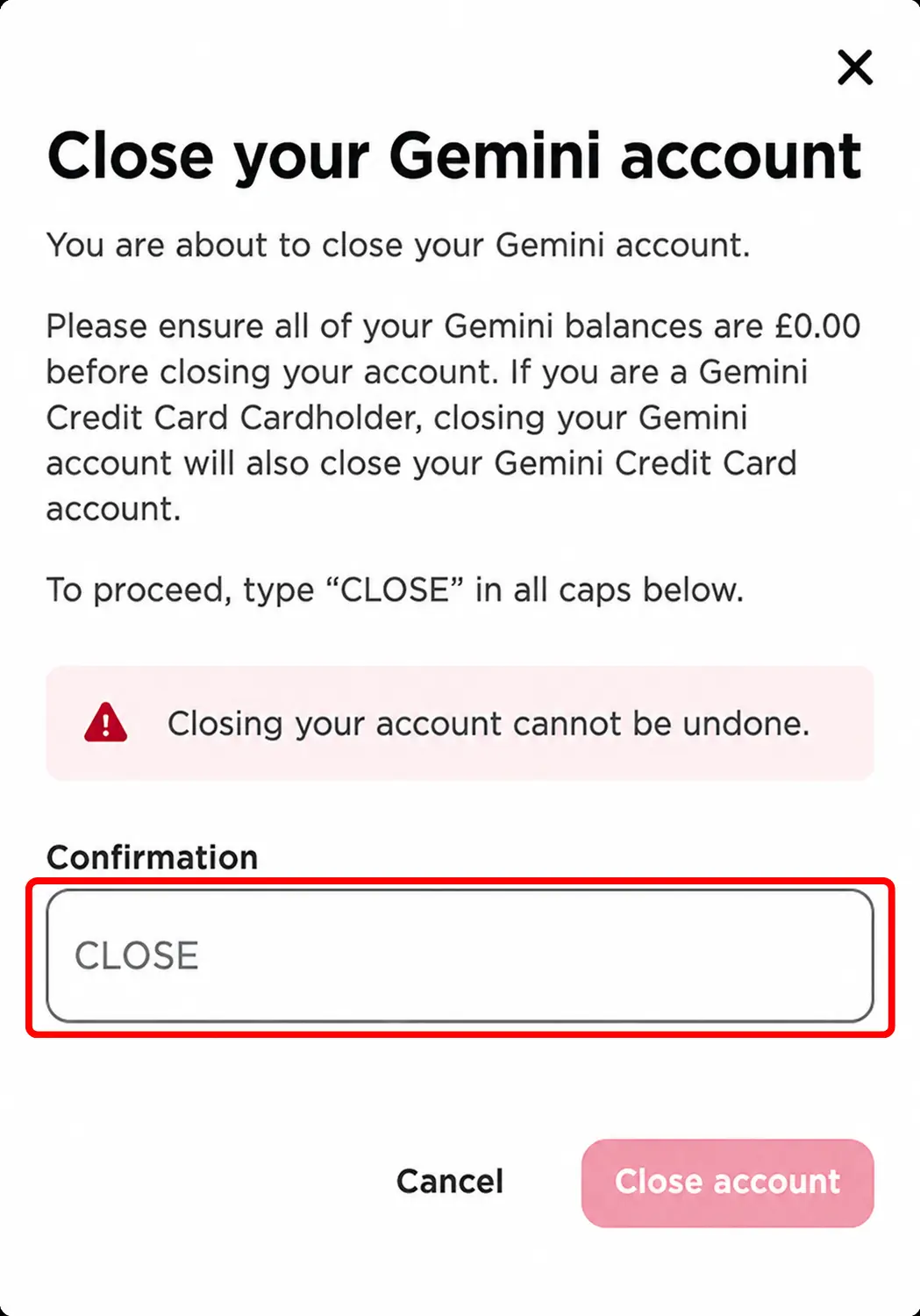
5단계: Gemini에서 대문자로 “CLOSE”를 입력하라고 안내합니다. 문구를 입력하고 요청을 확인하면 계정 해지 신청이 제출됩니다.
모바일 앱에서 Gemini 계정 해지하는 방법
주로 휴대폰에서 Gemini를 이용한다면 앱에서도 계정을 해지할 수 있습니다. 계정 설정 메뉴에서 해지 옵션을 찾을 수 있습니다.
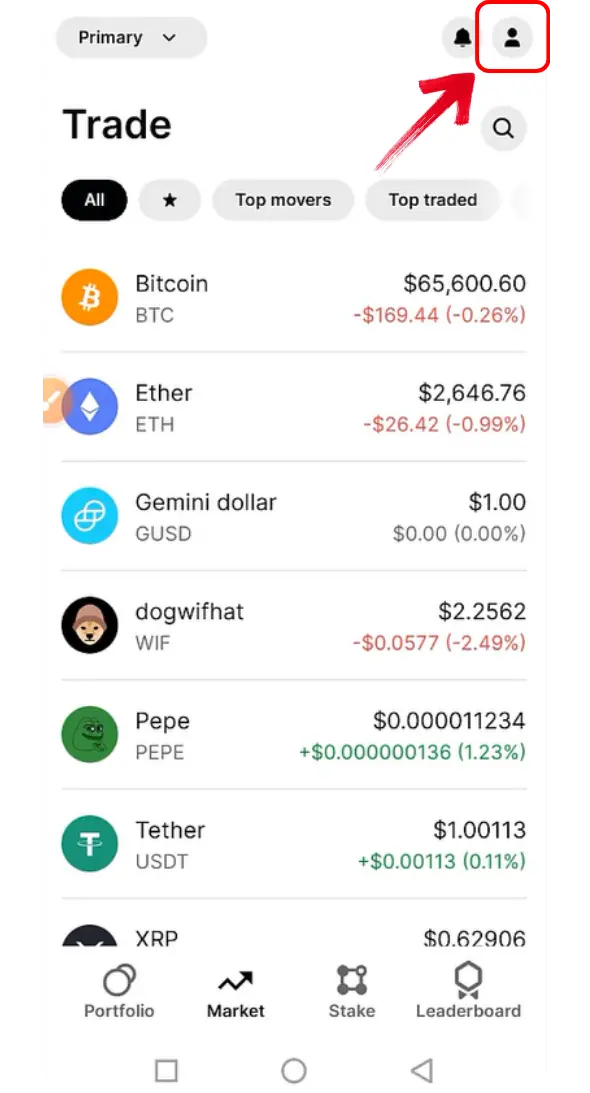
1단계: 먼저 휴대폰에서 Gemini 앱을 엽니다. 홈 화면에서 상단의 프로필 아이콘을 눌러 계정 페이지로 이동합니다.
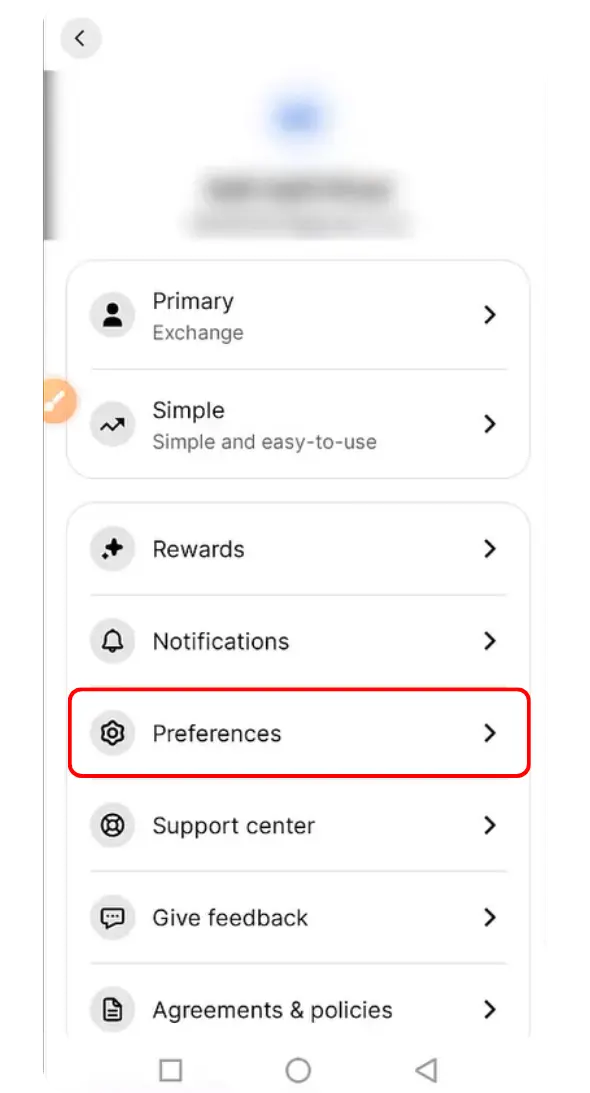
2단계: 계정 페이지가 열리면 “환경설정” 항목이 표시됩니다. 이 항목을 눌러 계정 설정으로 이동합니다.
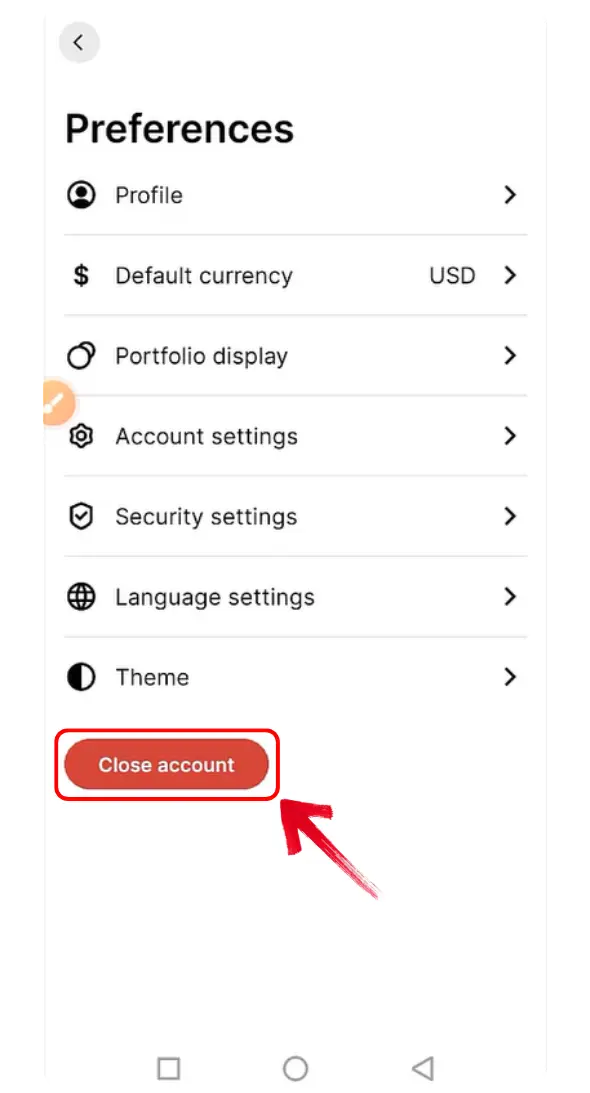
3단계: 환경설정 페이지에서 “계정 해지”를 눌러 다음 단계로 진행합니다.
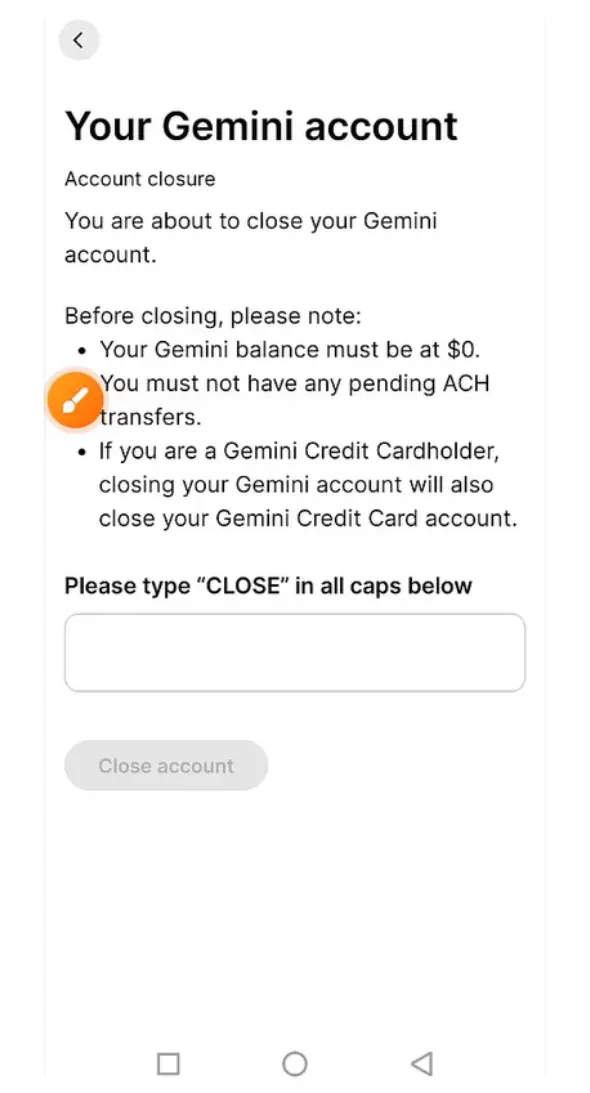
4단계: Gemini에서 계정 해지 여부를 확인하라고 안내합니다. 대문자로 “CLOSE”를 입력하세요.
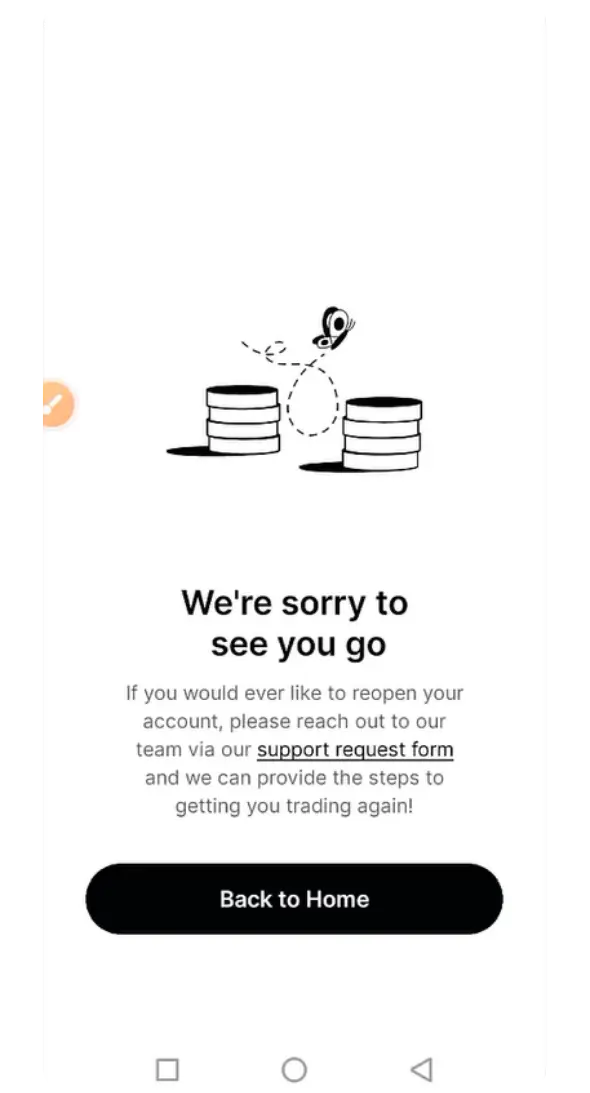
5단계: 해지를 확인하면 Gemini 화면에 요청을 접수했다는 알림이 표시됩니다.
Gemini 대안
다른 거래소를 이용할 계획이라면 현재 지역에서 이용할 수 있는 다음 거래소들을 비교해 보세요. 각 리뷰에서 지원 서비스와 계정 요건을 확인하세요.

Kraken
- 현물 테이커
- 0.8%
- 선물 테이커
- 0.05%
- 자산
- 682
- 최대 레버리지
- 50×

Bybit
- 현물 테이커
- 0.1%
- 선물 테이커
- 0.055%
- 자산
- 378
- 최대 레버리지
- 100×

Binance
- 현물 테이커
- 0.1%
- 선물 테이커
- 0.05%
- 자산
- 520
- 최대 레버리지
- 150×

Bitvavo
- 현물 테이커
- 0.25%
- 선물 테이커
- —
- 자산
- 427
- 최대 레버리지
- —

BloFin
- 현물 테이커
- 0.1%
- 선물 테이커
- 0.06%
- 자산
- 351
- 최대 레버리지
- 150×

Hyperliquid
- 현물 테이커
- 0.07%
- 선물 테이커
- 0.045%
- 자산
- 334
- 최대 레버리지
- 40×

Bitunix
- 현물 테이커
- 0.1%
- 선물 테이커
- 0.06%
- 자산
- 539
- 최대 레버리지
- 200×

WhiteBIT
- 현물 테이커
- 0.1%
- 선물 테이커
- 0.055%
- 자산
- 464
- 최대 레버리지
- 100×

Ourbit
- 현물 테이커
- 0%
- 선물 테이커
- 0.04%
- 자산
- 560
- 최대 레버리지
- 500×

WEEX
- 현물 테이커
- 0.1%
- 선물 테이커
- 0.08%
- 자산
- 2,016
- 최대 레버리지
- 400×

OKX EU
- 현물 테이커
- 0.2%
- 선물 테이커
- 0.05%
- 자산
- 290
- 최대 레버리지
- 10×

Bitget
- 현물 테이커
- 0.1%
- 선물 테이커
- 0.06%
- 자산
- 496
- 최대 레버리지
- 125×
OKX
- 현물 테이커
- 0.35%
- 선물 테이커
- 0.05%
- 자산
- 299
- 최대 레버리지
- 125×

Coinbase
- 현물 테이커
- 0.6%
- 선물 테이커
- 0.05%
- 자산
- 399
- 최대 레버리지
- 10×

Bybit EU
- 현물 테이커
- 0.25%
- 선물 테이커
- —
- 자산
- 108
- 최대 레버리지
- —

BYDFi
- 현물 테이커
- 0.1%
- 선물 테이커
- 0.06%
- 자산
- 527
- 최대 레버리지
- 500×

BTCC
- 현물 테이커
- 0.3%
- 선물 테이커
- 0.06%
- 자산
- 246
- 최대 레버리지
- 500×

Lighter
- 현물 테이커
- 0%
- 선물 테이커
- 0%
- 자산
- 8
- 최대 레버리지
- 50×

XT.com
- 현물 테이커
- 0.2%
- 선물 테이커
- 0.06%
- 자산
- 504
- 최대 레버리지
- 125×

Crypto.com
- 현물 테이커
- 0.5%
- 선물 테이커
- 0.04%
- 자산
- 411
- 최대 레버리지
- 50×

KCEX
- 현물 테이커
- 0%
- 선물 테이커
- 0.01%
- 자산
- 801
- 최대 레버리지
- 125×

Pionex
- 현물 테이커
- 0.05%
- 선물 테이커
- 0.05%
- 자산
- 394
- 최대 레버리지
- 100×

Zoomex
- 현물 테이커
- 0.1%
- 선물 테이커
- 0.06%
- 자산
- 65
- 최대 레버리지
- 1000×

Bitstamp
- 현물 테이커
- 0.4%
- 선물 테이커
- —
- 자산
- 117
- 최대 레버리지
- —

edgeX
- 현물 테이커
- —
- 선물 테이커
- 0.038%
- 자산
- 4
- 최대 레버리지
- 100×

Gate
- 현물 테이커
- 0.1%
- 선물 테이커
- 0.05%
- 자산
- 2,038
- 최대 레버리지
- 200×

Woo X
- 현물 테이커
- 0.1%
- 선물 테이커
- 0.05%
- 자산
- 17
- 최대 레버리지
- 100×

BingX
- 현물 테이커
- 0.1%
- 선물 테이커
- 0.05%
- 자산
- 640
- 최대 레버리지
- 150×

Derive
- 현물 테이커
- 0%
- 선물 테이커
- 0.03%
- 자산
- 15
- 최대 레버리지
- 15×

KuCoin
- 현물 테이커
- 0.1%
- 선물 테이커
- 0.06%
- 자산
- 818
- 최대 레버리지
- 125×

Bitbase
- 현물 테이커
- 0.1%
- 선물 테이커
- 0.06%
- 자산
- 385
- 최대 레버리지
- 150×

Phemex
- 현물 테이커
- 0.1%
- 선물 테이커
- 0.06%
- 자산
- 1,028
- 최대 레버리지
- 100×

dYdX
- 현물 테이커
- 0.1%
- 선물 테이커
- 0.05%
- 자산
- 57
- 최대 레버리지
- 50×

HTX
- 현물 테이커
- 0.2%
- 선물 테이커
- 0.06%
- 자산
- 497
- 최대 레버리지
- 200×

Tapbit
- 현물 테이커
- 0.1%
- 선물 테이커
- 0.06%
- 자산
- 52
- 최대 레버리지
- 150×

GMX
- 현물 테이커
- —
- 선물 테이커
- 0.06%
- 자산
- 103
- 최대 레버리지
- 100×

Deribit
- 현물 테이커
- 0%
- 선물 테이커
- 0.05%
- 자산
- 11
- 최대 레버리지
- 50×

Aster
- 현물 테이커
- 0.04%
- 선물 테이커
- 0.04%
- 자산
- 35
- 최대 레버리지
- 200×

Extended
- 현물 테이커
- 0.025%
- 선물 테이커
- 0.025%
- 자산
- 335
- 최대 레버리지
- 50×

Binance.US
- 현물 테이커
- 0.01%
- 선물 테이커
- —
- 자산
- 166
- 최대 레버리지
- —

LeveX
- 현물 테이커
- 0.1%
- 선물 테이커
- 0.06%
- 자산
- 117
- 최대 레버리지
- 500×

Backpack Exchange
- 현물 테이커
- 0.1%
- 선물 테이커
- 0.05%
- 자산
- 88
- 최대 레버리지
- 75×

Bitpanda
- 현물 테이커
- 1.49%
- 선물 테이커
- —
- 자산
- 568
- 최대 레버리지
- —

Toobit
- 현물 테이커
- 0.1%
- 선물 테이커
- 0.06%
- 자산
- 530
- 최대 레버리지
- 200×

Aevo
- 현물 테이커
- —
- 선물 테이커
- 0.08%
- 자산
- 72
- 최대 레버리지
- 20×

Bitfinex
- 현물 테이커
- 0%
- 선물 테이커
- 0%
- 자산
- 82
- 최대 레버리지
- 100×

Paradex
- 현물 테이커
- 0%
- 선물 테이커
- 0%
- 자산
- 43
- 최대 레버리지
- 50×

Upbit
- 현물 테이커
- 0.05%
- 선물 테이커
- —
- 자산
- 346
- 최대 레버리지
- —

Nado
- 현물 테이커
- 0.035%
- 선물 테이커
- 0.035%
- 자산
- 9
- 최대 레버리지
- 20×

Binance TR
- 현물 테이커
- 0.2%
- 선물 테이커
- —
- 자산
- —
- 최대 레버리지
- —

Pacifica
- 현물 테이커
- 0.04%
- 선물 테이커
- 0.04%
- 자산
- 1
- 최대 레버리지
- 50×

BullX
- 현물 테이커
- —
- 선물 테이커
- —
- 자산
- —
- 최대 레버리지
- —

Coincheck
- 현물 테이커
- 0%
- 선물 테이커
- —
- 자산
- 15
- 최대 레버리지
- —

GRVT
- 현물 테이커
- —
- 선물 테이커
- 0.045%
- 자산
- 184
- 최대 레버리지
- 50×

BTSE
- 현물 테이커
- 0.2%
- 선물 테이커
- 0.05%
- 자산
- 228
- 최대 레버리지
- 100×

VirgoCX
- 현물 테이커
- —
- 선물 테이커
- —
- 자산
- —
- 최대 레버리지
- —

Deepcoin
- 현물 테이커
- 0.1%
- 선물 테이커
- 0.06%
- 자산
- 114
- 최대 레버리지
- 125×

CoinW
- 현물 테이커
- 0.1%
- 선물 테이커
- 0.06%
- 자산
- 336
- 최대 레버리지
- 200×

Poloniex
- 현물 테이커
- 0.2%
- 선물 테이커
- 0.06%
- 자산
- 144
- 최대 레버리지
- 100×

MEXC
- 현물 테이커
- 0.05%
- 선물 테이커
- 0.02%
- 자산
- 1,274
- 최대 레버리지
- 500×

Delta Exchange
- 현물 테이커
- 0.1%
- 선물 테이커
- 0.05%
- 자산
- 1
- 최대 레버리지
- 100×

Hotcoin Global
- 현물 테이커
- 0.2%
- 선물 테이커
- 0.06%
- 자산
- 207
- 최대 레버리지
- 200×

Uphold
- 현물 테이커
- 0.25%
- 선물 테이커
- —
- 자산
- —
- 최대 레버리지
- —

Bithumb
- 현물 테이커
- 0.25%
- 선물 테이커
- —
- 자산
- 489
- 최대 레버리지
- —

Paybis
- 현물 테이커
- 1.49%
- 선물 테이커
- —
- 자산
- —
- 최대 레버리지
- —

EasyBit
- 현물 테이커
- 0.2%
- 선물 테이커
- —
- 자산
- —
- 최대 레버리지
- —

GMTrade
- 현물 테이커
- —
- 선물 테이커
- 0.024%
- 자산
- 70
- 최대 레버리지
- 500×

Ostium
- 현물 테이커
- —
- 선물 테이커
- 0.04%
- 자산
- 32
- 최대 레버리지
- 200×

Vest Markets
- 현물 테이커
- —
- 선물 테이커
- —
- 자산
- 68
- 최대 레버리지
- 100×

Bitrue
- 현물 테이커
- 0.098%
- 선물 테이커
- 0.06%
- 자산
- 480
- 최대 레버리지
- 125×

Helix
- 현물 테이커
- 0.05%
- 선물 테이커
- 0.05%
- 자산
- 26
- 최대 레버리지
- 100×

Coinmama
- 현물 테이커
- 3.9%
- 선물 테이커
- —
- 자산
- —
- 최대 레버리지
- —

LBank
- 현물 테이커
- 0.1%
- 선물 테이커
- 0.06%
- 자산
- 867
- 최대 레버리지
- 200×

Margex
- 현물 테이커
- —
- 선물 테이커
- 0.06%
- 자산
- 50
- 최대 레버리지
- 100×

PrimeXBT
- 현물 테이커
- —
- 선물 테이커
- 0.02%
- 자산
- 159
- 최대 레버리지
- 500×

eToro
- 현물 테이커
- 1%
- 선물 테이커
- —
- 자산
- —
- 최대 레버리지
- —

DigiFinex
- 현물 테이커
- 0.2%
- 선물 테이커
- 0.05%
- 자산
- 474
- 최대 레버리지
- 100×

BigONE
- 현물 테이커
- 0.2%
- 선물 테이커
- 0.06%
- 자산
- 155
- 최대 레버리지
- 100×
선택한 지역에서 이용할 수 있는 대체 서비스가 목록에 없습니다.
핵심 정리
해지를 확인하기 전에 남은 암호화폐와 법정화폐를 출금하고, 정기 구매를 취소한 뒤, 기록을 저장하세요. 나중에 계정에 다시 접속해야 한다면 Gemini 고객지원팀에 문의해 계정 재개를 요청하세요. 승인 여부는 계정 상태와 지역별 이용 자격에 따라 달라집니다.
자주 묻는 질문
네. Gemini 고객지원팀에 문의하면 계정 재개를 요청할 수 있습니다. 웹사이트나 앱에서 직접 계정을 다시 활성화할 수는 없으며, 계정 재개 여부는 지역별 이용 자격에 따라 달라집니다.
네. 해지를 확인하기 전에 암호화폐와 법정화폐 잔액을 모두 옮기세요. 이렇게 하면 계정 접근에 문제가 생기거나 남은 자금을 찾기 위해 나중에 Gemini에 문의해야 하는 상황을 막을 수 있습니다.
계정을 해지해도 모든 기록이 반드시 삭제되는 것은 아닙니다. Gemini는 법률 및 규제 의무를 이행하기 위해 계정 정보와 활동 내역, 커뮤니케이션 기록을 보관할 수 있습니다.