How to Find Your Secret Recovery Phrase in Metamask

Auf dieser Seite
Keeping your Web3 wallet secure starts with protecting your keys, passwords, and most importantly, your Secret Recovery Phrase (SRP). This phrase is the only way to regain access to wallets like MetaMask, and losing it means permanently losing your assets. In this guide, we’ll show you how to find your Secret Recovery Phrase in MetaMask and store it safely to ensure your funds remain secure.
What is a Secret Recovery Phrase?
When you first create an account, you’re given a secret recovery phrase (12, 18, or 24 words) that acts as a master key for your wallet. Your secret recovery phrase in Metamask allows you to restore your wallet even when you lose access to your local device.
You can also create Starknet and Solana accounts using SRP, which allows you to connect your wallet to non-EVM networks. If you ever lose your password or uninstall Metamask, recovering your wallet and its funds depends on having that recovery phrase. Due to its importance for wallet security, your SRP (also known as a mnemonic or seed phrase) must be stored securely.
If someone else gains access to it, they can use your wallet to buy and sell crypto, controlling all accounts derived from the phrase. Multiple MetaMask reviews also indicate that they cannot assist you in recovering funds if you lose your secret recovery phrase. So, finding it in Metamask and keeping it safe is non-negotiable.
How to Reveal Your Secret Recovery Phrase in Metamask
You’re still in luck if you lose your secret recovery phrase, but you remember your password, or the wallet is unlocked. In this situation, you can log in to your account to retrieve your secret recovery phrase in Metamask and store it safely, preferably offline. Here’s how to find your secret recovery phrase in the Metamask wallet safely:
For Metamask Browser Extension:
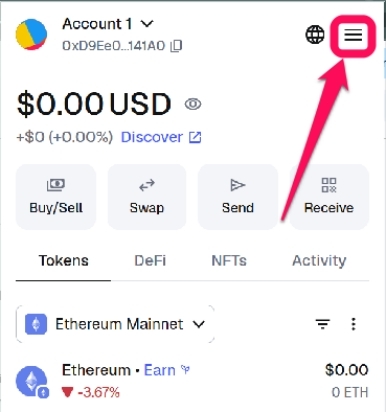
Step 1: Open your MetaMask wallet in the browser extension, then click the hamburger icon at the top right corner of your homepage.
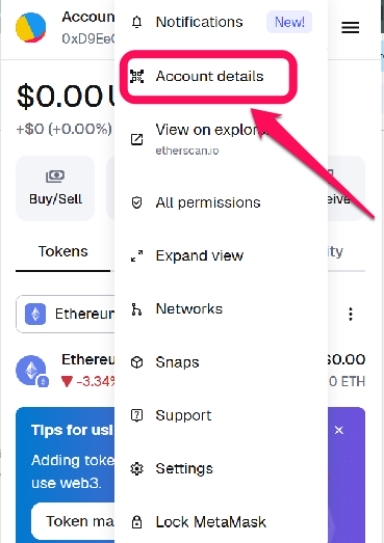
Step 2: Select the „Account details“ option from the menu.
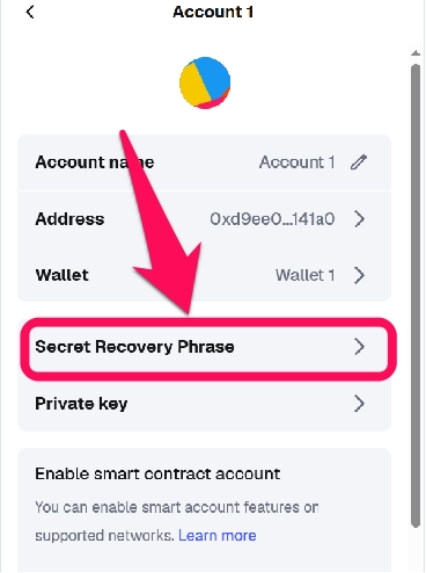
Step 3: Tap the Secret Recovery Phrase button on the account details page.
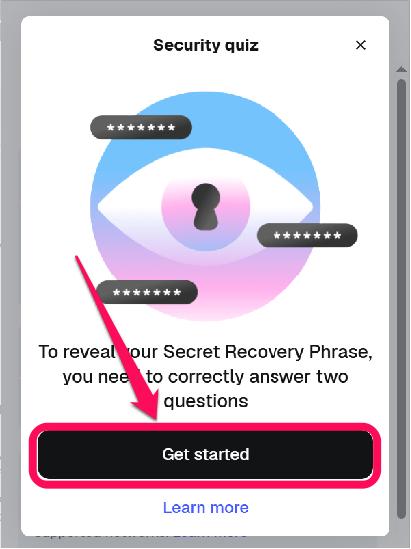
Step 4: Tap Get Started, then answer two brief questions to ensure you understand the security implications of self-custody.
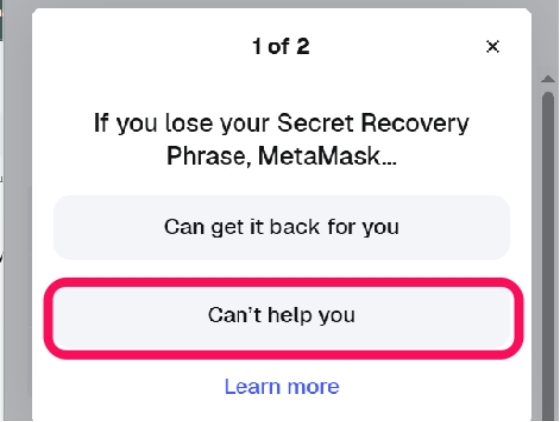
Step 5: The first security question is „If you lose your Secret Recovery Phrase, MetaMask…“ and the correct answer is „Can’t help you„.
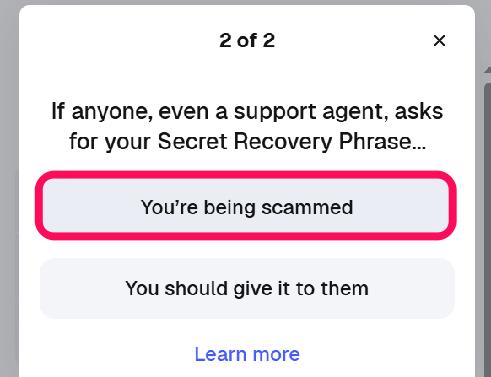
Step 6: The first security question is „If you lose your Secret Recovery Phrase, MetaMask…“ and the correct answer is „You’re being scammed„.
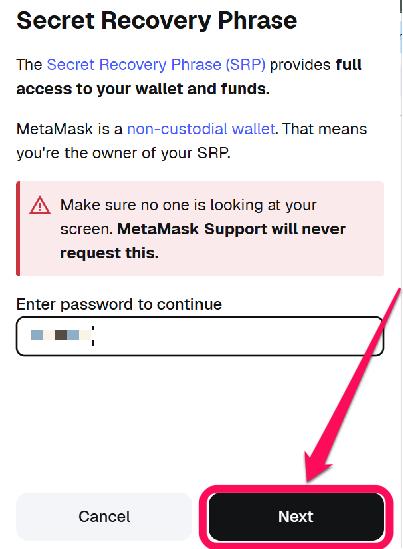
Step 7: Input your account password and click Next to proceed.
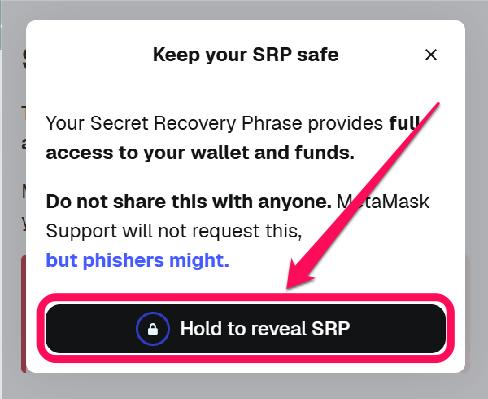
Step 8: Press the „Hold to reveal SRP“ button to view your secret recovery phrase.
For Metamask Mobile App:
Step 1: Open the Metamask app and log in to your wallet account.
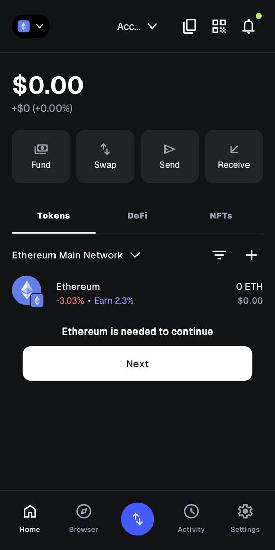
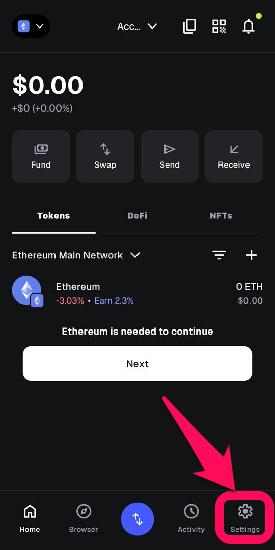
Step 2: Click the Settings button at the bottom right of the app’s interface.
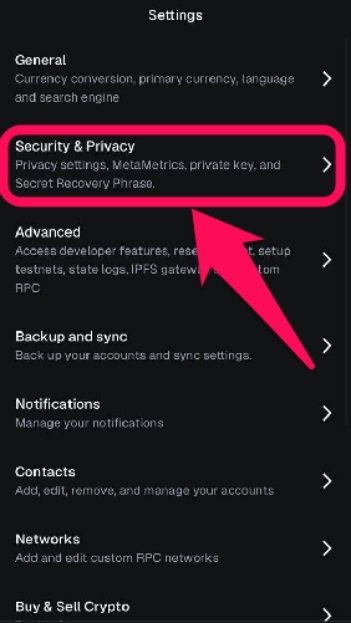
Step 3: Select Security & Privacy.
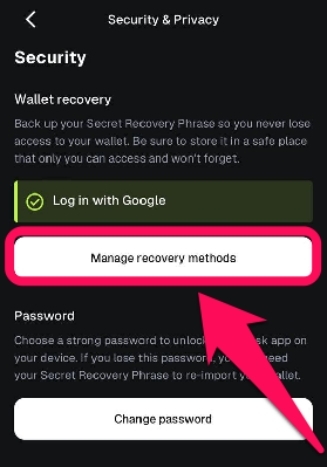
Step 4: Under the „Wallet Security“ menu, tap „Manage Recovery Method„.
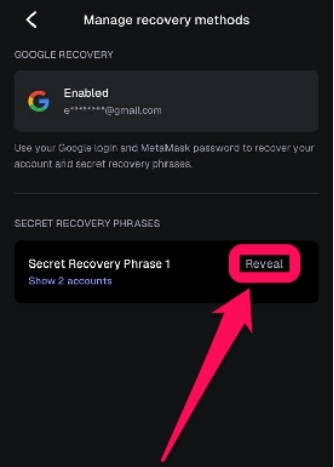
Step 5: Next tap „Reveal“ under the Secret Recovery Phrases section.
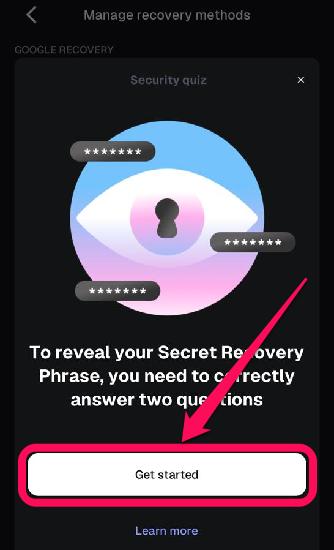
Step 6: Tap Get Started, then answer the brief questions to check your knowledge about the risks of self-custody.
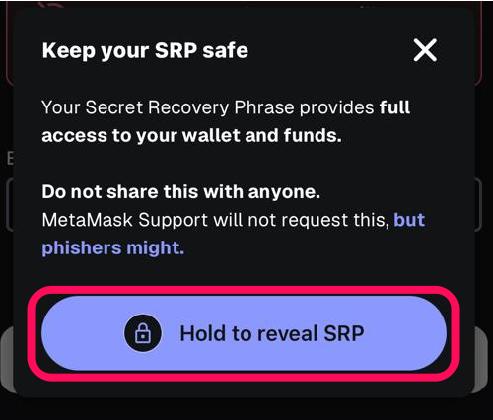
Step 7: Enter your wallet password, then hold the button to reveal your secret recovery phrase in Metamask. You can copy it or write it down manually and store it securely.
Related read: How to Find Your Private Key in MetaMask
Bottom Line
Your SRP enables full wallet recovery, account restoration, and management across networks, including new ones like Solana. It is the master key, granting anyone who possesses it full access to all accounts derived from it. Remember, the responsibility of managing the SRP is yours and yours alone. You need to keep it secure and not share it, as MetaMask cannot retrieve it for you if it’s lost. Back that phrase up for easier recovery.
FAQs
No, once created, your Secret Recovery Phrase remains fixed for the wallet. To obtain a new secret phrase, you must create a new wallet and transfer your assets to it.
The password protects your local wallet instance (for unlocking MetaMask on your device), while the secret recovery phrase in the MetaMask wallet enables full account recovery. Without the SRP, the password alone can’t restore accounts on a new device.
For most users who traditionally created a wallet, losing the recovery phrase equates to losing access to their wallet. If you lose or forget your recovery phrase, there is no way to recover your wallet except you’re a new user who created your account using the MetaMask EAA.
The secret recovery phrase is a set of 12 random words in MetaMask. It serves as a human-readable backup of your private keys, enabling you to recover your wallet and access your funds if you lose your device or forget your private key.
No. The total number of cryptocurrency wallets is insignificant compared to the number of possible seed phrases. Put simply, two people can’t receive the exact seed phrase.