Delete Gemini Account — Step by Step Guide


На этой странице
- Gemini accounts can be closed through either the web browser or mobile app.
- Withdraw all crypto and fiat balances before submitting the account closure request.
- Closed accounts may be reopened later by contacting Gemini’s support team.
You can close your Gemini account through its website or mobile app. First, withdraw your funds, cancel open orders, and download any statements you need. Gemini can consider requests to reopen closed accounts, but you must contact support and remain eligible for its services.
Before You Delete Your Gemini Account
Before you close your Gemini account, there are a few things you should take care of first so you do not run into any issues later.
- Withdraw all crypto and fiat balances.
- Cancel any open orders or recurring purchases.
- Download statements or transaction records if needed.
- You cannot reopen a closed account yourself; contact Gemini support if you need access again.
- Gemini may retain required regulatory records.
How to Delete Gemini Account on Web
Probably the most convenient way to delete your Gemini account is through a web browser, since everything is easier to find and navigate. Here is how you can delete your Gemini account on the web:
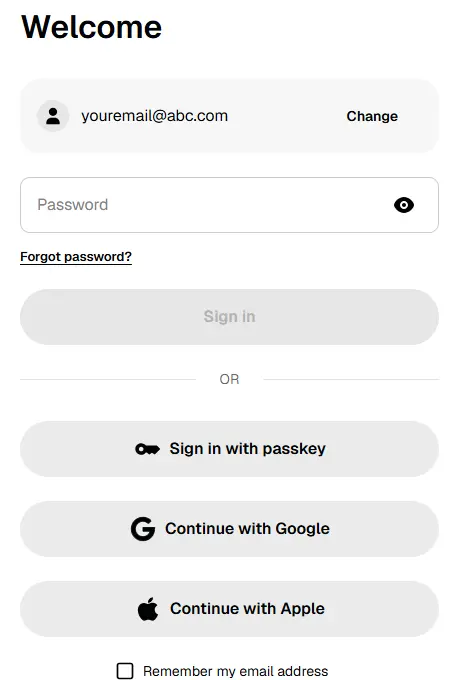
Step 1: To start, log in to your Gemini account through a desktop or mobile browser.
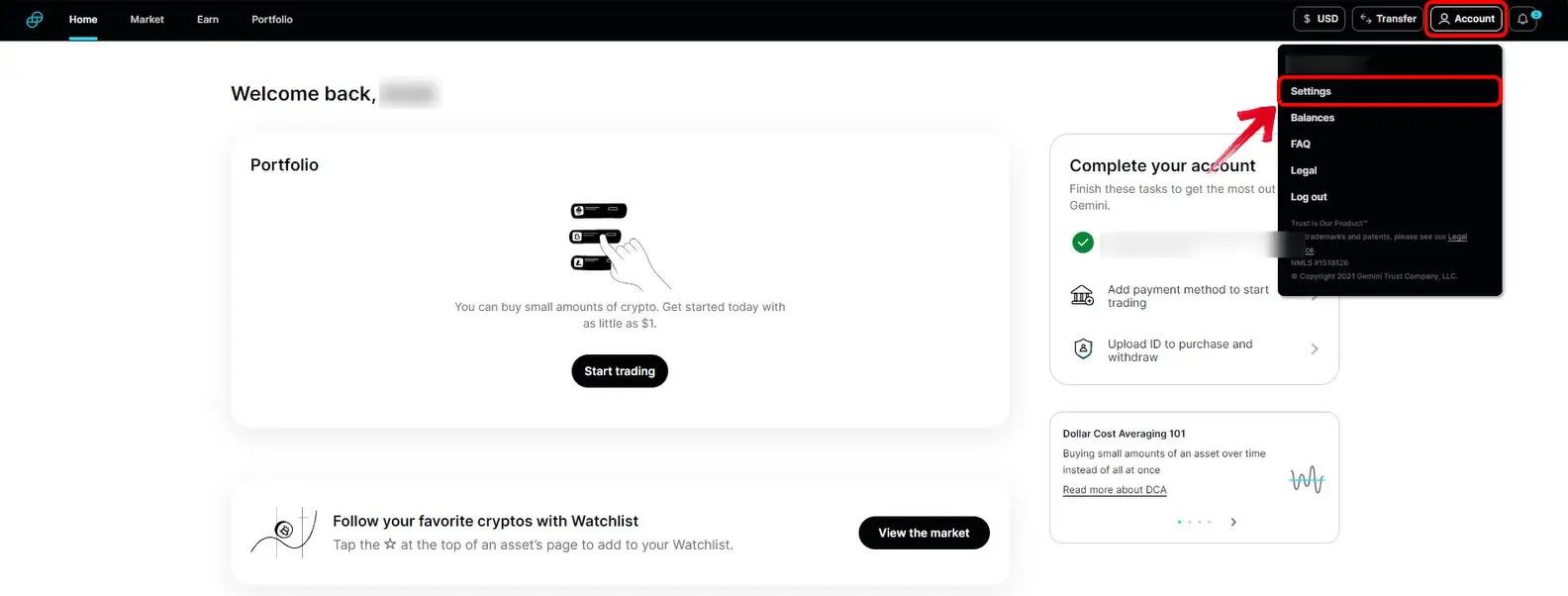
Step 2: Once you are logged in, click the Profile icon in the top-right corner. From the drop-down menu, select “Account”.
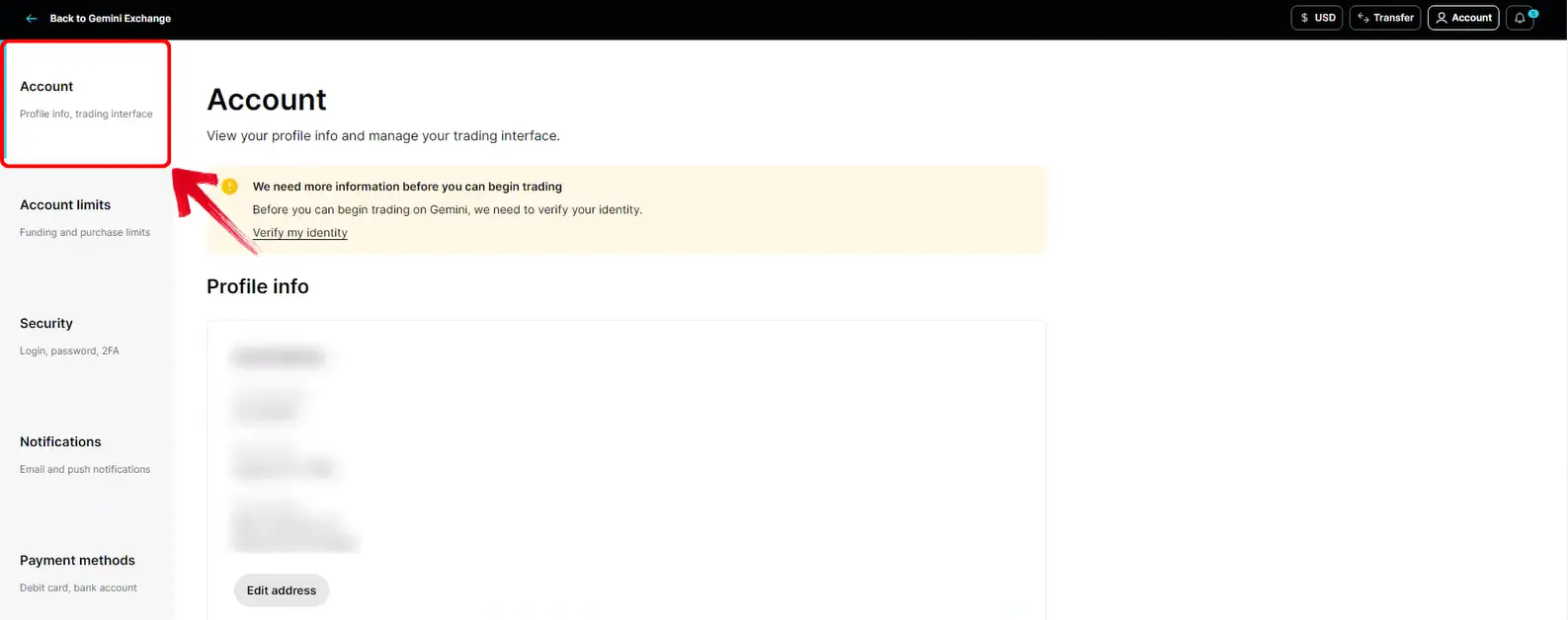
Step 3: Scroll down until you see the “Account Closure” section.
Step 4: Here, click the “Close account” option to begin the process.
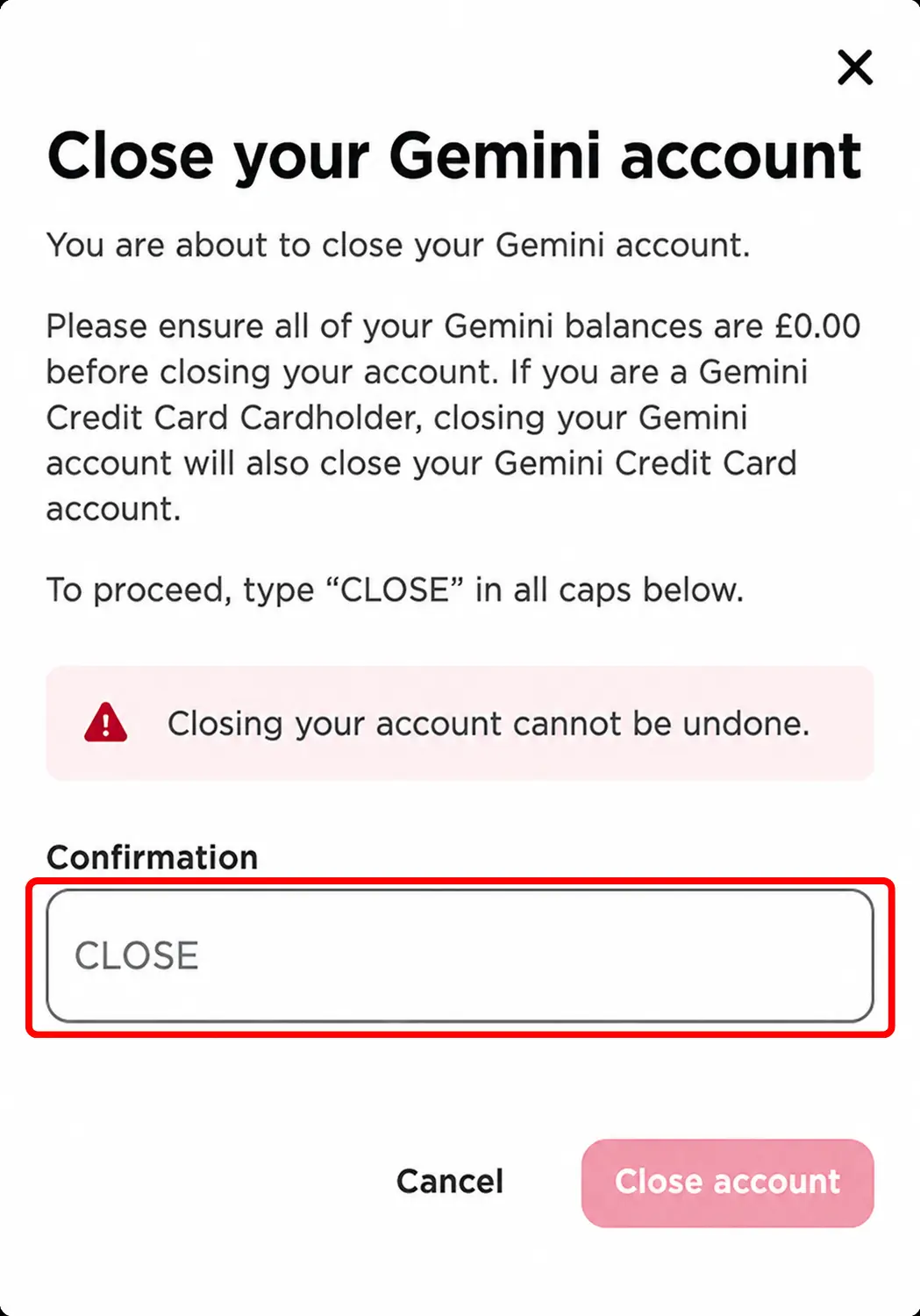
Step 5: Gemini will ask you to type “CLOSE” in capital letters. Enter it, confirm the request, and your account closure will be submitted.
How to Delete Gemini Account on Mobile App
If you mainly use Gemini on your phone, you can close the account from the app as well. The option is placed under your account preferences:
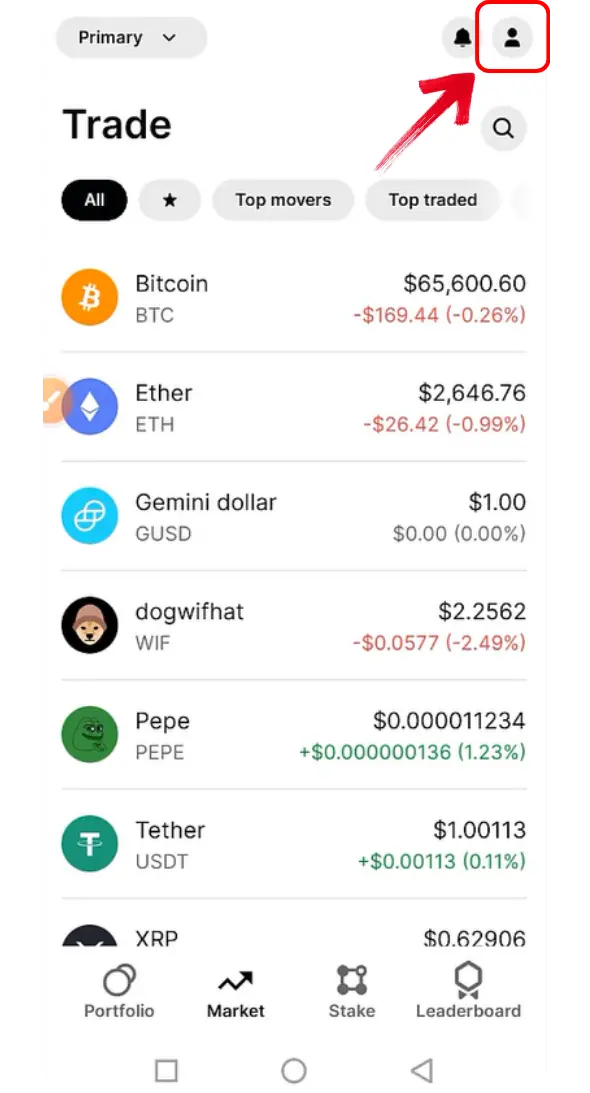
Step 1: Start by opening the Gemini app on your phone. Once you are on the home screen, tap the profile icon at the top to open your account page.
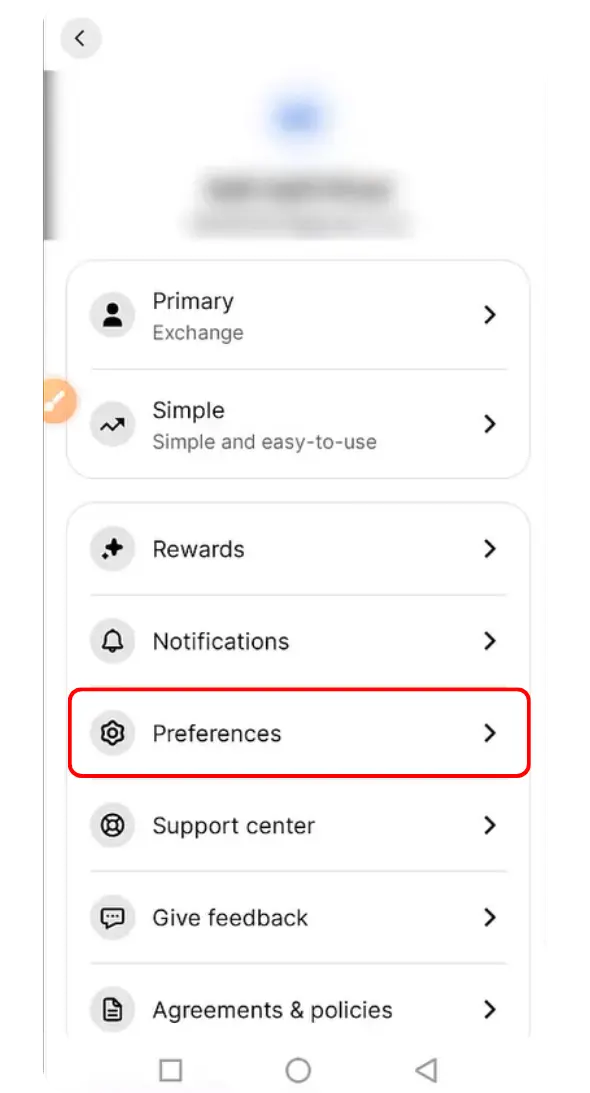
Step 2: Once the account page opens, you will see the “Preferences” option. Tap on it to access your account settings.
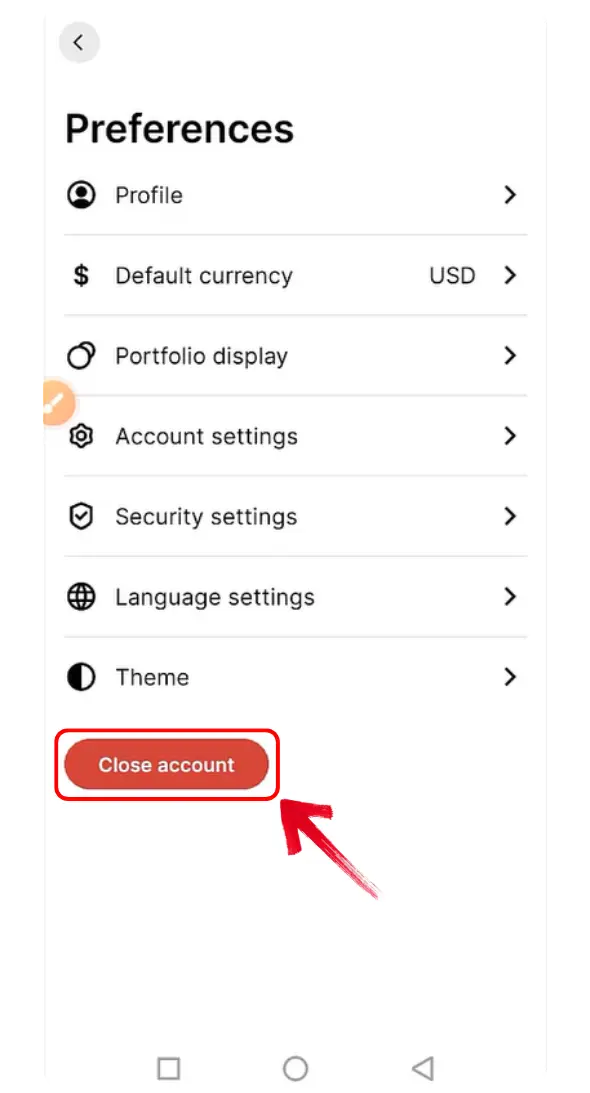
Step 3: On the Preferences page, tap on the “Close account” option to continue.
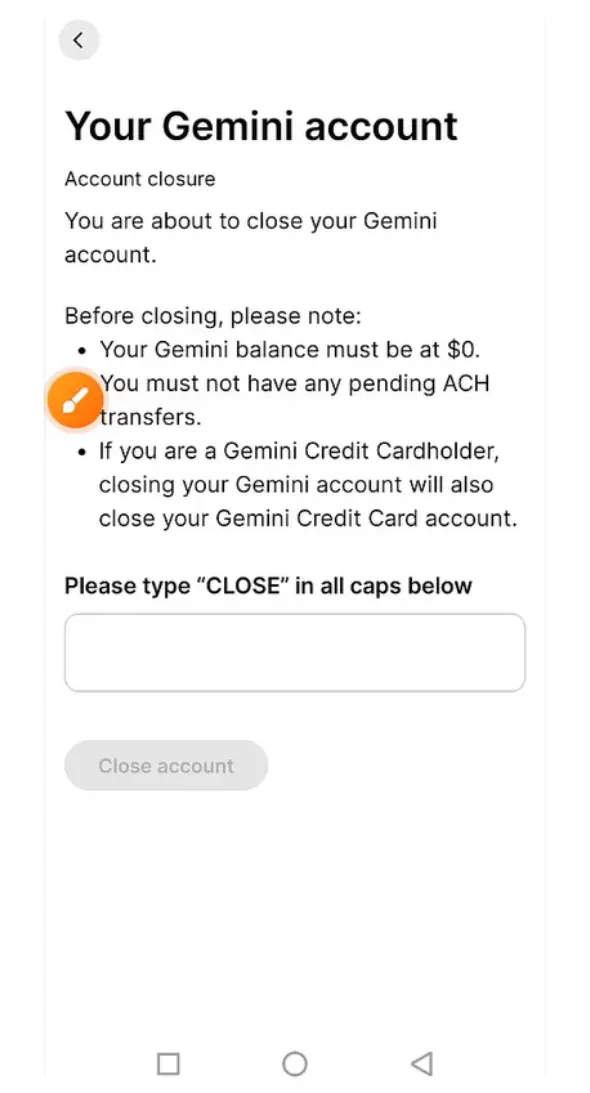
Step 4: Gemini will now ask you to confirm your decision. Make sure to type “CLOSE” in caps.
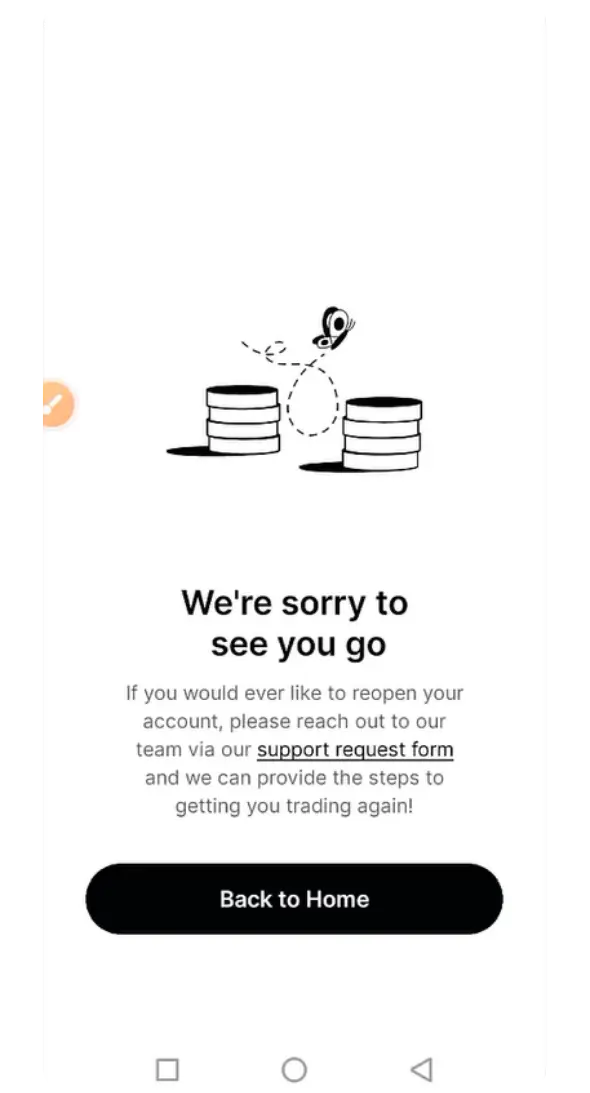
Step 5: Once you confirm the closure, Gemini will show a notice on your screen confirming that your request has been received.
Gemini Alternatives
If you plan to use another exchange, compare these options available in your selected region. Check each review for supported services and account requirements.

Kraken
- Комиссия тейкера на споте
- 0.8%
- Комиссия тейкера на фьючерсах
- 0.05%
- Активы
- 679
- Макс. плечо
- 50×

Bybit
- Комиссия тейкера на споте
- 0.1%
- Комиссия тейкера на фьючерсах
- 0.055%
- Активы
- 380
- Макс. плечо
- 100×

Binance
- Комиссия тейкера на споте
- 0.1%
- Комиссия тейкера на фьючерсах
- 0.05%
- Активы
- 507
- Макс. плечо
- 150×

Bitvavo
- Комиссия тейкера на споте
- 0.25%
- Комиссия тейкера на фьючерсах
- —
- Активы
- 427
- Макс. плечо
- —

BloFin
- Комиссия тейкера на споте
- 0.1%
- Комиссия тейкера на фьючерсах
- 0.05%
- Активы
- 243
- Макс. плечо
- 150×

Hyperliquid
- Комиссия тейкера на споте
- 0.07%
- Комиссия тейкера на фьючерсах
- 0.045%
- Активы
- 316
- Макс. плечо
- 40×

Bitunix
- Комиссия тейкера на споте
- 0.1%
- Комиссия тейкера на фьючерсах
- 0.06%
- Активы
- 546
- Макс. плечо
- 200×

WhiteBIT
- Комиссия тейкера на споте
- 0.1%
- Комиссия тейкера на фьючерсах
- 0.055%
- Активы
- 464
- Макс. плечо
- 100×

Ourbit
- Комиссия тейкера на споте
- 0%
- Комиссия тейкера на фьючерсах
- 0.04%
- Активы
- 565
- Макс. плечо
- 500×

WEEX
- Комиссия тейкера на споте
- 0.1%
- Комиссия тейкера на фьючерсах
- 0.08%
- Активы
- 2,048
- Макс. плечо
- 400×

OKX EU
- Комиссия тейкера на споте
- 0.2%
- Комиссия тейкера на фьючерсах
- 0.05%
- Активы
- 290
- Макс. плечо
- 10×

Bitget
- Комиссия тейкера на споте
- 0.1%
- Комиссия тейкера на фьючерсах
- 0.06%
- Активы
- 507
- Макс. плечо
- 125×
OKX
- Комиссия тейкера на споте
- 0.35%
- Комиссия тейкера на фьючерсах
- 0.05%
- Активы
- 298
- Макс. плечо
- 125×

Coinbase
- Комиссия тейкера на споте
- 0.6%
- Комиссия тейкера на фьючерсах
- 0.05%
- Активы
- 402
- Макс. плечо
- 10×

Bybit EU
- Комиссия тейкера на споте
- 0.25%
- Комиссия тейкера на фьючерсах
- —
- Активы
- 108
- Макс. плечо
- —

BYDFi
- Комиссия тейкера на споте
- 0.1%
- Комиссия тейкера на фьючерсах
- 0.06%
- Активы
- 527
- Макс. плечо
- 500×

BTCC
- Комиссия тейкера на споте
- 0.3%
- Комиссия тейкера на фьючерсах
- 0.06%
- Активы
- 246
- Макс. плечо
- 500×

Lighter
- Комиссия тейкера на споте
- 0%
- Комиссия тейкера на фьючерсах
- 0%
- Активы
- 2
- Макс. плечо
- 50×

XT.com
- Комиссия тейкера на споте
- 0.2%
- Комиссия тейкера на фьючерсах
- 0.06%
- Активы
- 520
- Макс. плечо
- 125×

Crypto.com
- Комиссия тейкера на споте
- 0.5%
- Комиссия тейкера на фьючерсах
- 0.04%
- Активы
- 417
- Макс. плечо
- 50×

KCEX
- Комиссия тейкера на споте
- 0%
- Комиссия тейкера на фьючерсах
- 0.01%
- Активы
- 819
- Макс. плечо
- 125×

Pionex
- Комиссия тейкера на споте
- 0.05%
- Комиссия тейкера на фьючерсах
- 0.05%
- Активы
- 392
- Макс. плечо
- 100×

Zoomex
- Комиссия тейкера на споте
- 0.1%
- Комиссия тейкера на фьючерсах
- 0.06%
- Активы
- 66
- Макс. плечо
- 1000×

Bitstamp
- Комиссия тейкера на споте
- 0.4%
- Комиссия тейкера на фьючерсах
- —
- Активы
- 118
- Макс. плечо
- —

edgeX
- Комиссия тейкера на споте
- —
- Комиссия тейкера на фьючерсах
- 0.038%
- Активы
- 168
- Макс. плечо
- 100×

Gate
- Комиссия тейкера на споте
- 0.1%
- Комиссия тейкера на фьючерсах
- 0.05%
- Активы
- 2,052
- Макс. плечо
- 200×

Woo X
- Комиссия тейкера на споте
- 0.1%
- Комиссия тейкера на фьючерсах
- 0.05%
- Активы
- 19
- Макс. плечо
- 100×

BingX
- Комиссия тейкера на споте
- 0.1%
- Комиссия тейкера на фьючерсах
- 0.05%
- Активы
- 637
- Макс. плечо
- 150×

Derive
- Комиссия тейкера на споте
- 0%
- Комиссия тейкера на фьючерсах
- 0.03%
- Активы
- 15
- Макс. плечо
- 15×

KuCoin
- Комиссия тейкера на споте
- 0.1%
- Комиссия тейкера на фьючерсах
- 0.06%
- Активы
- 814
- Макс. плечо
- 125×

Bitbase
- Комиссия тейкера на споте
- 0.1%
- Комиссия тейкера на фьючерсах
- 0.06%
- Активы
- 385
- Макс. плечо
- 150×

Phemex
- Комиссия тейкера на споте
- 0.1%
- Комиссия тейкера на фьючерсах
- 0.06%
- Активы
- 1,027
- Макс. плечо
- 100×

dYdX
- Комиссия тейкера на споте
- 0.1%
- Комиссия тейкера на фьючерсах
- 0.05%
- Активы
- 72
- Макс. плечо
- 50×

HTX
- Комиссия тейкера на споте
- 0.2%
- Комиссия тейкера на фьючерсах
- 0.06%
- Активы
- 489
- Макс. плечо
- 200×

Tapbit
- Комиссия тейкера на споте
- 0.1%
- Комиссия тейкера на фьючерсах
- 0.06%
- Активы
- 51
- Макс. плечо
- 150×

GMX
- Комиссия тейкера на споте
- —
- Комиссия тейкера на фьючерсах
- 0.06%
- Активы
- 103
- Макс. плечо
- 100×

Deribit
- Комиссия тейкера на споте
- 0%
- Комиссия тейкера на фьючерсах
- 0.05%
- Активы
- 11
- Макс. плечо
- 50×

Aster
- Комиссия тейкера на споте
- 0.04%
- Комиссия тейкера на фьючерсах
- 0.04%
- Активы
- 33
- Макс. плечо
- 200×

Extended
- Комиссия тейкера на споте
- 0.025%
- Комиссия тейкера на фьючерсах
- 0.025%
- Активы
- 317
- Макс. плечо
- 50×

Binance.US
- Комиссия тейкера на споте
- 0.01%
- Комиссия тейкера на фьючерсах
- —
- Активы
- 159
- Макс. плечо
- —

LeveX
- Комиссия тейкера на споте
- 0.1%
- Комиссия тейкера на фьючерсах
- 0.06%
- Активы
- 118
- Макс. плечо
- 500×

Backpack Exchange
- Комиссия тейкера на споте
- 0.1%
- Комиссия тейкера на фьючерсах
- 0.05%
- Активы
- 88
- Макс. плечо
- 75×

Bitpanda
- Комиссия тейкера на споте
- 1.49%
- Комиссия тейкера на фьючерсах
- —
- Активы
- 575
- Макс. плечо
- —

Toobit
- Комиссия тейкера на споте
- 0.1%
- Комиссия тейкера на фьючерсах
- 0.06%
- Активы
- 528
- Макс. плечо
- 200×

Aevo
- Комиссия тейкера на споте
- —
- Комиссия тейкера на фьючерсах
- 0.08%
- Активы
- 78
- Макс. плечо
- 20×

Bitfinex
- Комиссия тейкера на споте
- 0%
- Комиссия тейкера на фьючерсах
- 0%
- Активы
- 82
- Макс. плечо
- 100×

Paradex
- Комиссия тейкера на споте
- 0%
- Комиссия тейкера на фьючерсах
- 0%
- Активы
- 59
- Макс. плечо
- 50×

Upbit
- Комиссия тейкера на споте
- —
- Комиссия тейкера на фьючерсах
- —
- Активы
- 341
- Макс. плечо
- —

Nado
- Комиссия тейкера на споте
- —
- Комиссия тейкера на фьючерсах
- —
- Активы
- 9
- Макс. плечо
- —

Binance TR
- Комиссия тейкера на споте
- —
- Комиссия тейкера на фьючерсах
- —
- Активы
- —
- Макс. плечо
- —

Pacifica
- Комиссия тейкера на споте
- —
- Комиссия тейкера на фьючерсах
- 0.04%
- Активы
- 1
- Макс. плечо
- 50×

BullX
- Комиссия тейкера на споте
- —
- Комиссия тейкера на фьючерсах
- —
- Активы
- —
- Макс. плечо
- —

Coincheck
- Комиссия тейкера на споте
- —
- Комиссия тейкера на фьючерсах
- —
- Активы
- 16
- Макс. плечо
- —

GRVT
- Комиссия тейкера на споте
- —
- Комиссия тейкера на фьючерсах
- 0.045%
- Активы
- 186
- Макс. плечо
- 50×

BTSE
- Комиссия тейкера на споте
- 0.2%
- Комиссия тейкера на фьючерсах
- 0.05%
- Активы
- 233
- Макс. плечо
- 100×

VirgoCX
- Комиссия тейкера на споте
- —
- Комиссия тейкера на фьючерсах
- —
- Активы
- —
- Макс. плечо
- —

Deepcoin
- Комиссия тейкера на споте
- 0.1%
- Комиссия тейкера на фьючерсах
- 0.06%
- Активы
- 114
- Макс. плечо
- 125×

CoinW
- Комиссия тейкера на споте
- 0.1%
- Комиссия тейкера на фьючерсах
- 0.06%
- Активы
- 342
- Макс. плечо
- 200×

Poloniex
- Комиссия тейкера на споте
- 0.2%
- Комиссия тейкера на фьючерсах
- 0.06%
- Активы
- 116
- Макс. плечо
- 100×

Delta Exchange
- Комиссия тейкера на споте
- 0.1%
- Комиссия тейкера на фьючерсах
- 0.05%
- Активы
- 1
- Макс. плечо
- 100×

Hotcoin Global
- Комиссия тейкера на споте
- 0.2%
- Комиссия тейкера на фьючерсах
- 0.06%
- Активы
- 202
- Макс. плечо
- 200×

Uphold
- Комиссия тейкера на споте
- 0.25%
- Комиссия тейкера на фьючерсах
- —
- Активы
- —
- Макс. плечо
- —

Bithumb
- Комиссия тейкера на споте
- 0.25%
- Комиссия тейкера на фьючерсах
- —
- Активы
- 468
- Макс. плечо
- —

Paybis
- Комиссия тейкера на споте
- 1.49%
- Комиссия тейкера на фьючерсах
- —
- Активы
- —
- Макс. плечо
- —

EasyBit
- Комиссия тейкера на споте
- —
- Комиссия тейкера на фьючерсах
- —
- Активы
- —
- Макс. плечо
- —

GMTrade
- Комиссия тейкера на споте
- —
- Комиссия тейкера на фьючерсах
- —
- Активы
- 70
- Макс. плечо
- —

Ostium
- Комиссия тейкера на споте
- —
- Комиссия тейкера на фьючерсах
- 0.04%
- Активы
- 32
- Макс. плечо
- 200×

Vest Markets
- Комиссия тейкера на споте
- —
- Комиссия тейкера на фьючерсах
- —
- Активы
- 80
- Макс. плечо
- —

Bitrue
- Комиссия тейкера на споте
- 0.098%
- Комиссия тейкера на фьючерсах
- 0.06%
- Активы
- 487
- Макс. плечо
- 125×

Helix
- Комиссия тейкера на споте
- 0.05%
- Комиссия тейкера на фьючерсах
- 0.05%
- Активы
- 22
- Макс. плечо
- 100×

MEXC
- Комиссия тейкера на споте
- 0.05%
- Комиссия тейкера на фьючерсах
- 0.02%
- Активы
- 1,320
- Макс. плечо
- 200×

Coinmama
- Комиссия тейкера на споте
- 3.9%
- Комиссия тейкера на фьючерсах
- —
- Активы
- —
- Макс. плечо
- —

LBank
- Комиссия тейкера на споте
- 0.1%
- Комиссия тейкера на фьючерсах
- 0.06%
- Активы
- 834
- Макс. плечо
- 200×

Margex
- Комиссия тейкера на споте
- —
- Комиссия тейкера на фьючерсах
- 0.06%
- Активы
- 50
- Макс. плечо
- 100×

PrimeXBT
- Комиссия тейкера на споте
- —
- Комиссия тейкера на фьючерсах
- 0.02%
- Активы
- 159
- Макс. плечо
- 500×

eToro
- Комиссия тейкера на споте
- 1%
- Комиссия тейкера на фьючерсах
- —
- Активы
- —
- Макс. плечо
- —

DigiFinex
- Комиссия тейкера на споте
- 0.2%
- Комиссия тейкера на фьючерсах
- 0.05%
- Активы
- 499
- Макс. плечо
- 100×

BigONE
- Комиссия тейкера на споте
- 0.2%
- Комиссия тейкера на фьючерсах
- 0.06%
- Активы
- 159
- Макс. плечо
- 100×
Для выбранного региона нет доступных альтернатив из списка.
Bottom Line
Withdraw your remaining crypto and fiat, cancel recurring purchases, and save your records before confirming closure. If you later need access, contact Gemini support to request reopening. Approval depends on your account and regional eligibility.
FAQs
Yes. Gemini allows users to request account reopening by contacting its support team. You cannot reactivate the account yourself through the website or app, and reopening is subject to regional eligibility.
Yes, move all crypto and fiat balances before confirming the closure. This helps prevent access issues and avoids having to contact Gemini later to recover remaining funds.
Closing the account does not necessarily erase every record. Gemini may retain account information, activities, and communications to meet its legal and regulatory obligations.