Hyperliquid Vaults – Start Copy Trading on Hyperliquid


Hyperliquid is one of the few decentralized trading platforms that allows you to engage in copy trading, where you can use your funds to replicate the trades of expert traders and earn passively. In this guide, we will cover how to start copy trading on Hyperliquid, the associated fees, available options, and a few tips to help you get started.
What are Hyperliquid Vaults?
Hyperliquid vaults are innovative tools built into the Hyperliquid L1, where you can deposit USDC and earn a share of the profits generated. There are two types of vaults available: Protocol Vaults and User Vaults.
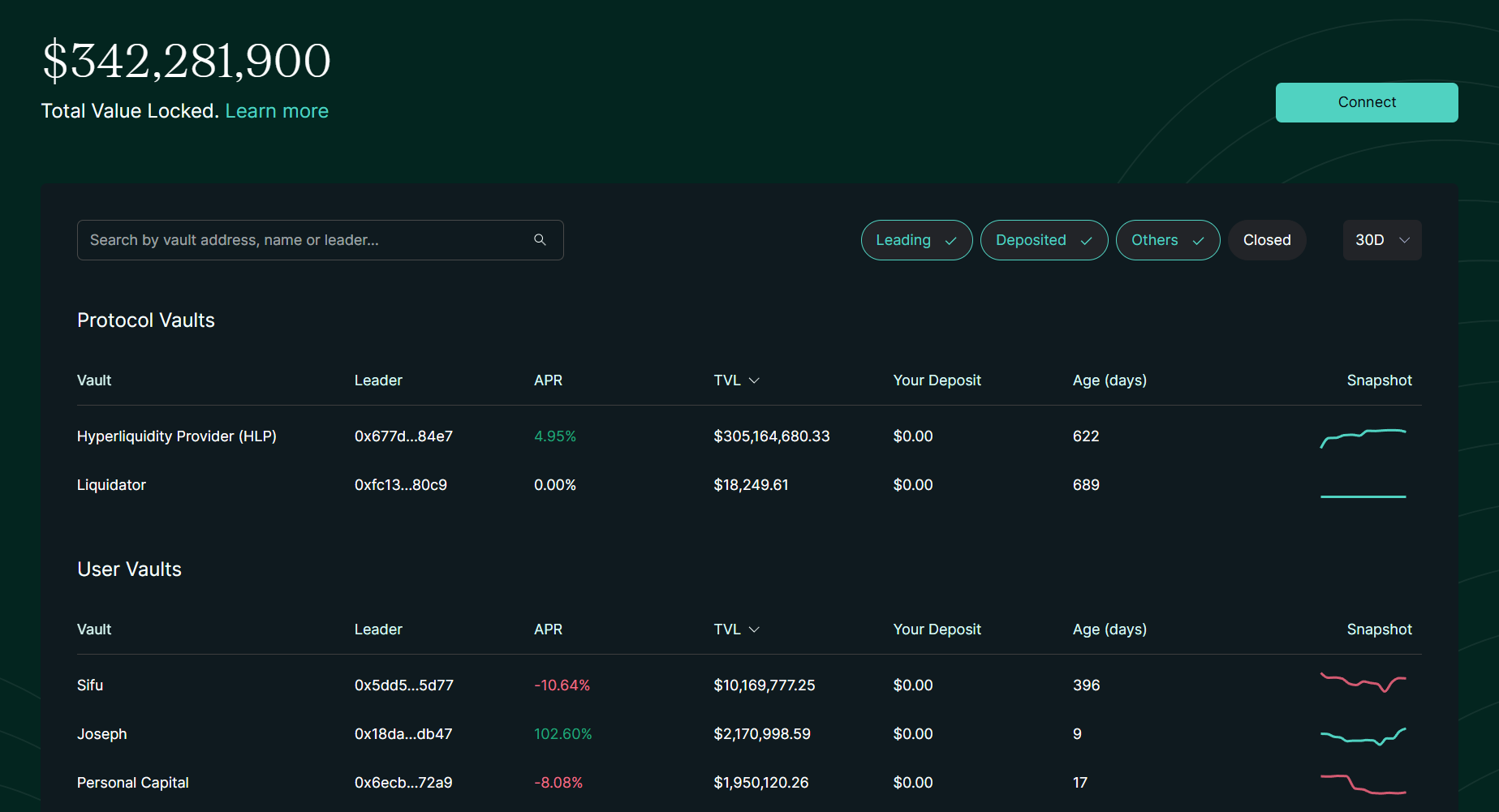
Protocol Vaults
Currently, there is only one Protocol Vault in operation, called the Hyperliquidity Provider Vault (HLP Vault on Hyperliquid). This vault acts as a liquidity provider to ensure the smooth functioning of the order book. Protocol Vaults charge no fees, so all profits earned are yours to keep. These vaults are generally safer options but tend to offer comparatively lower returns.
User Vaults
For copy trading, User Vaults are required. These vaults are created by traders, allowing others to deposit USDC and automatically copy the trades made by the trader. A 10% share of the profits goes to the trader as a fee, while the remaining amount is retained by the user.
Key Features
- Completely Decentralized: Hyperliquid ensures full decentralization, offering users complete control over their funds and trades.
- Safe Protocol Vaults with Lucrative Returns: Protocol vaults provide a safer option with steady and appealing returns.
- Metrics for Informed Decisions: A variety of metrics help users choose which traders to copy for the best results.
- Low Slippage and Fees: Reduced slippage and minimal fees make trades more efficient and potentially more profitable.
How to Start Copy Trading on Hyperliquid
Copy trading on Hyperliquid can be done through both protocol vaults and user vaults. However, before we begin, there are some initial steps you need to take. Let’s go through the process of starting copy trading on Hyperliquid step by step:
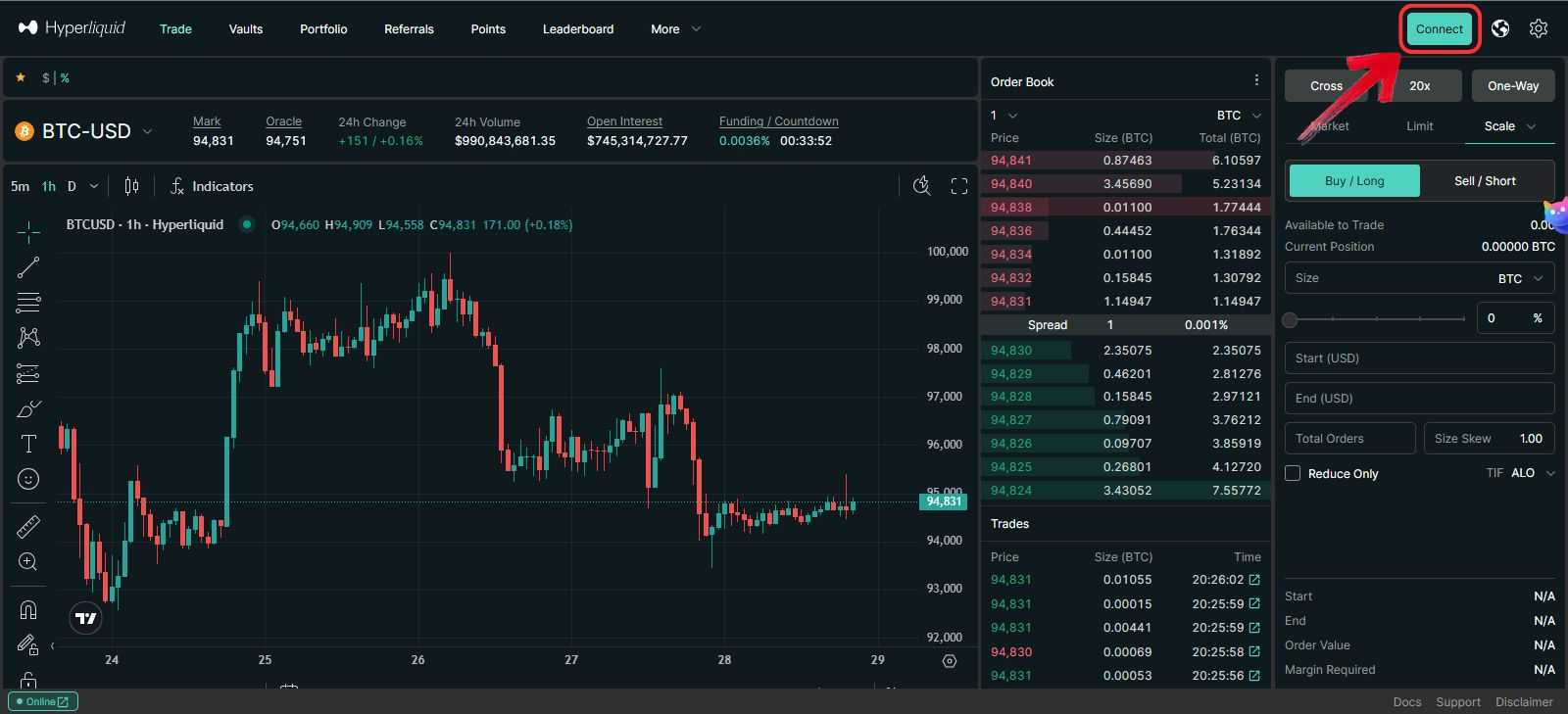
Step 1: Connect Your Web3 Wallet to Hyperliquid
Before trading on Hyperliquid, it is essential to connect your Web3 wallet by simply clicking on the “Connect” button. Without this connection, you won’t be able to access features like trading, copy trading, or other services on the platform.
If this is your first time on Hyperliquid, check out our Getting Started on Hyperliquid guide to set up your account.
Step 2: Deposit Funds in Your Hyperliquid Layer 1 Wallet
Once your Web3 wallet is connected, you need to deposit funds into the Hyperliquid Layer 1 wallet to start copy trading. Simply click on the “Deposit” button and add USDC to your account.
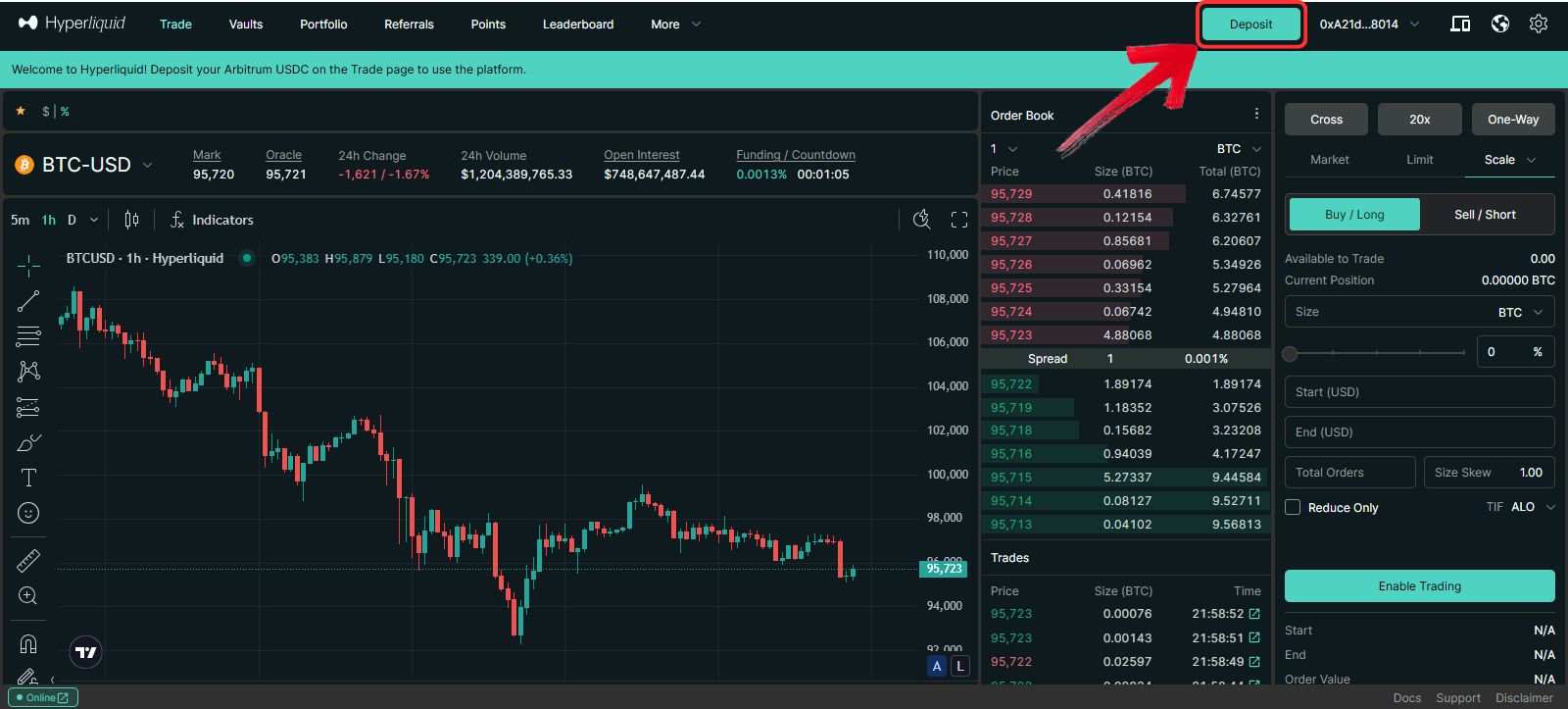
If you’re new to decentralized trading, depositing funds might seem tricky. For a detailed walkthrough, refer to our Hyperliquid Deposits Guide for transferring funds to your Layer 1 wallet.
Step 3: Transfer Funds to Your Perps Wallet
With funds now available, you must ensure they are transferred to your Perps wallet for copy trading.
1. Click on the “Perps to Spot Transfer” button.
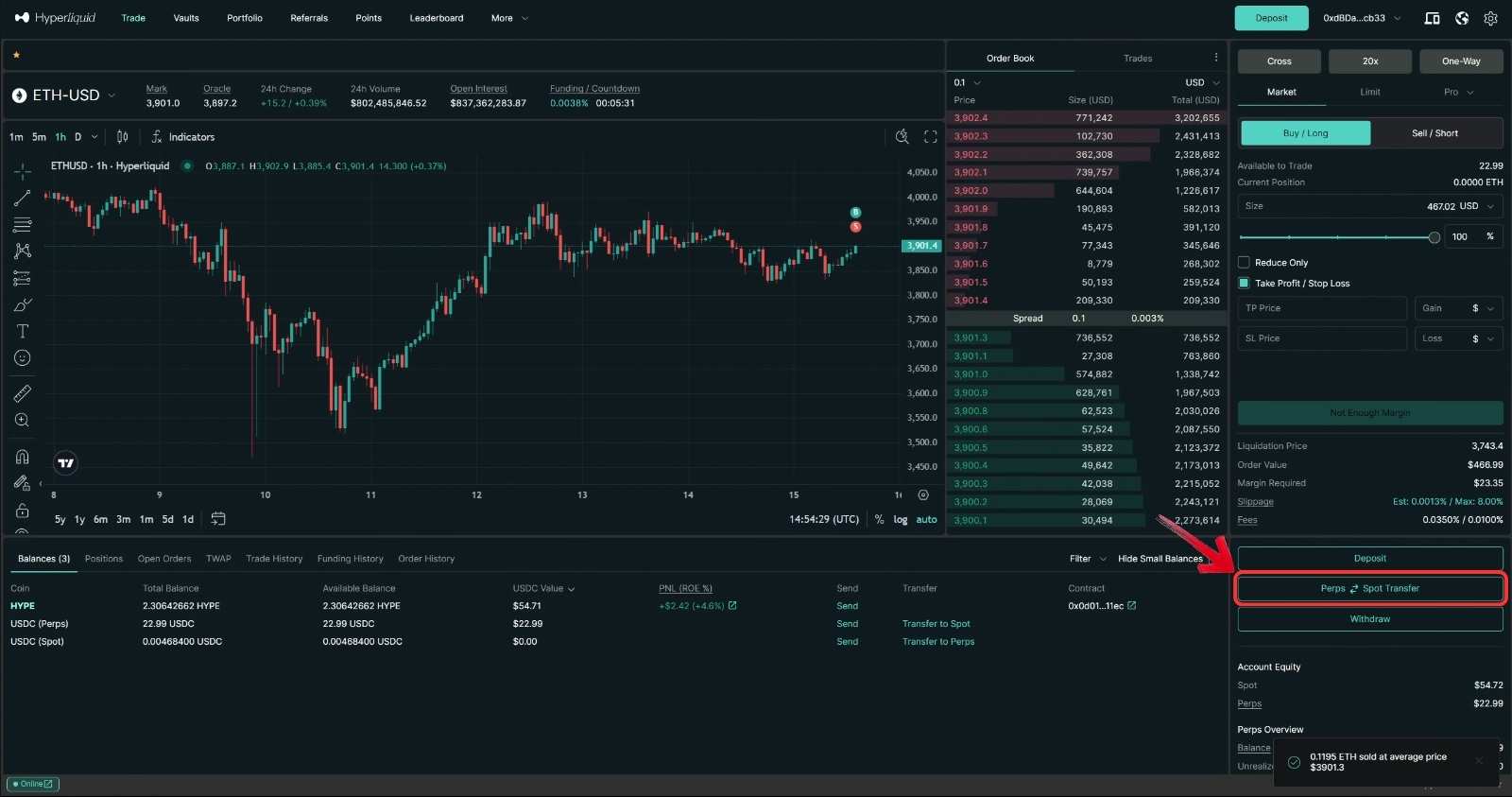
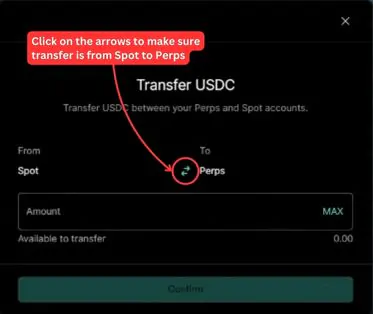
2. A Transfer USDC window will appear, set the transfer flow from “Spot” to “Perps”.
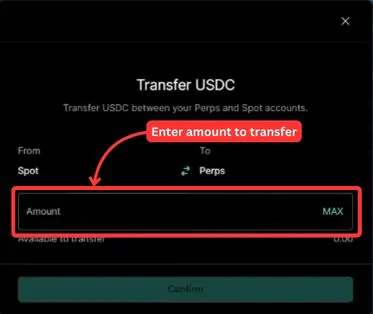
3. Enter the amount of USDC you wish to use for copy trading, then press “Confirm”.
Step 4: Start Copy Trading on Hyperliquid
Once the initial setup is complete, you’re ready to begin copy trading.
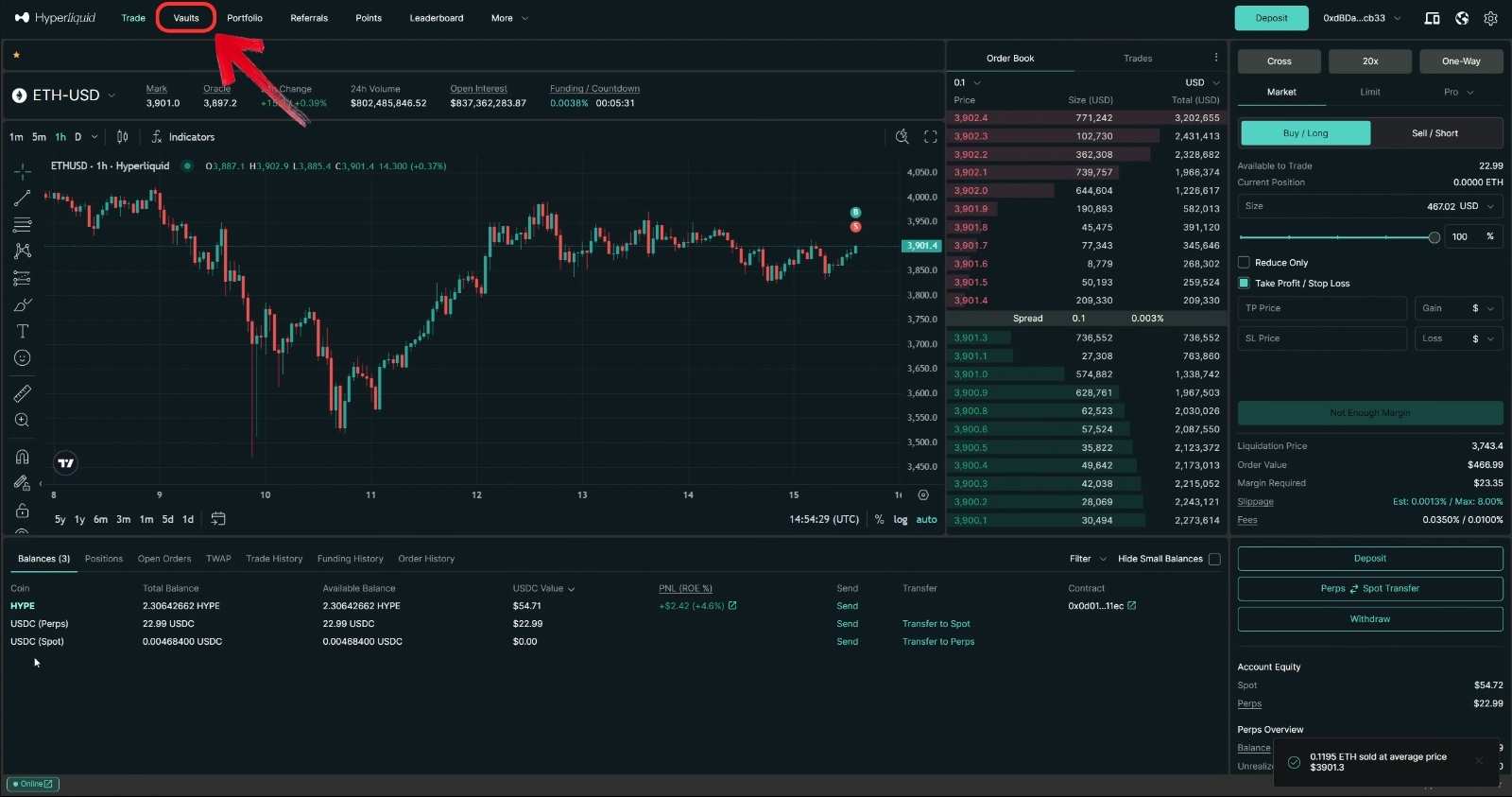
1. Click on the “Vaults” button in the toolbar to view available Hyperliquid vaults.
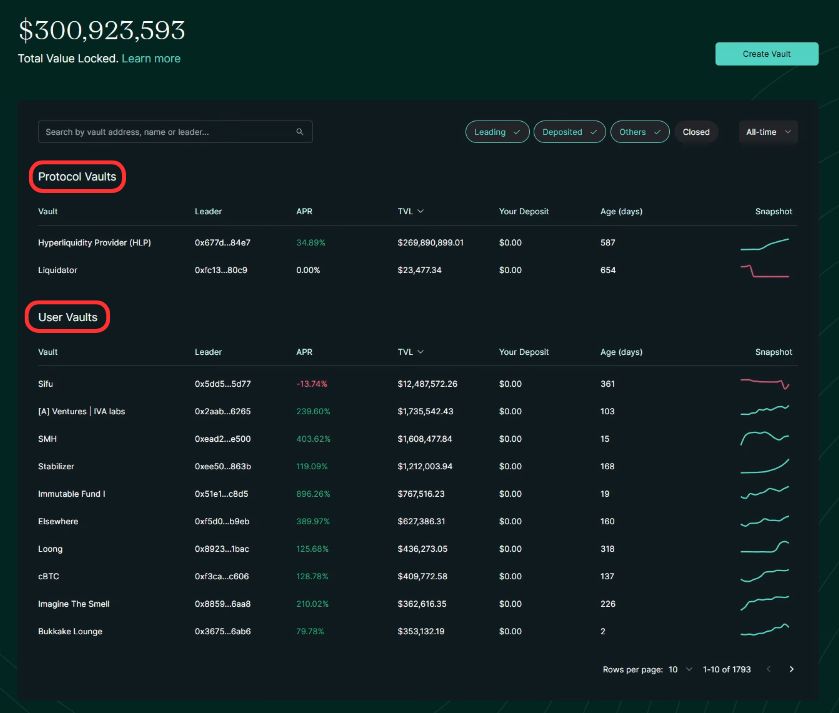
2. On the vaults webpage, you will see both Protocol Vaults and User Vaults.
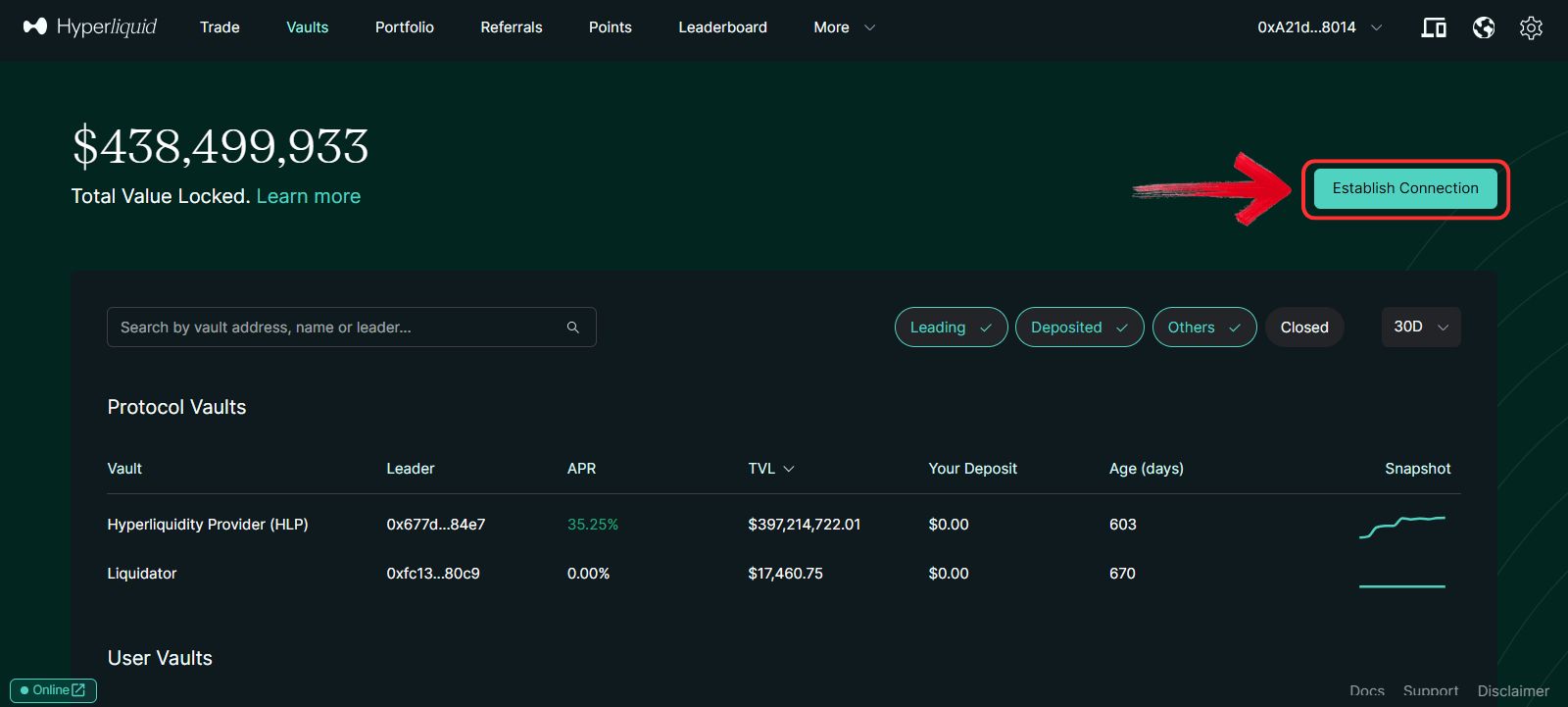
3. To get started, click on the “Establish Connection” button.
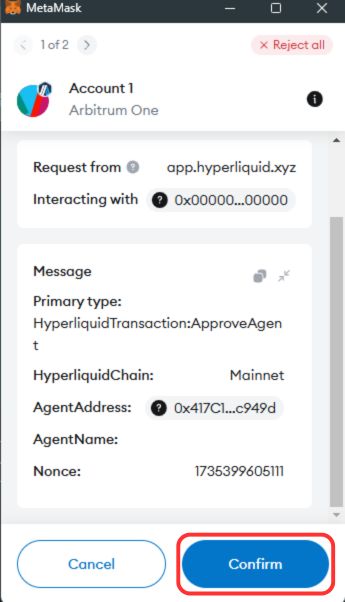
4. Your Web3 wallet pop-up will appear—click “Confirm” to establish the connection.
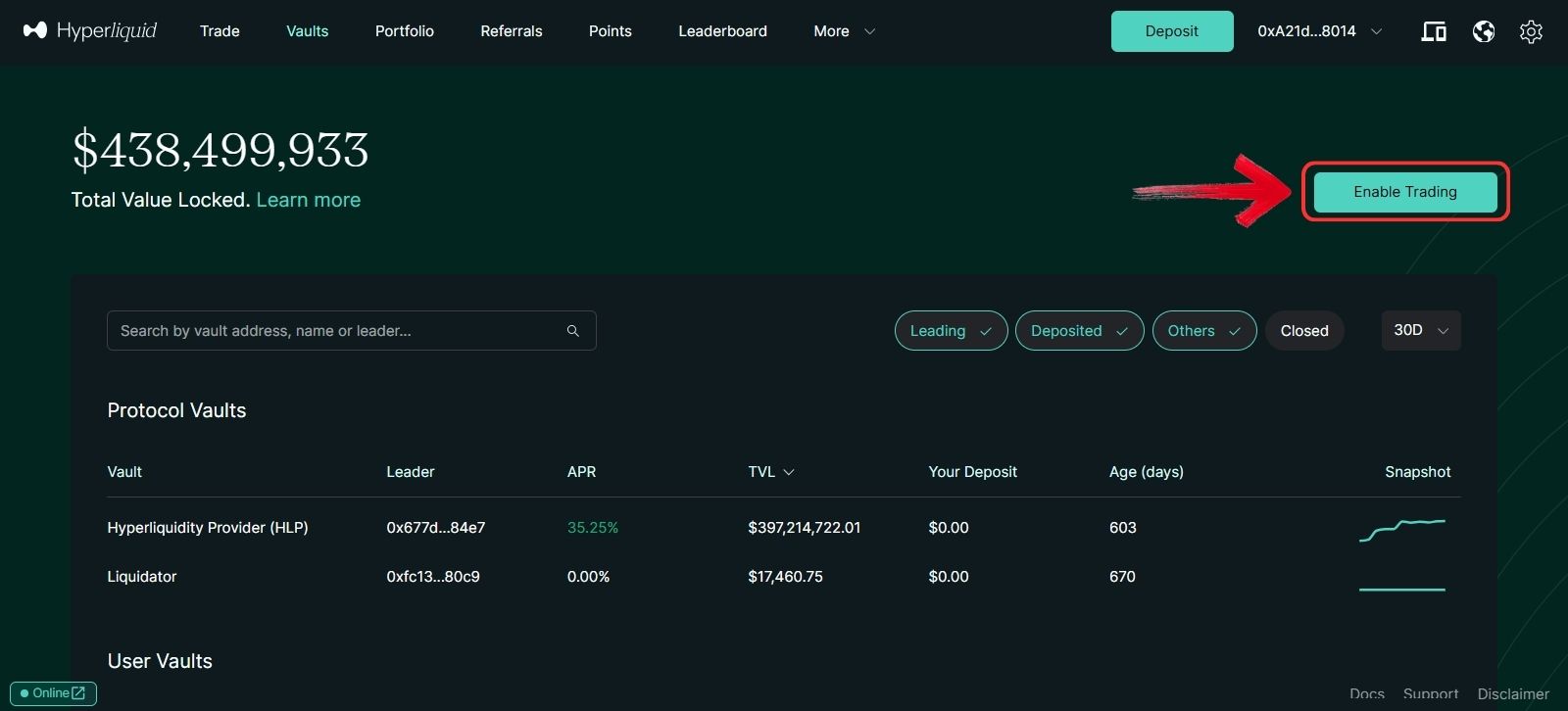
5. Once the connection is established, click on the “Enable Trading” button.
6. You are now set to start copy trading on both Protocol Vaults and User Vaults.
Protocol Vaults
Currently, Hyperliquid has only one Protocol Vault—the Hyperliquidity Provider (HLP) vault. To provide liquidity to this vault, follow these steps:
Steps to Deposit into the HLP Vault
Step 1: Select the “Hyperliquidity Provider (HLP)” vault under the Protocol Vaults section.
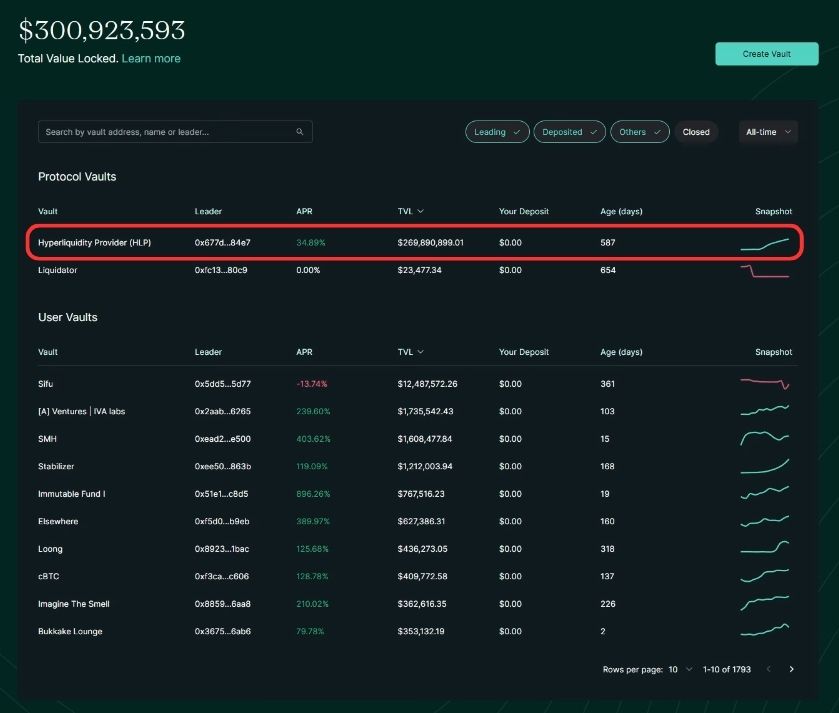
Step 2: Review various performance metrics of the vault to make an informed decision.
Step 3: To deposit, enter the amount of USDC you want to contribute in the Deposit field.
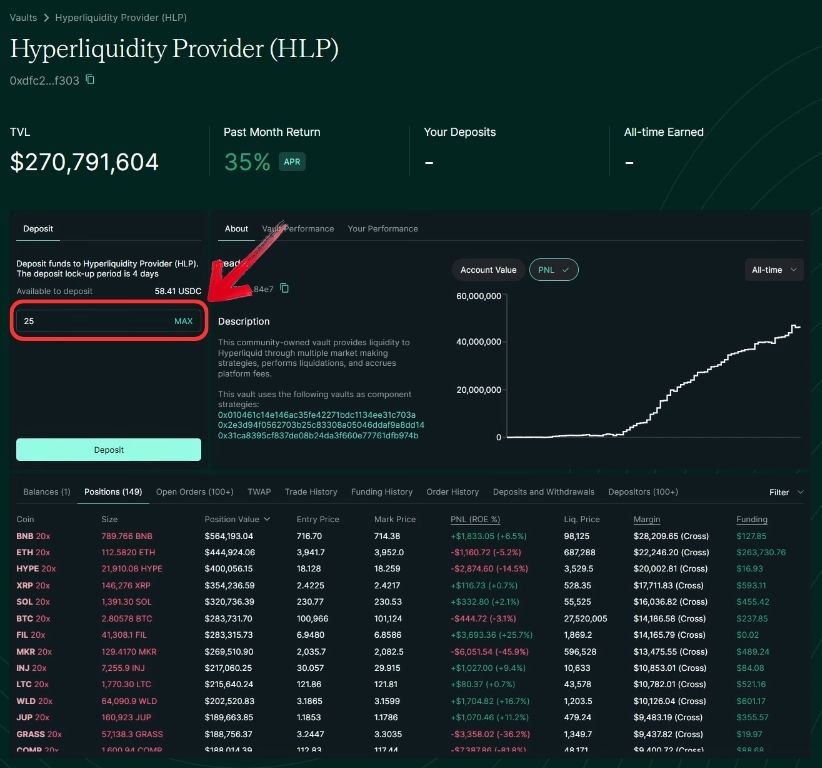
Step 4: Confirm your deposit by clicking the “Deposit” button.
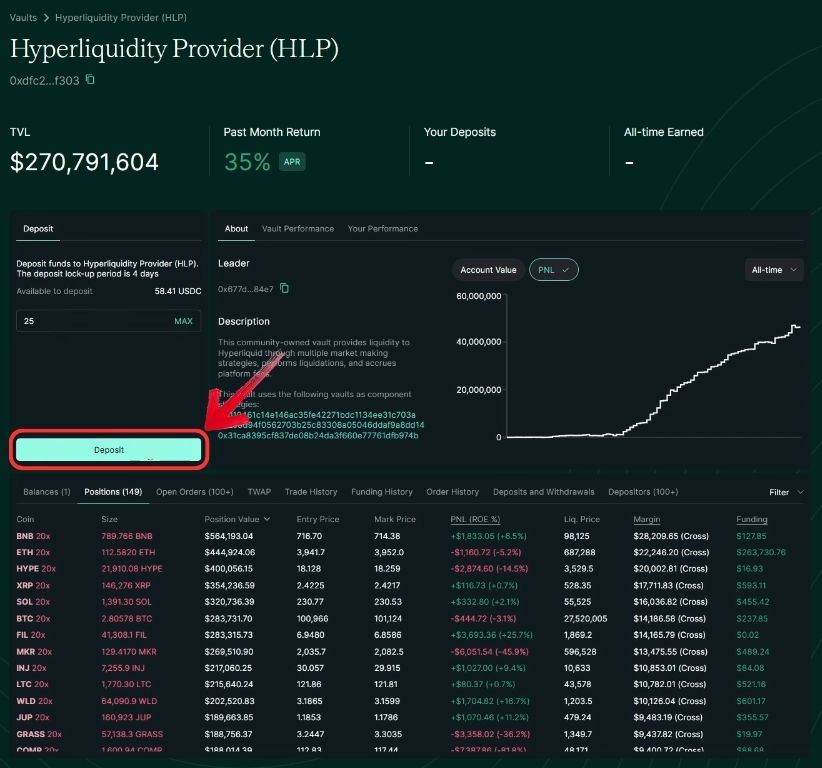
Step 5: Once your deposit is confirmed, your USDC will be added to the HLP vault, and you’ll start earning with it.
Steps to Withdraw Funds from the HLP Vault
If you wish to withdraw your funds later, follow these steps:
Step 1: Click on the Withdraw tab in the HLP vault and enter the amount you want to withdraw.
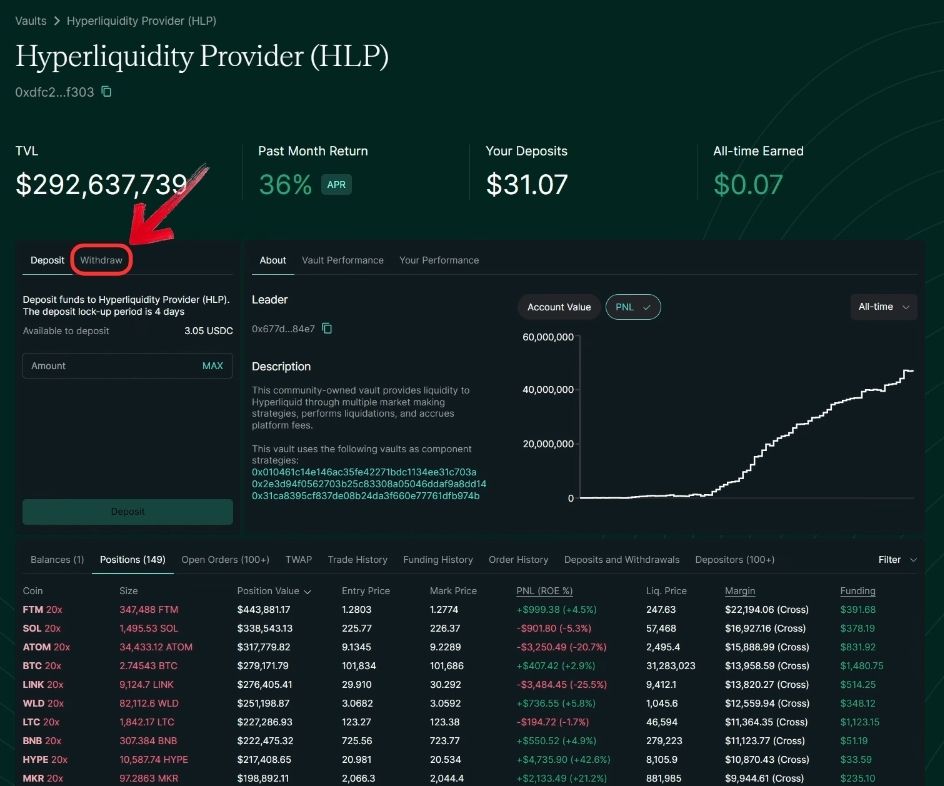
Step 2: Confirm the withdrawal by clicking the Withdraw button.
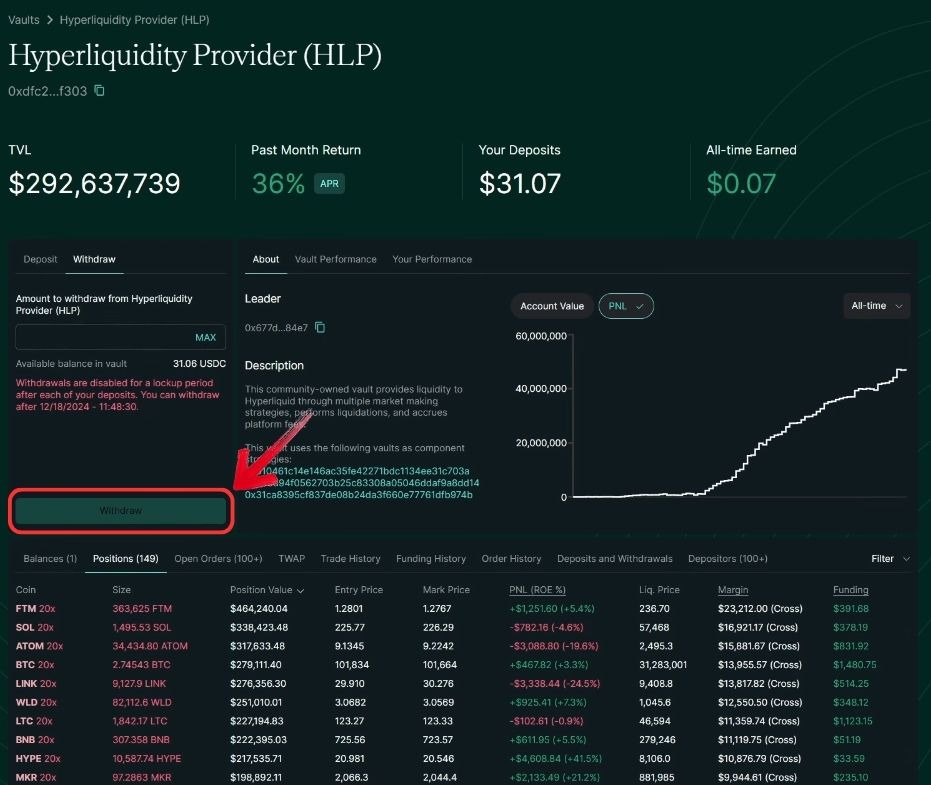
Step 3: Your USDC, along with the profits earned, will be transferred back to your Hyperliquid Perps wallet.
Users Vault
The process to start copy trading with Hyperliquid User Vaults is similar to Protocol Vaults, but the key difference is the variety of users available to choose from. To select the right trader to copy, you’ll need to analyze metrics. One of the most useful metrics is Total Value Locked (TVL), as it indicates the number of users who trust that particular trader. Ultimately, the choice is yours. Once you’ve shortlisted a trader, follow these steps.
Steps to Deposit into User Vaults
Step 1: First, click on the “User” you wish to copy trade.
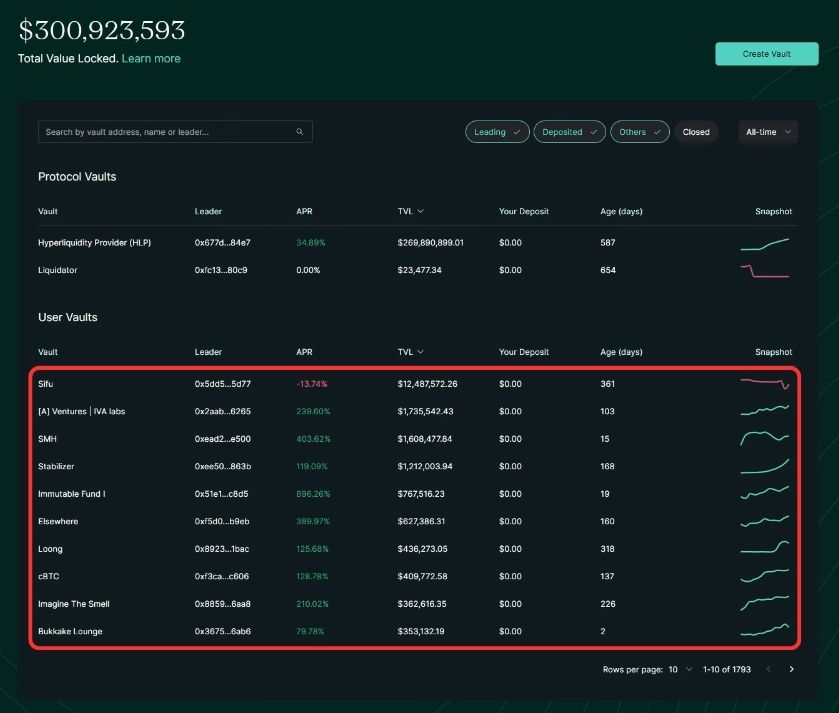
Step 2: Here, you will see more metrics to review the trader’s performance, such as their PnL (Profit and Loss) over a period of time.
Step 3: To deposit USDC, enter the amount you want to trade with on the Users Vault on Hyperliquid.
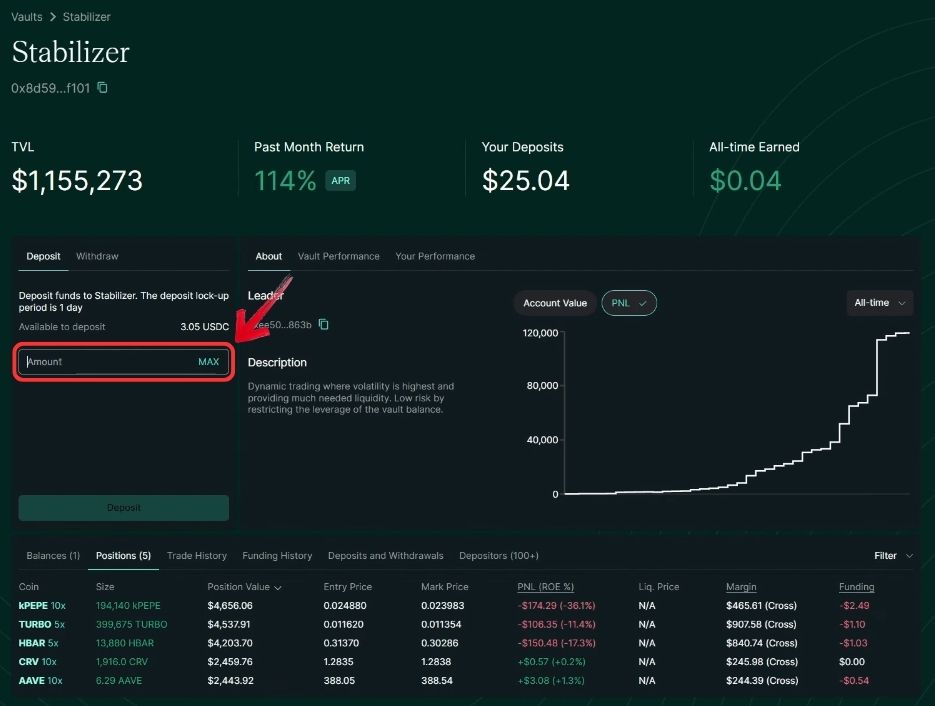
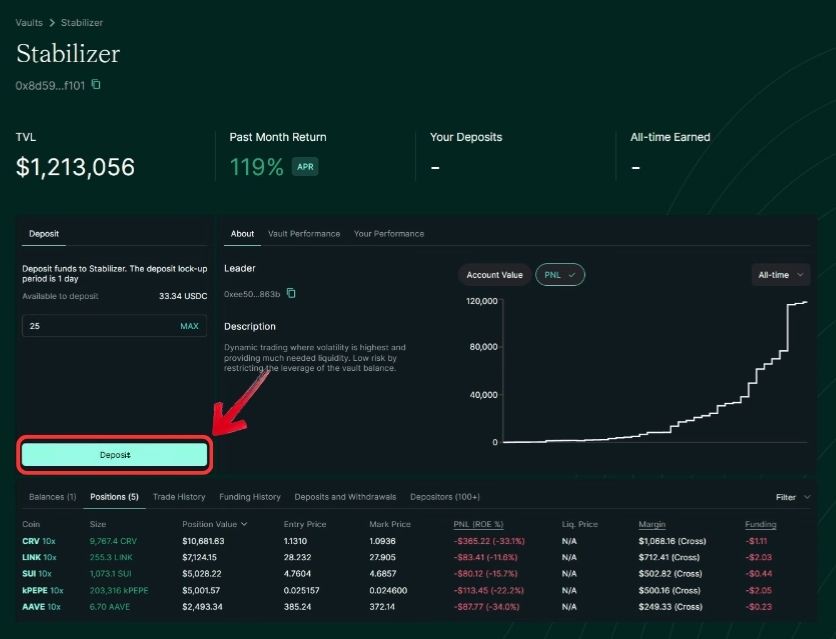
Step 4: The entered amount will automatically be used to copy the trader’s trades. To confirm, click the “Deposit” button.
Steps to Withdraw from User Vaults
With the deposit now confirmed, you can also withdraw easily from a User Vault.
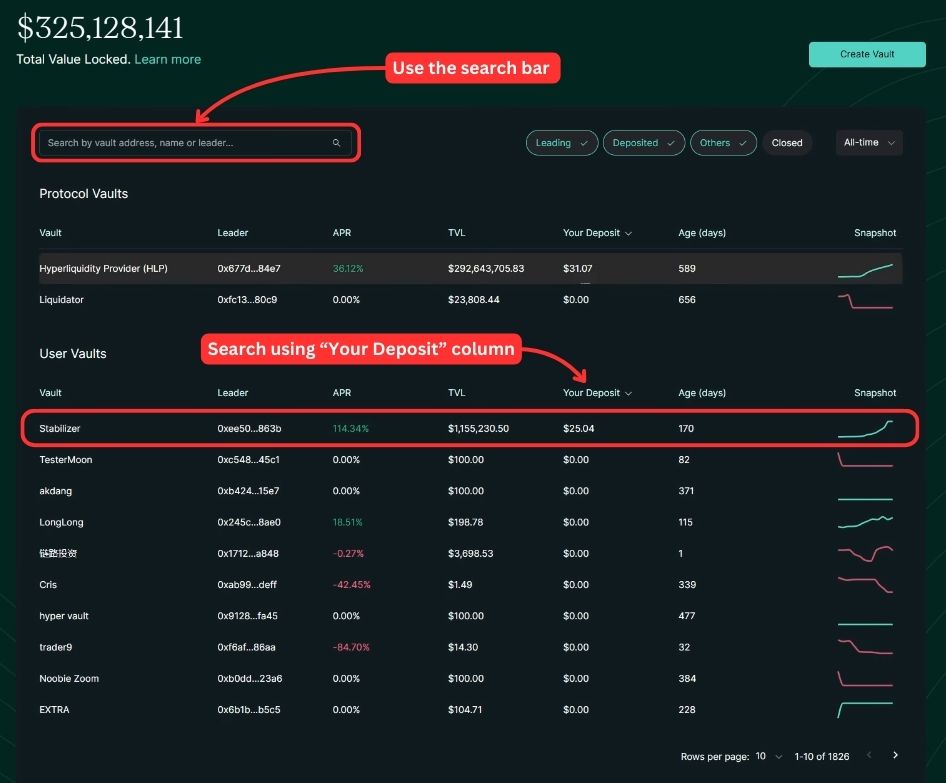
Step 1: Locate the trader. You can search for the trader you deposited with using the “Search” button or check the “Your Deposit” column to find your deposited amount. Once you’ve found the vault, click on it.
Step 2: On the vault page, click on the “Withdraw” tab and enter the amount you want to withdraw.
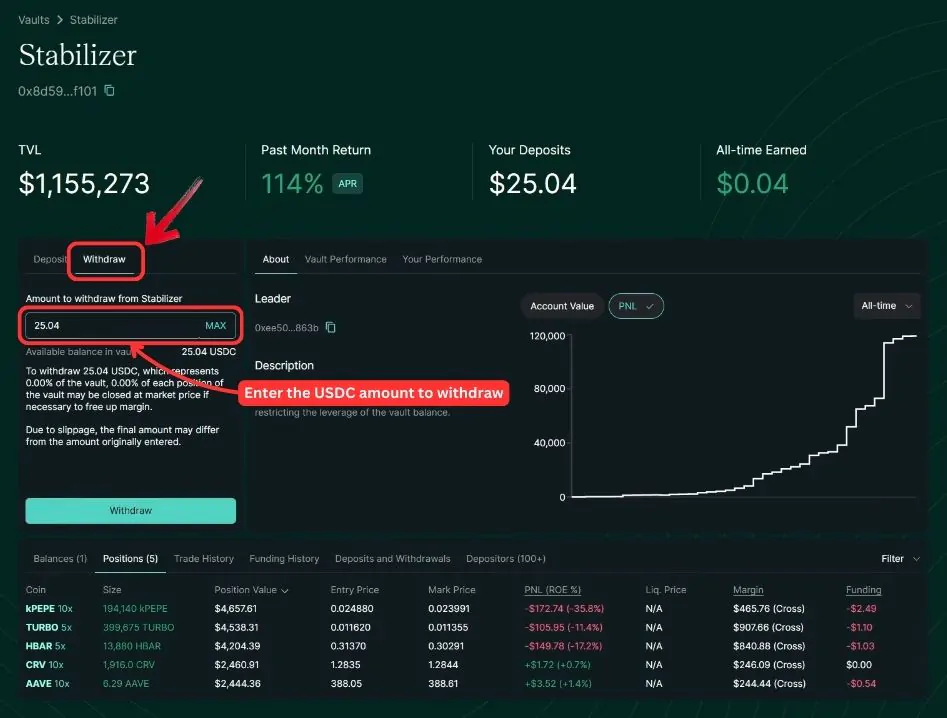
Step 3: To confirm the withdrawal, click the Withdraw button, and your funds will be transferred back to your Hyperliquid Perps wallet.
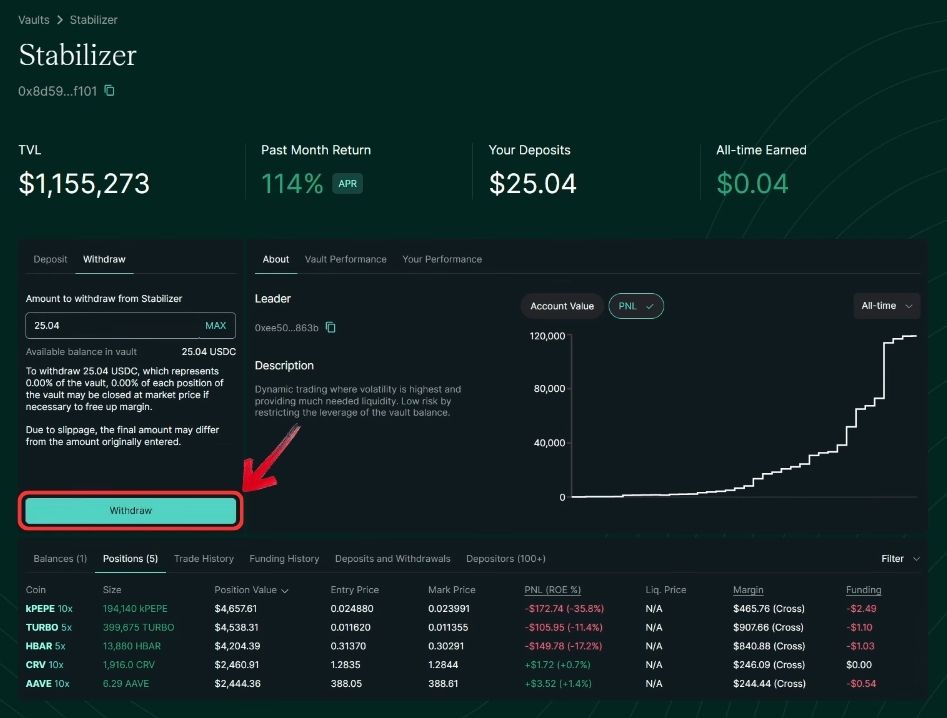
With these steps, you’ve completed the Copy Trading on Hyperliquid 101! You’re now ready to confidently start copy trading on Hyperliquid. If you’re interested in a more hands-on approach, watch our full video tutorial on Copy Trading on Hyperliquid.
Fees
- Protocol Vault: No fees.
- User Vault: 10% of the profits go to the vault owner.
- General Fees: Trading fees apply to all trades, with a 0.01% maker fee and a 0.035% taker fee. In addition, there are funding fees.
Tips
- Understand Withdrawal Timelines: After depositing, funds can be withdrawn immediately from most accounts, but withdrawals from Protocol Vaults require a 4-day waiting period, while User Vaults have a 1-day wait.
- Choose Traders Wisely: Before following a trader, review key indicators like TVL (Total Value Locked), the number of depositors, and their PnL (Profit and Loss). These metrics help you identify vaults with proven success and reliability.
- Analyze Vault Data: On the vault page, you can dive deeper into details like open trades, historical PnL, and trading strategies. This analysis gives you insight into the trader’s risk appetite and trading style, helping you make informed decisions.
Bottomline
Copy trading on Hyperliquid offers a unique way to earn passively by replicating the trades of experienced traders, allowing you to achieve attractive APYs. However, it’s important to note that copy trading is just one of the many features Hyperliquid offers. Its core strength lies in being a decentralized platform for perpetual and spot trading with low fees and high efficiency. If you’re looking to explore more about Hyperliquid’s features, performance, and why it stands out, don’t miss our full Hyperliquid Review.
FAQs
Yes, you can withdraw your funds from one User Vault and deposit them into another. Ensure you account for the 1-day withdrawal waiting period before reallocating your funds.
If a trader stops trading, the funds in their User Vault will remain idle. You can withdraw your funds at any time after the 1-day waiting period or move them to another User Vault.
No, all fees are transparent. Protocol Vaults charge no fees, while User Vaults take a 10% profit share. Trading fees are 0.01% for makers and 0.035% for takers, with additional funding fees for leveraged positions.
The waiting period ensures that trades are settled and liquidity is maintained in the vault. Protocol Vaults require a 4-day wait, while User Vaults have a 1-day waiting period.
Yes, copy trading involves risks. If the trader you’re copying makes a loss, it will reflect on your investment. Make sure to review their performance metrics like PnL, TVL, and trading history before depositing funds.
Protocol Vaults are managed by Hyperliquid and provide liquidity to the platform, offering safer but lower returns. User Vaults, on the other hand, are created by traders and allow you to copy their trades. They carry higher risk but potentially greater rewards, with a 10% fee paid to the trader from your profits.