Как импортировать кошельки в MetaMask

На этой странице
Управление двумя кошельками быстро становится запутанным и утомительным. Возможно, вы создали два отдельных криптокошелька в MetaMask ради безопасности и удобства, но со временем поняли, что вам достаточно одного. Тогда возникает вопрос, как управлять средствами, распределёнными по разным кошелькам. К счастью, импортировать кошелёк в MetaMask несложно. В этом руководстве я расскажу, как это сделать.
Импорт кошелька в MetaMask
Управлять криптокошельками из одного места удобно, и в MetaMask это понимают. Поэтому сервис сделал импорт кошельков максимально простым. Легче всего импортировать кошелёк при настройке расширения MetaMask. Кроме того, есть ещё два способа добавлять аккаунты и управлять ими прямо в MetaMask.
Импорт с помощью секретной фразы восстановления
Первый способ импортировать кошелёк в MetaMask доступен при первоначальной настройке. Когда вы входите в систему и создаёте кошелёк, MetaMask предлагает вместо создания нового импортировать существующий с помощью секретной фразы восстановления. Вот как это сделать:
Шаг 1: После установки расширения MetaMask в браузере откроется новая вкладка. В ней можно будет приступить к настройке кошелька.
Шаг 2: В окне настройки MetaMask поставьте галочку в поле «Я принимаю Условия использования MetaMask», а затем нажмите «Импортировать существующий кошелёк».

Шаг 3: На следующем экране MetaMask запросит согласие на использование данных. Выберите нужные настройки и нажмите «Я согласен», чтобы продолжить.

Шаг 4: Секретные фразы восстановления в разных кошельках могут состоять из разного числа слов. Выберите нужную длину фразы в выпадающем меню.
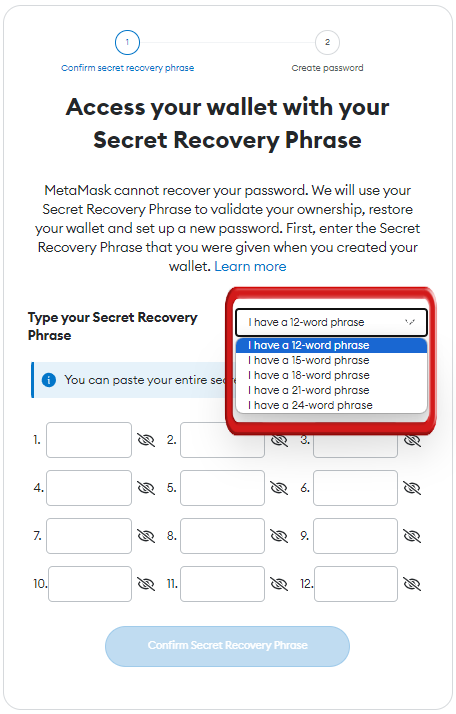
Шаг 5: Введите секретную фразу восстановления. Убедитесь, что слова указаны в правильном порядке.

Внимание
Никогда не сообщайте свою секретную фразу восстановления другим людям.
Шаг 6: Задайте пароль, чтобы защитить кошелёк, а затем нажмите «Импортировать кошелёк». После этого кошелёк будет импортирован в MetaMask.
Кошелёк успешно импортирован, а настройка MetaMask завершена. Теперь можно пользоваться всеми возможностями сервиса. Однако, если вы хотите импортировать в MetaMask ещё один кошелёк, этот способ не подойдёт. В таком случае воспользуйтесь одним из двух других способов.
Импорт с помощью приватного ключа или JSON-файла
Если вы хотите использовать MetaMask для управления несколькими кошельками, их можно импортировать с помощью приватного ключа или JSON-файла. Процедура проста и позволяет управлять несколькими аккаунтами в MetaMask. Если вы опасаетесь, что придётся хранить и вводить несколько seed-фраз от разных криптокошельков, выполните следующие действия, чтобы упростить себе задачу:
Шаг 1: Откройте выпадающее меню «Аккаунты» в расширении MetaMask.
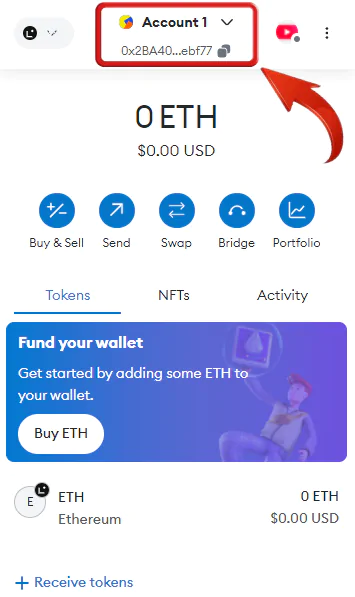
Шаг 2: В меню аккаунтов нажмите «Добавить аккаунт или аппаратный кошелёк».
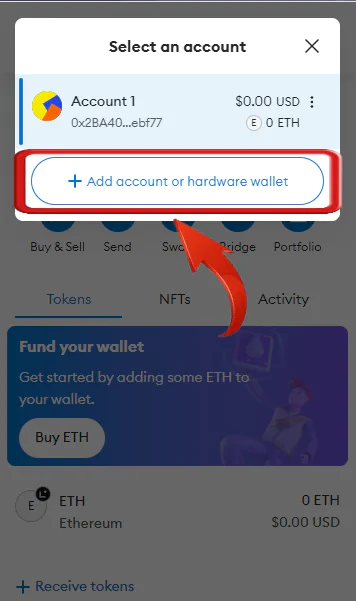
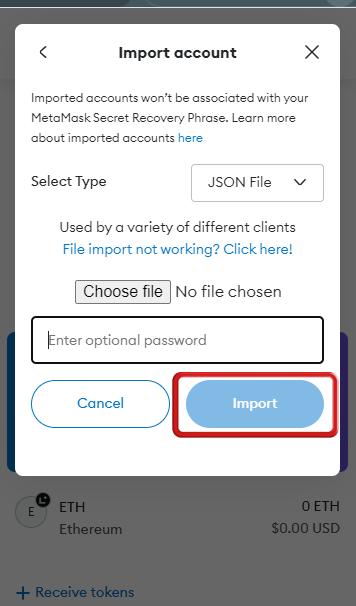
Шаг 3: Нажмите «Импортировать аккаунт», чтобы посмотреть доступные способы импорта кошелька в MetaMask.
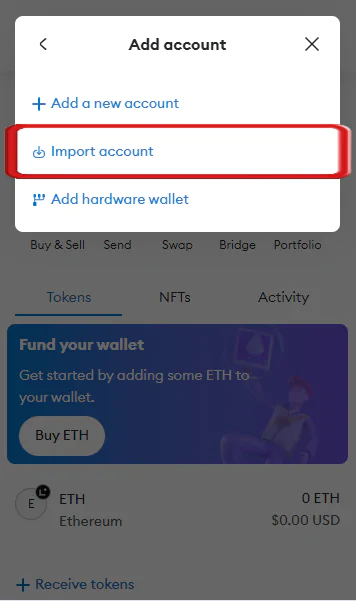
Шаг 4: На следующем экране выберите способ импорта криптоаккаунта: с помощью приватного ключа или JSON-файла.
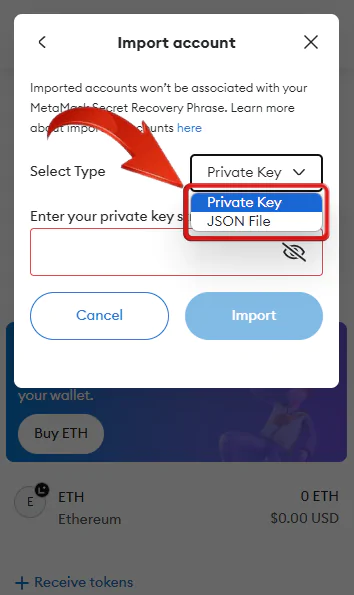
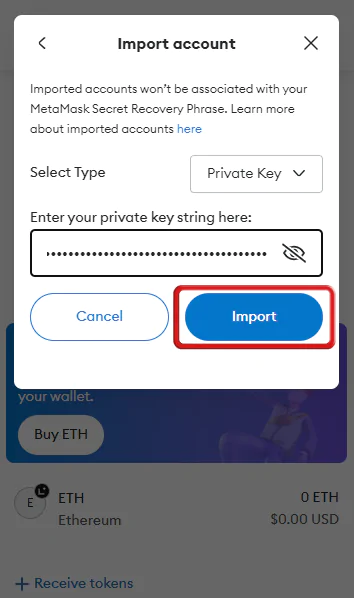
Шаг 5: Чтобы импортировать аккаунт с помощью приватного ключа, выберите «Приватный ключ», введите ключ и нажмите «Импортировать».
Шаг 6: Если у вас есть JSON-файл, выберите «JSON-файл», загрузите его и нажмите «Импортировать».
Эти способы позволяют использовать MetaMask для управления всеми активами в одном месте и снижают риск забыть или потерять пароли. Однако для более централизованного и безопасного взаимодействия с крипторынком хорошей альтернативой может стать Coinbase Wallet. Благодаря централизованным биржам Coinbase предлагает пользователям качественные инвестиционные продукты, а её кошелёк может быть удобнее, чем MetaMask.
Чтобы упростить управление средствами, лучше пользоваться одним криптокошельком для всех транзакций. Если управлять текущим кошельком становится слишком сложно, стоит перейти на новый. Хранение криптоактивов в одном кошельке упрощает транзакции и делает их безопаснее.
Часто задаваемые вопросы
Да, кошелёк Crypto.com можно импортировать в MetaMask. Если у вас есть криптовалютный кошелёк в приложении Crypto.com DeFi Wallet, MetaMask или на другой некастодиальной платформе, его легко подключить к расширению MetaMask Wallet, введя фразу восстановления.
Согласно официальному сайту поддержки MetaMask, не рекомендуется одновременно использовать несколько кошельков в одном аккаунте MetaMask. Там прямо говорится, что если в браузере одновременно активны несколько расширений MetaMask, это приведёт к проблемам и ни одно из них не будет работать корректно. Поэтому лучше использовать один кошелёк с несколькими аккаунтами для разных задач.