Как перевести активы в Hyperliquid: пошаговое руководство


На этой странице
Недавний аирдроп Hyperliquid на сумму более 3 млрд долларов привлёк большое внимание. Многие пользователи зашли на платформу Hyperliquid, чтобы изучить её возможности как децентрализованной биржи бессрочных контрактов (Perp DEX). Чтобы начать работу, нужно перевести активы в Hyperliquid. Это позволит торговать на платформе и пользоваться другими функциями, например Hyperliquid Vaults.
В этом руководстве мы расскажем, как перевести активы в Hyperliquid, рассмотрим доступные способы и разберём распространённые заблуждения. Так вы сможете увереннее ориентироваться в децентрализованной торговле.
Внимательно выбирайте сеть назначения: USDC в кошельке Arbitrum ещё не зачислены на Hyperliquid. Если вы выбрали этот маршрут, после перевода активов завершите депозит на Hyperliquid. По другим поддерживаемым маршрутам средства могут поступить напрямую в HyperCore или HyperEVM. Проверьте сеть назначения, актив и минимальную сумму на экране депозита. Подробнее читайте в инструкции Hyperliquid по внесению депозита.
Можно ли перевести активы в Hyperliquid?
Да, вы можете перевести средства на платформу Hyperliquid и начать торговать.
Если вы хотите взаимодействовать с блокчейном Hyperliquid, возможно, чтобы получить право на участие в будущих аирдропах, если о них объявят, ознакомьтесь с нашим руководством о том, как добавить Hyperliquid в MetaMask.
Что нужно для перевода активов в Hyperliquid?
Для начала работы и торговли на Hyperliquid вам понадобятся:
- EVM-совместимый кошелёк: Он необходим, поскольку сейчас платформа поддерживает только сеть Arbitrum. Вам понадобится EVM-совместимый кошелёк, например MetaMask или Coinbase Wallet. Если вы используете MetaMask, сначала добавьте сеть Arbitrum, чтобы создать кошелёк Arbitrum.
- USDC: Все торговые пары на платформе Hyperliquid котируются в USDC. Поэтому, чтобы начать торговлю, переведите на платформу USDC.
Как перевести активы в Hyperliquid?
Сеть Arbitrum поддерживают многие кроссчейн-мосты. Выбор зависит от того, из какой сети вы хотите перевести USDC в Arbitrum.
Hybridge
HyBridge это нативный кроссчейн-мост для блокчейна Hyperliquid, который упрощает перевод активов в экосистему Hyperliquid. С его помощью можно переводить токены между семью блокчейнами, включая EVM-совместимые сети и блокчейны, не совместимые с EVM, например Solana.
Шаг 1: HyBridge доступен в браузере. Откройте браузер и перейдите на сайт HyBridge.
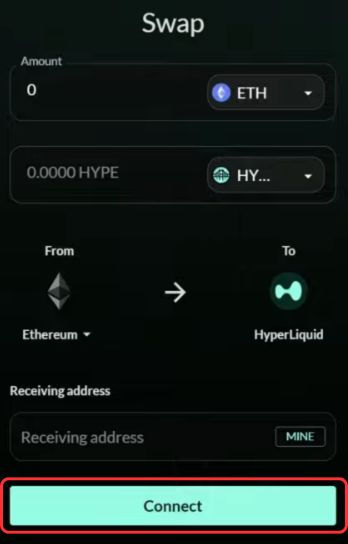
Шаг 2: Сначала подключите кошелёк, нажав кнопку «Подключить».
Шаг 3: После подключения кошелька откройте поле «Откуда» и выберите сеть отправления, например Solana.
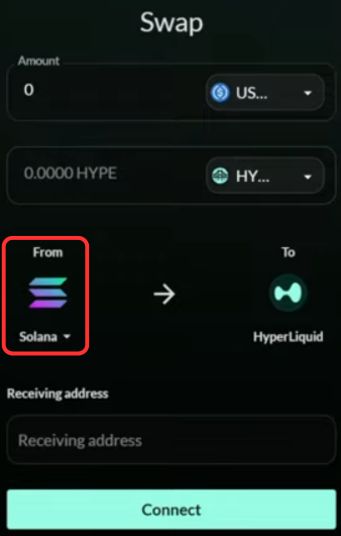
Шаг 4: По умолчанию будет выбрана сеть Hyperliquid.
Шаг 5: В поле «Сумма» выберите токен «USDC» для перевода.
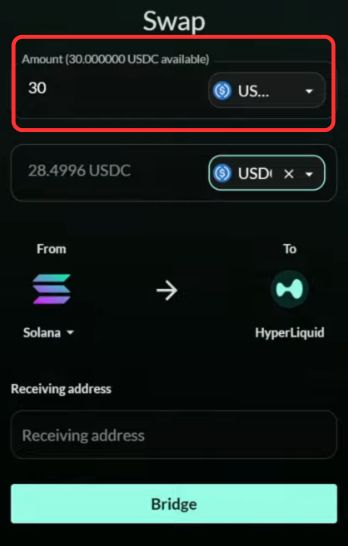
Шаг 6: В качестве токена для получения в сети Arbitrum выберите «USDC».
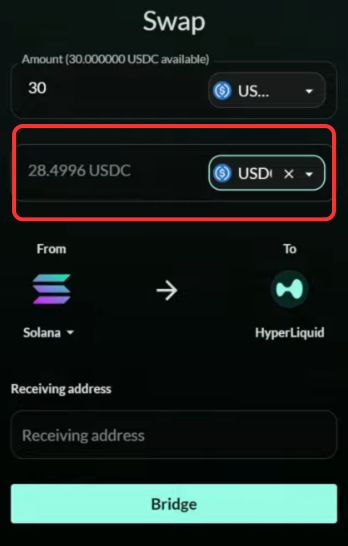
Шаг 7: Заполнив все данные транзакции, перейдите к полю «Адрес получателя» и вставьте адрес «Получения» в сети Arbitrum.
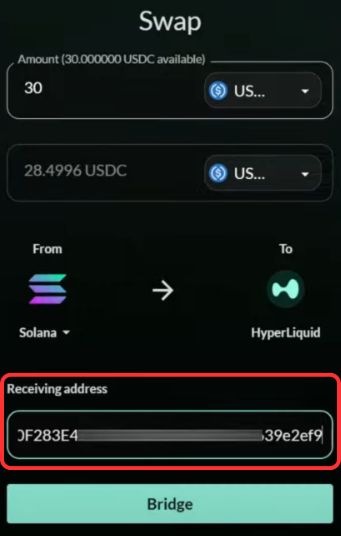
Шаг 8: Адрес кошелька Arbitrum можно найти в MetaMask или другом совместимом кошельке, где добавлена сеть Arbitrum.

Шаг 9: Указав адрес получателя, нажмите кнопку «Перевести» . Уже через несколько секунд USDC будут успешно переведены на платформу Hyperliquid!
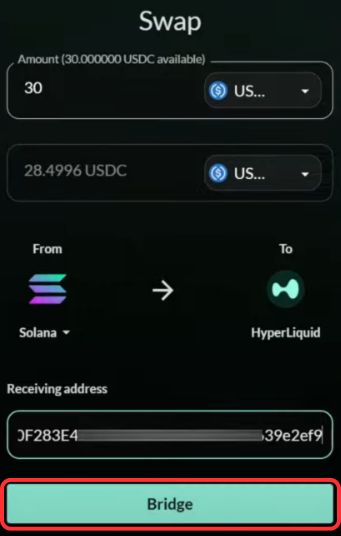
Перевести средства с помощью HyBridge просто. Если выбрать сеть Hyperliquid, процесс становится понятнее и доступнее даже тем, кто не разбирается в технических деталях. Пошаговую инструкцию о том, как перевести активы из Solana в Hyperliquid с помощью HyBridge, ищите в нашем руководстве.
Но что делать, если HyBridge не поддерживает нужную вам сеть? В этом случае можно воспользоваться альтернативами, например Squid.
Squid
Squid поддерживает более 70 сетей EVM, сети Cosmos и некоторые блокчейны, не совместимые с EVM, например Solana. Это надёжная альтернатива, если нужной вам сети нет в HyBridge.
С помощью Squid Boost кроссчейн-операции можно выполнять менее чем за 20 секунд, экономя пользователям время. В общей сложности Squid уже помог сэкономить более пяти лет пользовательского времени и пользуется доверием ведущих платформ. Squid предлагает разнообразные инструменты для кроссчейн-стейкинга, минтинга, платежей и других операций. Они интегрируются через Squid SDK и обеспечивают простой и эффективный процесс.
Шаг 1: Откройте браузер и перейдите в приложение Squid.Шаг 2: Перейдите в поле «Оплатить», затем нажмите кнопку «Сеть» и выберите сеть, из которой хотите перевести активы через мост.
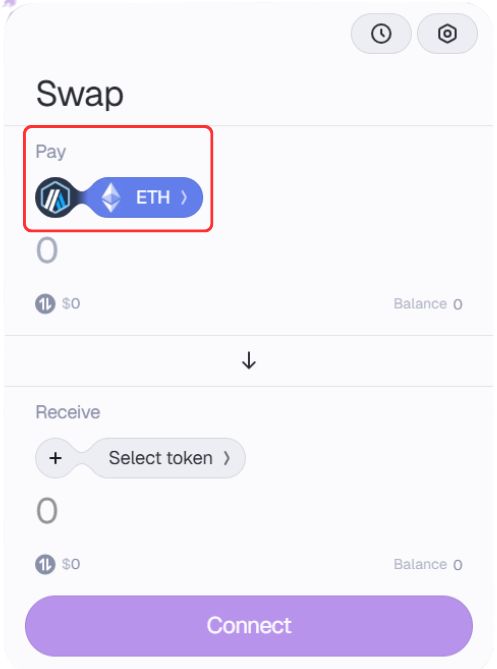
Шаг 3: Слева появится список сетей и токенов. Выберите сеть и токен для перевода.
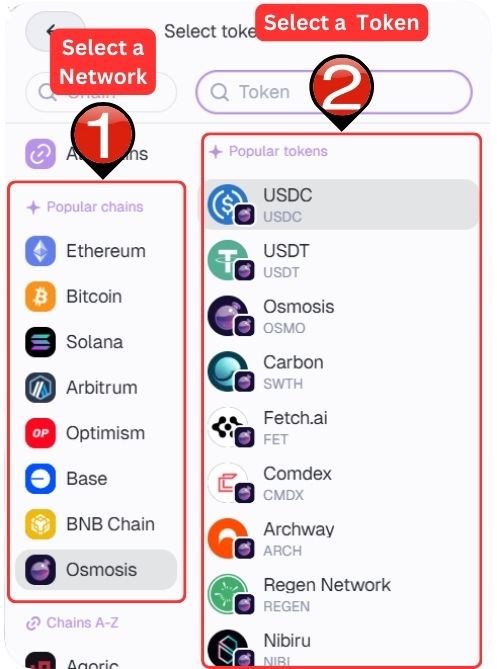
Шаг 4: Теперь перейдите к полю «Получить». Нажмите на название сети и, как на предыдущем шаге, выберите «Arbitrum». В качестве токена для получения укажите USDC.
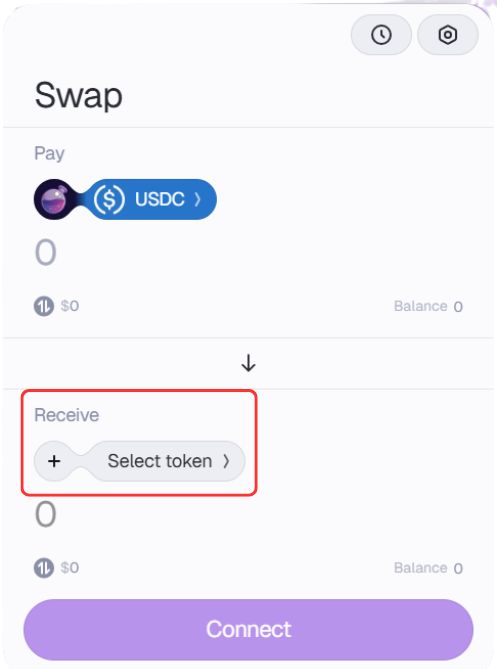
<div style=»background-color: #f5f8fc; border-left: 4px solid #0078D4; padding: 15px; border-radius: 4px; font-family: Arial, sans-serif; margin: 10px 0; color: #000000;»><span style=»color: #d83b01; font-weight: bold;»>Важно:</span> Hyperliquid поддерживает Arbitrum и использует только торговые пары с USDC.</div>
Шаг 5: Укажите количество токенов, которое хотите перевести в сеть Arbitrum.

Шаг 6: Котировки в реальном времени появятся только после подключения кошелька. Нажмите кнопку «Подключить» и подключите кошельки для выполнения перевода.
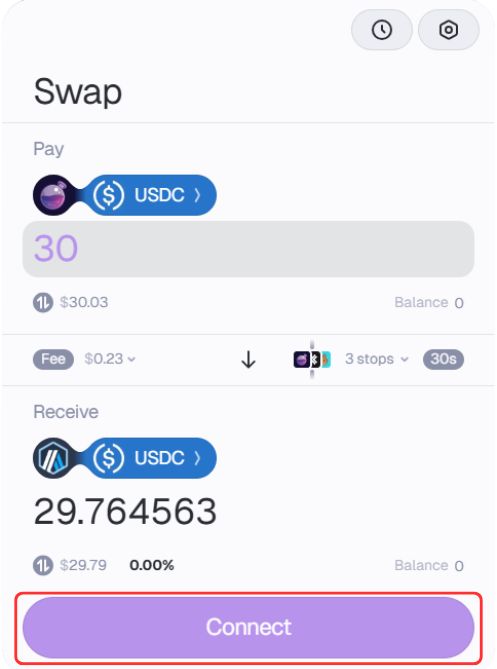
Шаг 7: После подключения кошельков появятся котировки в реальном времени. Проверьте детали перевода и нажмите «Обменять», чтобы продолжить.
Дополнительные варианты быстрого перевода в Hyperliquid
1. Мост MetaMask:
Пользователи MetaMask могут воспользоваться мостом MetaMask, чтобы быстро обменивать токены между разными EVM-сетями и переводить USDC в Hyperliquid.
2. Централизованная биржа (CEX):
Если вы не хотите пользоваться мостом, можно купить USDC на централизованной бирже, например BloFin, которая поддерживает сеть Arbitrum, а затем перевести токены на свой кошелек в Arbitrum.
3. Комиссии за газ:
Убедитесь, что у вас достаточно токенов для оплаты газа. Необходимый токен зависит от задействованных сетей:
- Если переводите токены из Solana, запаситесь $SOL для оплаты газа.
- Для EVM-сетей, например Arbitrum, в решениях второго уровня широко используется $ETH.
Комиссии за переводы в Hyperliquid
Расходы зависят от маршрута перевода. Для пополнения через Arbitrum потребуется ETH на оплату газа. Другие мосты могут взимать дополнительные комиссии или учитывать расходы на конвертацию. За торговлю в Hyperliquid плата за газ не взимается, однако действуют торговые комиссии. Проверяйте котировку на пополнение или вывод для выбранной сети, а не исходите из предположения, что комиссия за вывод всегда одинакова.
Токен HYPE
Hyperliquid
Подключение- Рыночная капитализация
- $20,59B Место №10
- Объём торгов за 24 ч
- $1,37B По всем отслеживаемым рынкам
- Объём в обращении
- 239,41M HYPE 25,2% от общего предложения
Итоги
Перевод активов в Hyperliquid может быть очень выгодным. Платформа предлагает децентрализованную среду для безопасной торговли активами и при этом проста в использовании. Однако важно различать перевод средств на платформу Hyperliquid и перевод в блокчейн Hyperliquid. Блокчейн пока находится в разработке, а платформа на данный момент поддерживает только сеть Arbitrum. Поэтому, чтобы начать торговать, пользователям нужно перевести средства на платформу Hyperliquid через Arbitrum.
Часто задаваемые вопросы
Для перевода средств в Hyperliquid можно воспользоваться специальными мостами, например Hybridge. Среди других вариантов также Symbiosis и LayerZero.
Hyperliquid быстро развивается и привлекает внимание многих пользователей. Платформа появилась сравнительно недавно, но предлагает хорошо продуманный формат децентрализованной торговли, напоминающий централизованные финансы (CeFi). По рыночной капитализации Hyperliquid занимает 22-е место. Проект пользуется сильной поддержкой сообщества, а пользователи хвалят его как надежную площадку для торговли криптовалютами.
Нет, все торговые пары на платформе Hyperliquid представлены в USDC. Чтобы начать торговать, нужно перевести USDC в Arbitrum. Кроме того, можно воспользоваться централизованной биржей и пополнить кошелек в Arbitrum напрямую в USDC.
Hyperliquid использует ончейн-книгу ордеров, чтобы повысить эффективность и прозрачность торговли. В отличие от AMM, книги ордеров позволяют сопоставлять ордера на покупку и продажу в реальном времени, снижая проскальзывание и помогая трейдерам точнее определять рыночную цену.