How to Change or Reset Your KuCoin Trading Password

이 페이지에서
핵심 요점
  • The KuCoin Trading Password is a separate 6-digit code used to confirm trades, withdrawals, P2P sales, and API actions.
  • Changing your Trading Password requires the existing code and triggers a 24-hour restriction on withdrawals, P2P sales and Red Packets.
  • You cannot view a forgotten Trading Password. Resetting it requires account verification and may involve identity checks and manual review.

Security matters when an app holds real money, especially when one account can trade, withdraw, and manage crypto. KuCoin adds a separate Trading Password for sensitive actions, including opening or closing trades. The code adds another confirmation step for those actions, but it does not make a compromised account safe. Keep your login credentials, two-factor authentication and trading password separate. In this article, we explain what the KuCoin Trading Password is and how to change or reset it.

What Is a KuCoin Trading Password?

KuCoin Trading Password is a separate 6-digit code that you set for sensitive account actions. It must contain 6 numbers only, so letters and symbols will not work. It is not the same as your login password or Google Authenticator code. You will be asked for it when placing trades, withdrawing crypto, selling through P2P, or creating API keys. It adds a security check alongside your login password and two-factor authentication.

Visit KuCoin!

How to Change a KuCoin Trading Password

If you remember your current trading password, you can change it directly from your KuCoin account security settings.

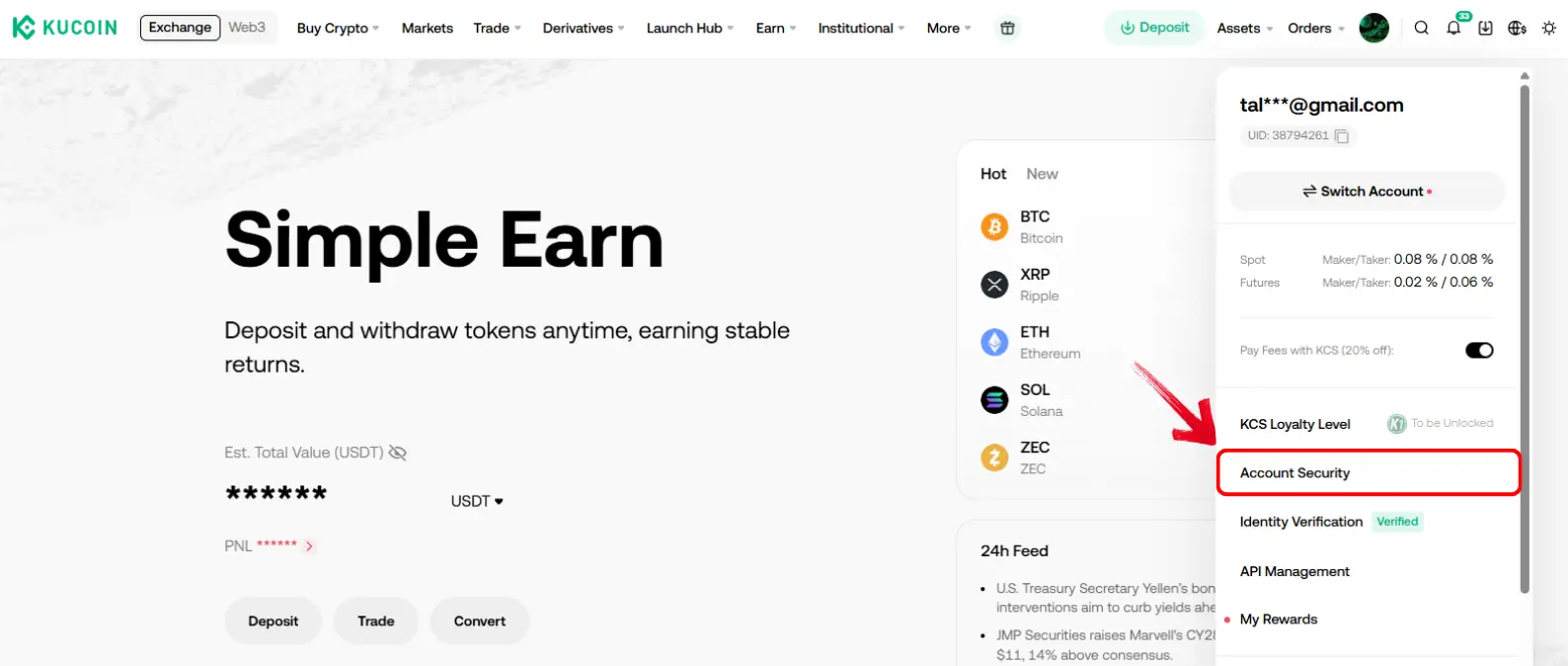
Step 1: First, sign in to your KuCoin account. Hover over the profile icon and select “Account Security”.

KuCoin Account security

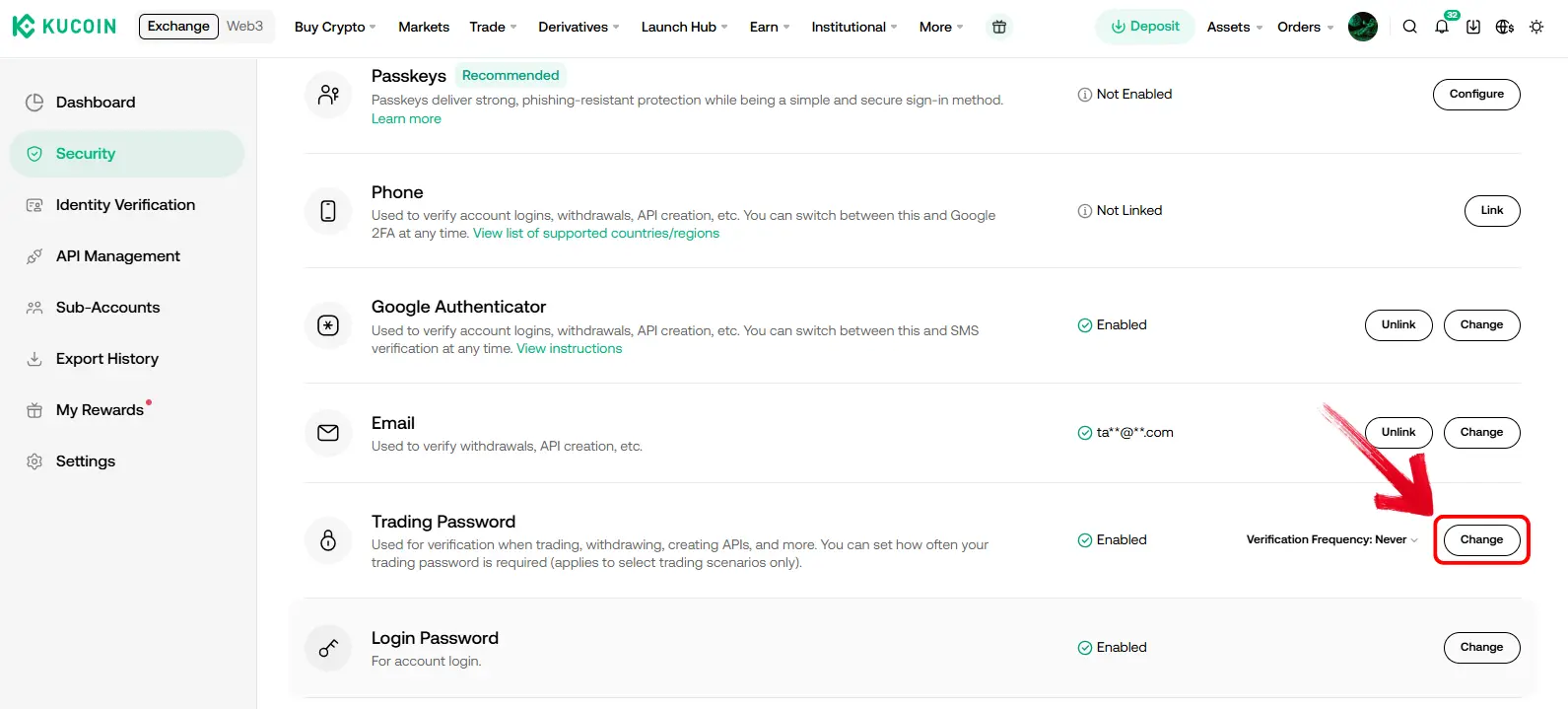
Step 2: On the Account Security page, scroll down to the “Trading Password” option and click “Change”.

KuCoin trading password security option

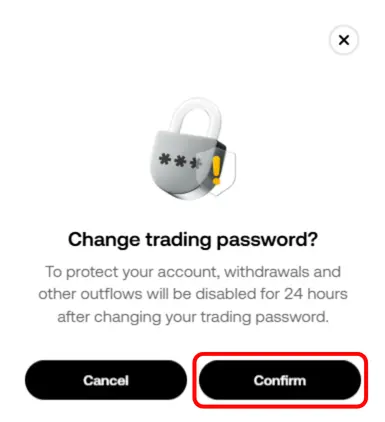
Step 3: KuCoin will show a security notice about the temporary withdrawal restriction. Click “Confirm” to continue.

KuCoin security message

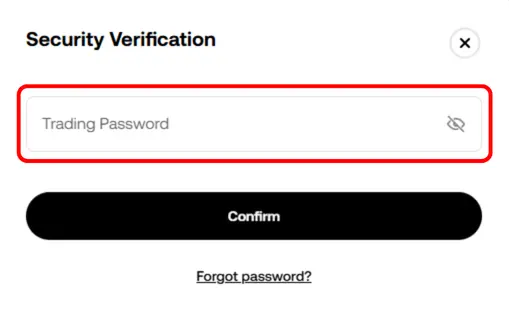
Step 4: Enter your current KuCoin trading password to verify the change.

Enter KuCoin old trading password

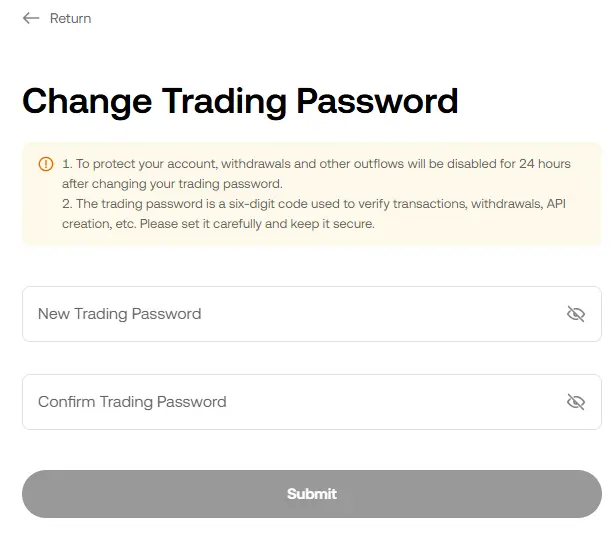
Step 5: Once confirmed, enter and confirm your new KuCoin trading password.

change KuCoin trading password

How to Reset a KuCoin Trading Password

If you do not remember your current trading password, the process starts from the same account security page. The screens below show the account flow; the exact checks depend on your account. KuCoin’s official reset instructions also describe identity verification and a manual review that can take approximately 1–3 business days. Follow any additional checks shown rather than assuming email and authenticator codes always complete the reset.

Step 1: Go back to the “Account Security” page by selecting it from the profile menu.

KuCoin Account security

Step 2: Scroll down to “Trading Password” and click “Change”.

KuCoin trading password security option

Step 3: Click “Confirm” on the withdrawal restriction notice to continue.

KuCoin security message

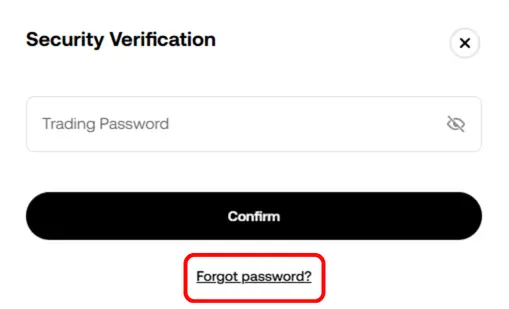
Step 4: When KuCoin asks for your current trading password, click “Forgot Password?”.

Forgot KuCoin trading password

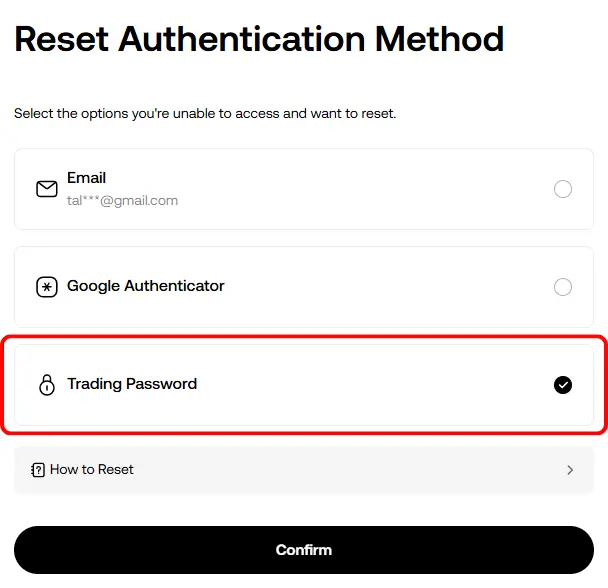
Step 5: On the “Reset Authentication Method” screen, select “Trading Password”.

KuCoin reset authentication method screen
Tip: You can also reset your email address or authenticator from this screen.

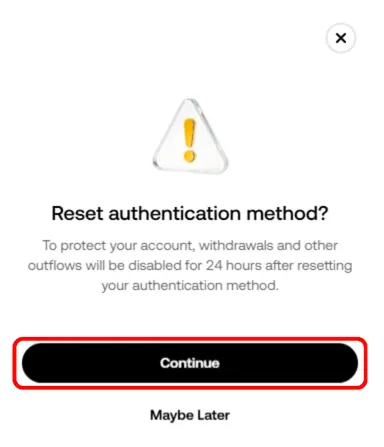
Step 6: KuCoin will show the withdrawal restriction notice again. Click “Continue” to proceed.

KuCoin authentication method reset security warning

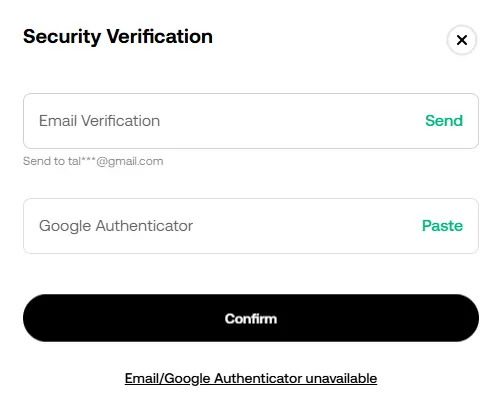
Step 7: Enter the verification codes sent to your linked security methods, such as your email address and Google Authenticator.

KuCoin reset trading password authentication codes

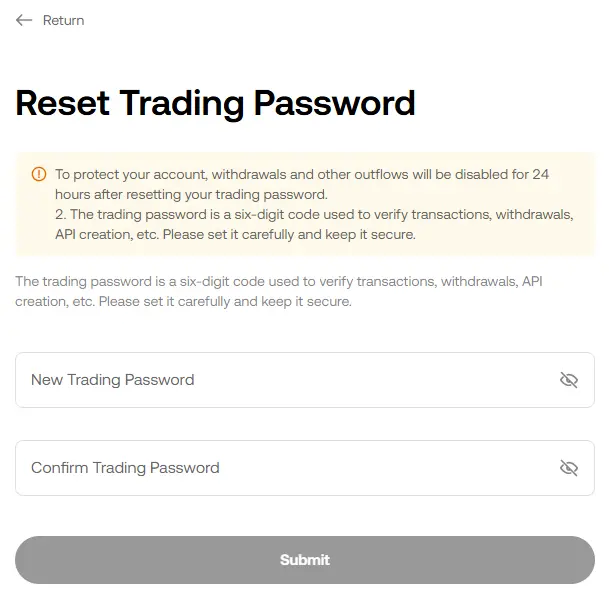
Step 8: Enter and confirm your new 6-digit trading password, then click “Submit”.

Reset KuCoin trading password

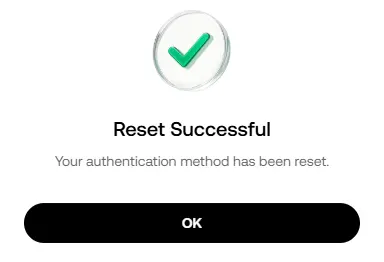
Step 9: KuCoin will notify you once your trading password has been reset successfully.

KuCoin trading password reset successful message

Can I Turn Off the KuCoin Trading Password?

No, KuCoin does not provide an option to turn off your Trading Password once you have set it. You can change or reset the 6-digit code from your Account Security settings, but you cannot remove the requirement altogether. KuCoin uses it as an extra confirmation for trading, withdrawals, P2P transactions, and API-related actions.

Is KuCoin Safe?

A trading password adds an account-security layer, but keeping funds on any centralised exchange still carries custody and platform risk. Its Proof of Reserves lets users verify that their balances were included in a reserve snapshot. KuCoin did experience a major security incident in 2020. However, the exchange covered affected user funds in full through KuCoin and its insurance fund, and no users were left with losses.

KuCoin says it keeps 95% of user funds in cold storage and uses multi-signature and MPC protocols alongside institutional-grade custodians. It also states that it has secured $250 million in asset insurance.

For a closer look at KuCoin’s trading features, fees, and overall user experience, read our full KuCoin review.

Bottom Line

Because it is only a 6-digit code, the KuCoin Trading Password can seem like a small detail. But it sits behind the actions that directly involve your funds, which is why KuCoin treats a change or reset carefully and applies a temporary restriction. If you are comparing account features across exchanges, you can look through our KuCoin alternatives guide.

질문

FAQs

No. KuCoin Trading Password is a separate 6-digit number, while Google Authenticator provides a time-based verification code.

Yes. Select “Forgot Password?” from the Trading Password screen, then complete the requested account and identity checks. Some resets require manual review.

You cannot view your existing KuCoin Trading Password. If you forget it, you will need to reset it through the account verification process and set a new 6-digit code.

제휴 고지: 이 페이지의 링크를 통해 계정을 개설하면 CryptoWinRate가 수수료를 받을 수 있으며, 이용자에게 추가 비용은 발생하지 않습니다. 이는 점수나 표시된 데이터에 영향을 주지 않습니다. 점수와 데이터는 모두 거래소 데이터베이스를 기반으로 합니다.
작성자

CryptoWinRate

Editorial Desk

Crypto Win Rate

계속 읽기

관련 문서

최고의 KuCoin 대안 2026

트레이더들이 KuCoin 대안을 찾는 이유 KuCoin에서 법정화폐를 입출금하려면 수수료가 각기 다른 외부 업체를 거쳐야 합니다. 은행 계좌와 직접 연결하는 방식보다 비용이 많이 들고 절차도…

CryptoWinRate· 2024년 2월 27일

KuCoin P2P Trading Guide

To start cryptocurrency trading, you’ll first need to buy crypto. Unfortunately, banks and several other payment methods don’t support the direct buying of crypto…

CryptoWinRate· 2024년 1월 31일

KuCoin Withdrawal Methods Guide 2026

KuCoin Withdrawal options KuCoin cryptocurrency exchange stands out for its comprehensive range of withdrawal options. We will explore the various withdrawal methods, limits, fees,…

CryptoWinRate· 2024년 1월 16일