Cómo encontrar tu clave privada en MetaMask: guía sencilla

En esta página
La clave privada de MetaMask es un secreto criptográfico que protege tu cuenta. Al igual que saber cómo hacer una copia de seguridad de tu wallet de MetaMask, es fundamental para la seguridad entender cómo encontrar y proteger tu clave privada. En este artículo explicamos la diferencia entre las claves privadas y la frase secreta de recuperación (SRP) para proteger tu cuenta. También te guiaremos paso a paso para encontrar tu clave privada en MetaMask.
Cómo revelar tu clave privada en MetaMask
Sigue estos pasos para encontrar, revelar y guardar tu clave privada en MetaMask:
Paso 1: Abre tu wallet de MetaMask, ya sea la extensión del navegador o la aplicación móvil.
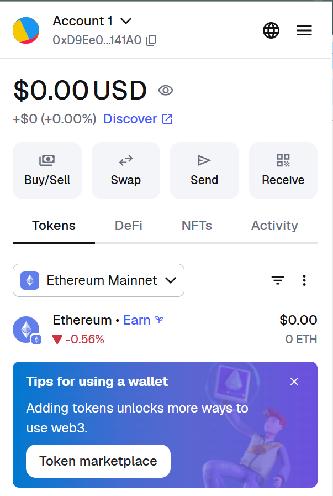
Paso 2: Pulsa el menú desplegable para seleccionar una cuenta en la página de inicio de MetaMask.
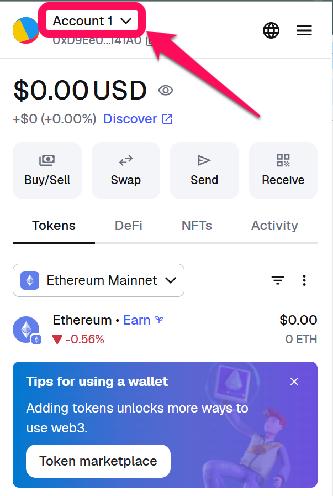
Paso 3: Pulsa los tres puntos verticales junto a la cuenta cuya clave privada quieres consultar y selecciona «Detalles de la cuenta».
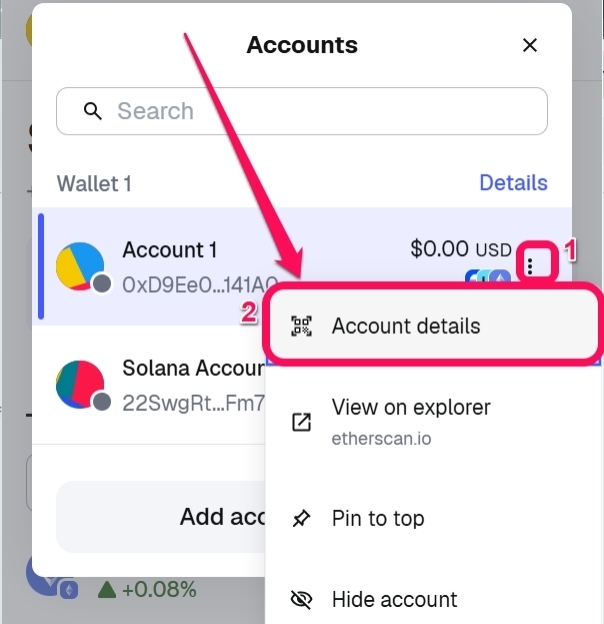
Paso 4: En los detalles de la cuenta de MetaMask, selecciona «Clave privada».
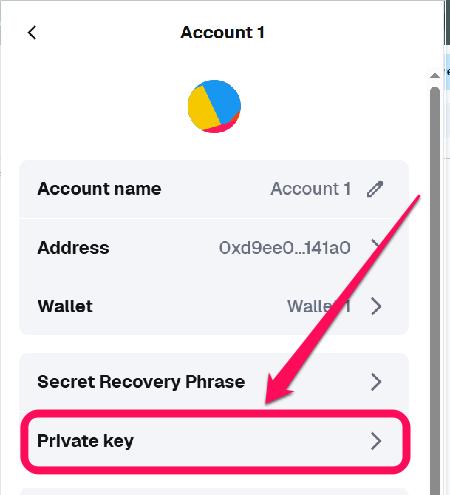
Paso 5: Introduce la contraseña de tu cuenta para confirmar.
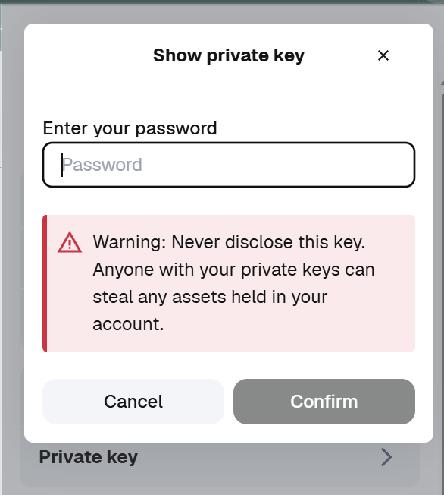
Paso 6: Mantén pulsado el botón para revelar la clave privada de la cuenta.
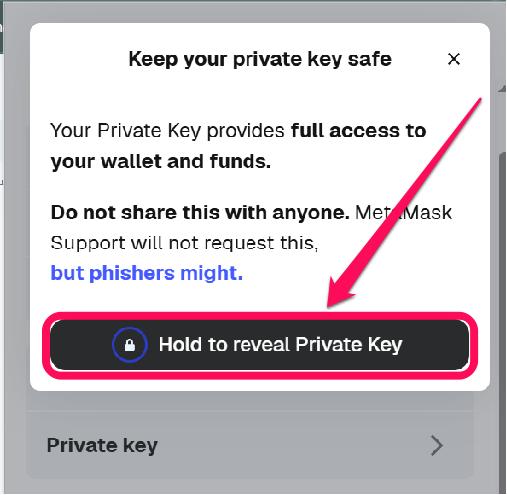
Una vez que hayas encontrado la clave privada de la cuenta, puedes copiarla y guardarla de forma segura, por ejemplo, sin conexión o cifrada, para proteger los datos de tu cuenta de MetaMask, que es una hot wallet.
¿Qué es una clave privada?
Una clave privada es una cadena criptográfica hexadecimal única que genera una dirección de wallet. La clave privada demuestra que eres propietario de los fondos asociados a esa dirección. Contribuye a la seguridad de MetaMask, pero no sustituye a una contraseña. Este número secreto te permite firmar transacciones en la blockchain, transferir fondos e interactuar con aplicaciones descentralizadas desde tu cuenta.
Si alguien conoce tu clave privada, tendrá, en la práctica, el control total de los fondos de esa dirección. La clave privada de tu cuenta es distinta de la frase secreta de recuperación, aunque está relacionada con ella, ya que esta última puede utilizarse para derivar varias claves privadas.
La clave privada se almacena cifrada en el dispositivo local donde utilizas MetaMask. Sin embargo, MetaMask no la guarda en sus servidores, por lo que solo tú puedes protegerla. Por eso, NUNCA debes revelar tu clave privada ni tu frase semilla a nadie.
Clave privada frente a frase secreta
Aunque ambos elementos criptográficos son fundamentales para la seguridad de la wallet, la clave privada y la frase secreta de recuperación, o SRP, son diferentes. En primer lugar, las claves privadas controlan una sola cuenta y sirven para importarla a otra wallet o para hacer una copia de seguridad de una cuenta concreta.
Además, las claves privadas son largas cadenas criptográficas alfanuméricas, normalmente hexadecimales para base 58, entre otros formatos. Si la pierdes, perderás el acceso a los activos y fondos de esa cuenta.
En cambio, la frase secreta (SRP) controla todas las cuentas derivadas de tu wallet. Es la clave maestra y resulta necesaria para recuperar las cuentas, incluso si pierdes el acceso a la wallet o al dispositivo. La SRP de MetaMask consta de 12 palabras que debes anotar, guardar en una copia de seguridad o memorizar en el orden en que aparecen.
Si la pierdes, perderás el acceso a todas las cuentas derivadas y a los fondos de tu wallet. Si alguien obtiene tu frase secreta, podrá restaurar la wallet y robar todos los activos de tu cartera. Debes guardar una copia de seguridad de la SRP de forma segura, ya que es la única manera de recuperar la wallet completa.
En resumen
Debes proteger las claves privadas de tus cuentas para hacer una copia de seguridad de tu wallet de MetaMask y evitar que sufra una brecha de seguridad. Las claves privadas controlan cuentas específicas de la wallet y nunca debes compartirlas, guardarlas de forma insegura ni mostrarlas en un entorno poco seguro. Si otra persona descubre tu clave privada, esa cuenta quedará comprometida y no habrá forma de revertirlo.
Preguntas frecuentes
Sí, pero solo podrás recuperar la cuenta asociada a esa clave privada. Si pierdes el acceso a tu dispositivo, pero conservas la clave privada, puedes importar esa cuenta a otra wallet de MetaMask o a una wallet compatible.
No, no es seguro. No recomendamos compartir tu clave privada, ya que quien la tenga controlará por completo esa cuenta.
Hay distintas formas de proteger tus claves privadas. Puedes guardarlas sin conexión, utilizar wallets de hardware para almacenar grandes cantidades de activos digitales y evitar guardar claves sin cifrar en dispositivos o servicios en la nube, entre otras medidas.
Si pierdes tu clave privada, perderás el acceso a la cuenta que controla. Ya no podrás firmar transacciones ni acceder a los fondos y activos de esa cuenta. Si pierdes la clave privada y tampoco tienes la frase secreta de recuperación (SRP), no habrá forma de recuperar la cuenta ni los fondos que contiene.
Aunque hagas una copia de seguridad perfecta de tu wallet de MetaMask, tu clave privada y tu SRP pueden quedar expuestas mediante phishing, como sitios web falsos y estafas; malware, como keyloggers y programas que secuestran el portapapeles; o ingeniería social. El atacante podría vaciar tu wallet si alguien te engaña para que introduzcas tu clave privada o frase secreta de recuperación. No hagas clic en enlaces maliciosos y verifica siempre las URL y las dApps a las que te conectas.