How to Withdraw Funds from Hyperliquid: Step-by-Step Guide


Bu sayfada
Hyperliquid is a relatively new platform, and you might be facing issues on how to withdraw funds. If so, you’re not alone—many users are still getting familiar with the platform. In this guide, we will walk you through the step-by-step process of withdrawing funds from Hyperliquid, while also highlighting some common mistakes.
Withdraw Funds from Hyperliquid
Withdrawing funds from Hyperliquid to your Web3 wallet is a straightforward process. Here’s what you need to know before you get started:
1. Wallet Compatibility
Your wallet must support the Arbitrum network since Hyperliquid currently only supports Arbitrum. The most commonly used wallet for EVM-compatible chains is MetaMask, which you can easily download.
2. Adding Arbitrum to Your Wallet
Most compatible wallets don’t have the Arbitrum network added by default. You will need to add it manually. If you’re using MetaMask, follow these steps to add Arbitrum to MetaMask to ensure a successful withdrawal.
3. Adding USDC to MetaMask
To see your funds in MetaMask, make sure you’ve added the USDC token. Many users withdraw USDC from Hyperliquid to MetaMask but then don’t see it due to the token not being added to MetaMask. Once added, you’ll be able to see your USDC balance.
Now that you’ve set up your wallet, let’s walk through how to withdraw funds from Hyperliquid.
Step 1: Make Your Funds Available in USDC
First, ensure your funds are available for withdrawal:
-
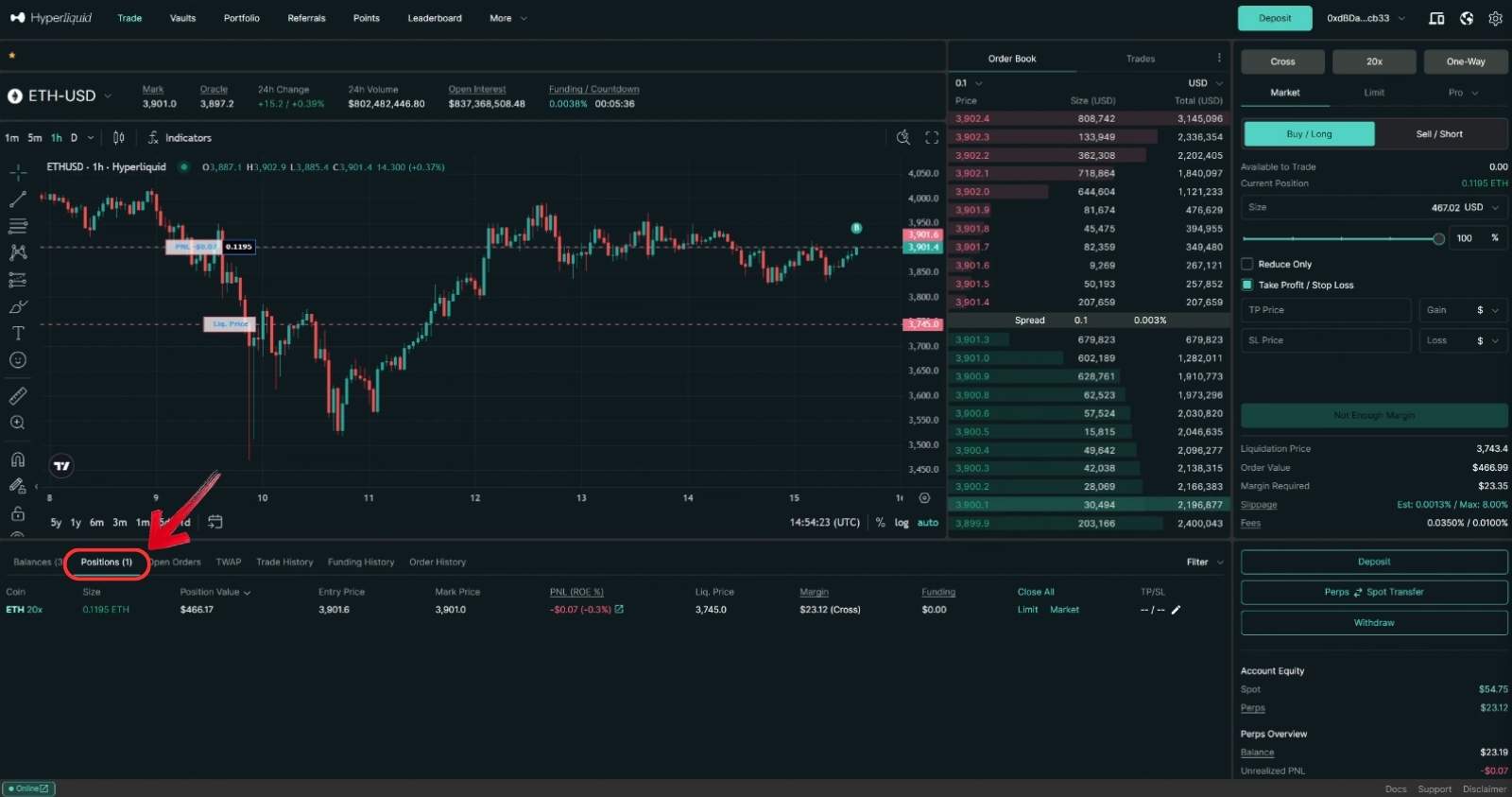
Check Open Orders
Go to the “Positions” tab in the trading overview. If you have any open positions, close them to make the funds available for withdrawal.
-
Transfer Funds to Perp Wallet
Next, you need to move your funds to your Perp Hyperliquid wallet:
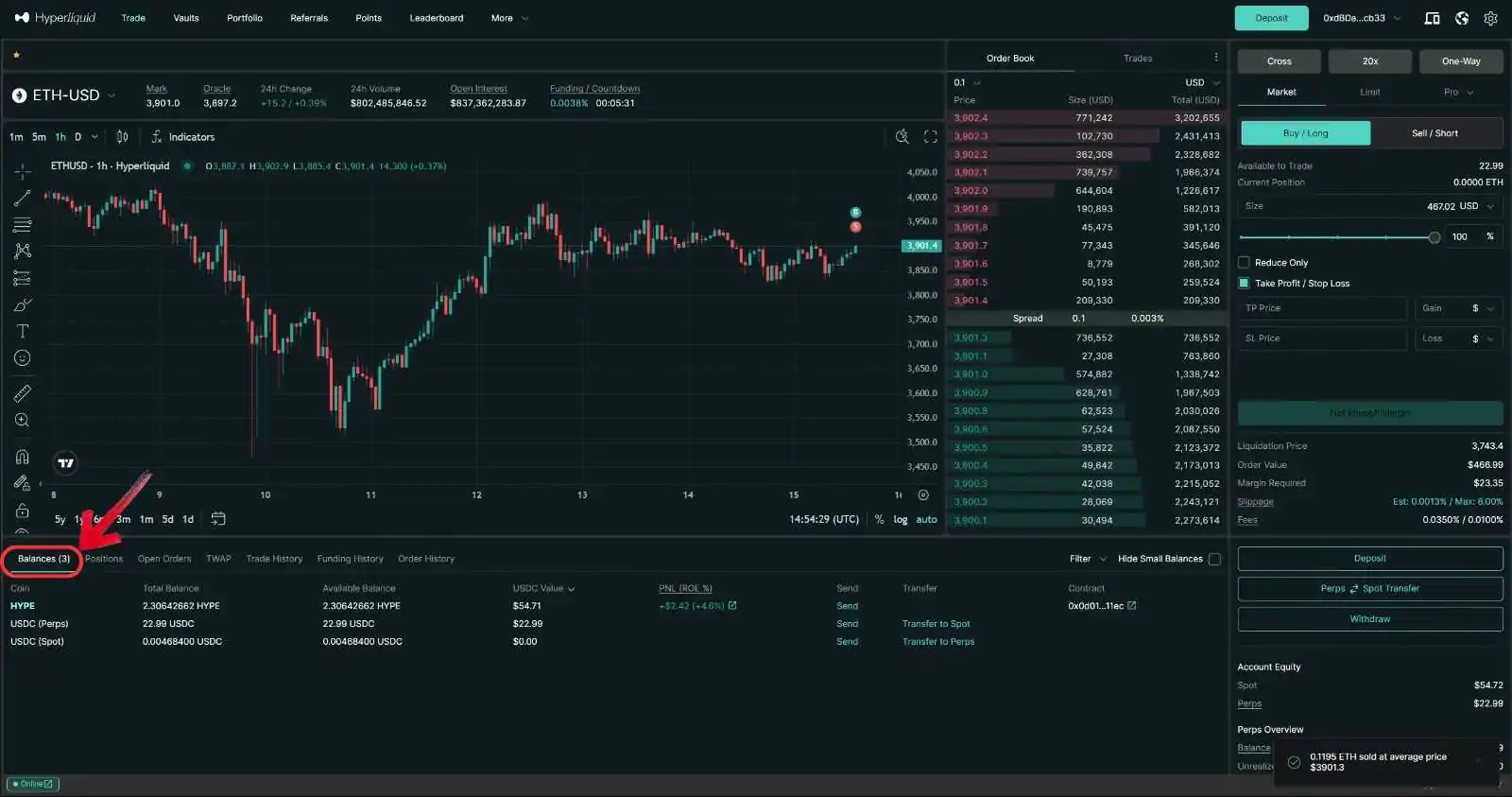
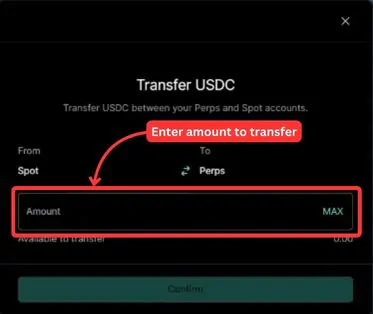
1. Go to the “Balances” tab and check if you have USDC in your Spot wallet.
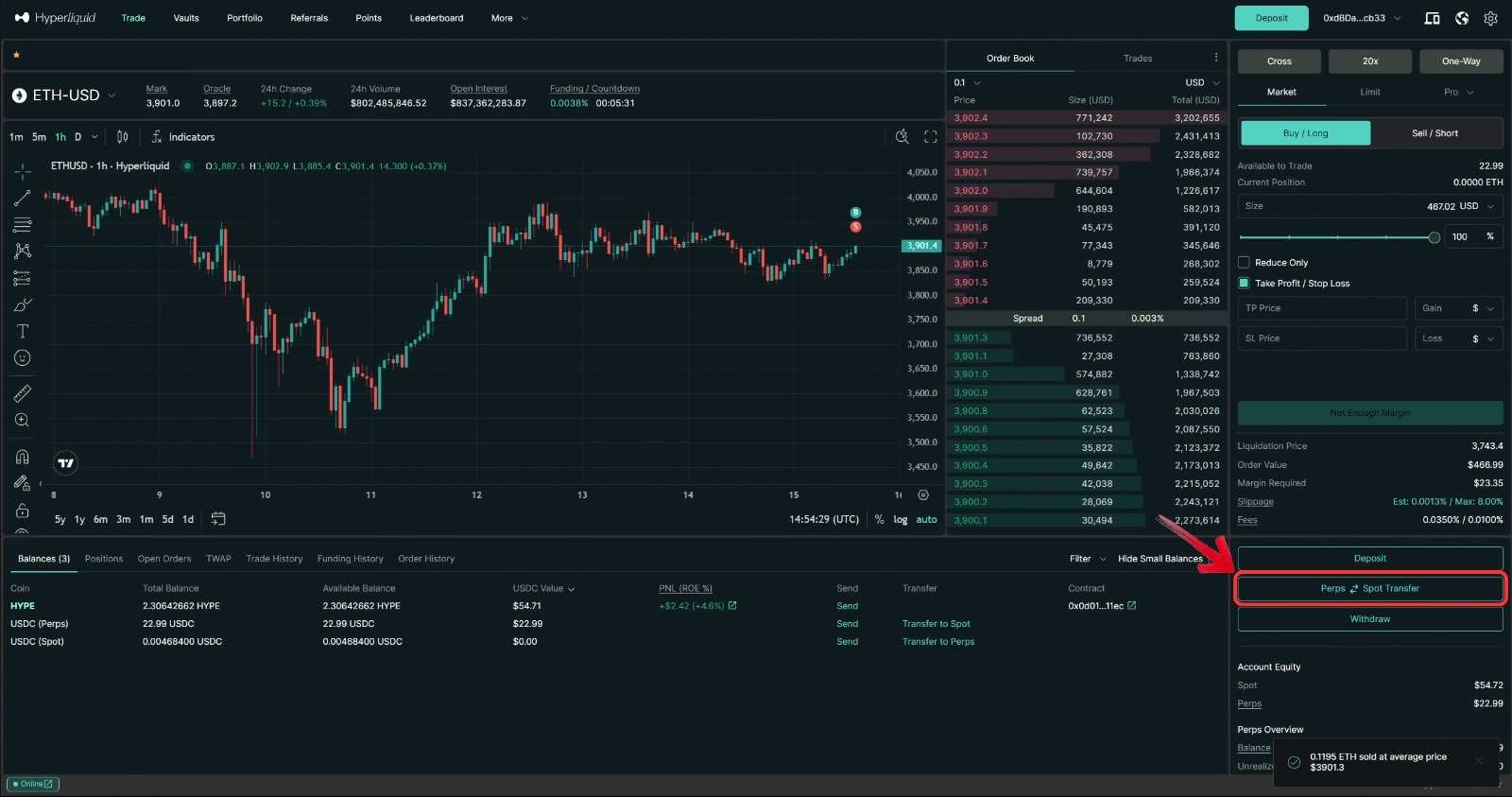
2. If you have USDC in the Spot wallet, click on the “Perps to Spot Transfer” button on the right panel.
3. This will open the Perp to Spot Transfer window. Make sure the transfer is set from “Spot” to “Perps”.
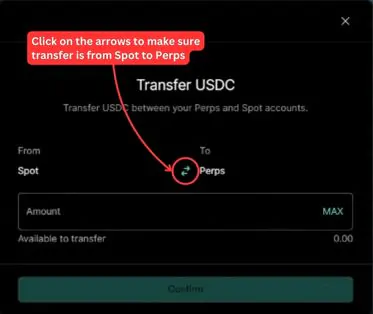
4. Enter the amount you wish to withdraw. If you plan to withdraw the entire balance, click “Max” and then press “Confirm”.
Step 2: Withdraw from L1
Now that your funds are available in your Perp Hyperliquid wallet, it’s time to transfer them to your MetaMask or another compatible wallet:
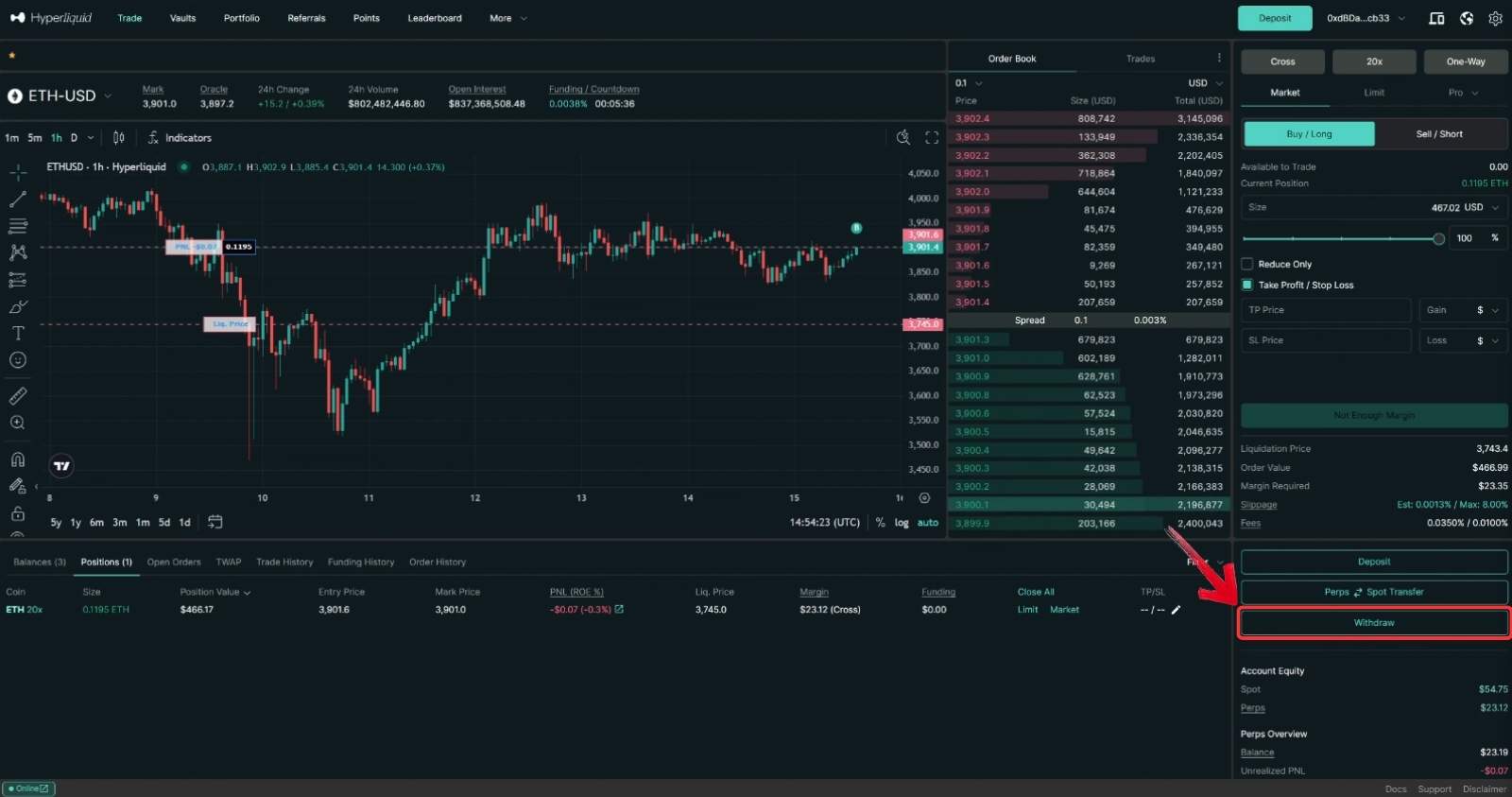
1. Click on the “Withdraw” button in the right panel.
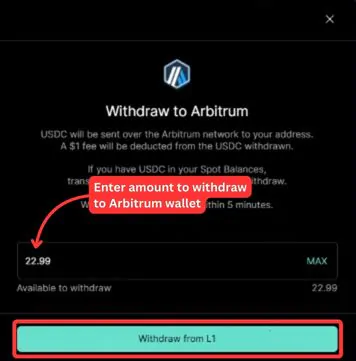
2. A “Withdraw to Arbitrum” pop-up will appear. Enter the amount of USDC you wish to transfer from Hyperliquid L1 to your Arbitrum wallet, then click “Withdraw from L1”.
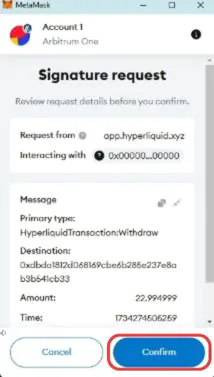
3. Your wallet extension will pop up asking you to confirm the transaction. Click “Confirm” to complete the withdrawal from Hyperliquid.
Step 3: Check Your Wallet
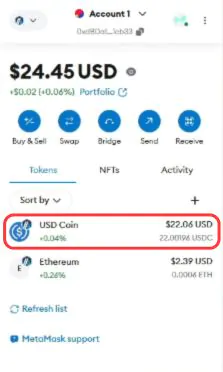
Once the transfer is complete, open your wallet extension. Your USDC funds should appear in your MetaMask wallet under the USDC token.
If you need help with depositing funds into Hyperliquid, refer to our complete deposit guide. For a visual walkthrough, check out our detailed YouTube tutorial on how to withdraw funds from Hyperliquid!
Withdrawal Fees
Hyperliquid charges a fixed withdrawal fee of $1 USDC for every transaction. This fee applies regardless of the withdrawal amount, ensuring simplicity and transparency. Be sure to account for this fee when planning your withdrawals from the platform.
Bottomline
Withdrawing funds from Hyperliquid is a straightforward process, but it’s important to ensure your wallet is compatible with the Arbitrum network and has USDC added. Always account for the fixed $1 USDC withdrawal fee when planning your transfers. By following these simple steps, you can easily move your funds from Hyperliquid to your Web3 wallet and enjoy a seamless withdrawal experience.
FAQs
No, Hyperliquid currently supports withdrawals in USDC only. Ensure you convert your assets to USDC before initiating a withdrawal.
The funds will still be transferred successfully, but they won’t appear in your MetaMask wallet until you manually add the USDC token.
Withdrawals to the Arbitrum network are typically processed within a few minutes, but transaction times may vary depending on network congestion.
Yes, any wallet compatible with the Arbitrum network can be used. Ensure your chosen wallet supports USDC and Arbitrum for a smooth experience.
Hyperliquid does not enforce a minimum withdrawal amount. However, ensure your withdrawal covers the $1 USDC fixed fee to avoid errors.
While Hyperliquid charges a $1 USDC withdrawal fee, small gas fees may also apply for transactions on the Arbitrum network.